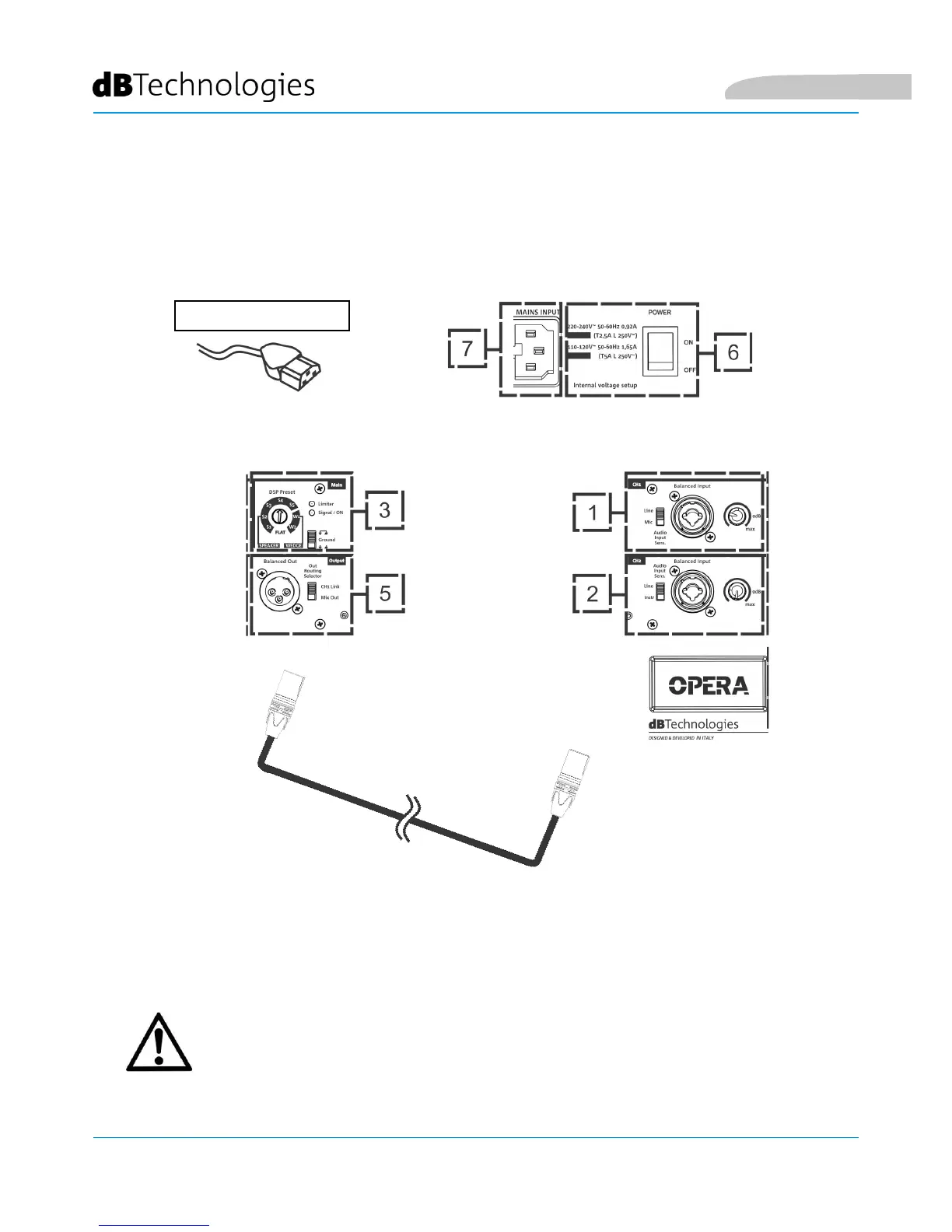
• Connect the power cable to the socket (7), then set the turning on selector (6) to ON. The Limiter LED
(3) blinks briey.
POWER SUPPLY CONNECTION
POWER SUPPLY
WARNING!
Use only good quality cables.
Replace any damaged cable to prevent malfunctioning and sound poor
quality.
CONNECTING THE OUTPUTS OF MULTIPLE MODULES (audio daisy chain)
It is possible to connect the output of an OPERA speaker to a second speaker using a cable with XLR balanced
connector, which connects the output (2) of the rst speaker to the input (5) or (4) of the second speaker.
Set the relevant selector to "LINE".
The Out Routing Selector (2) in "CH1 link" position allows providing the output of the second speaker with only
the signal coming from the CH1 (5) channel. In the "Mix Out" position, it allows the CH1 (5) and CH2 (1) channel
mixing.
English



 To Next Page