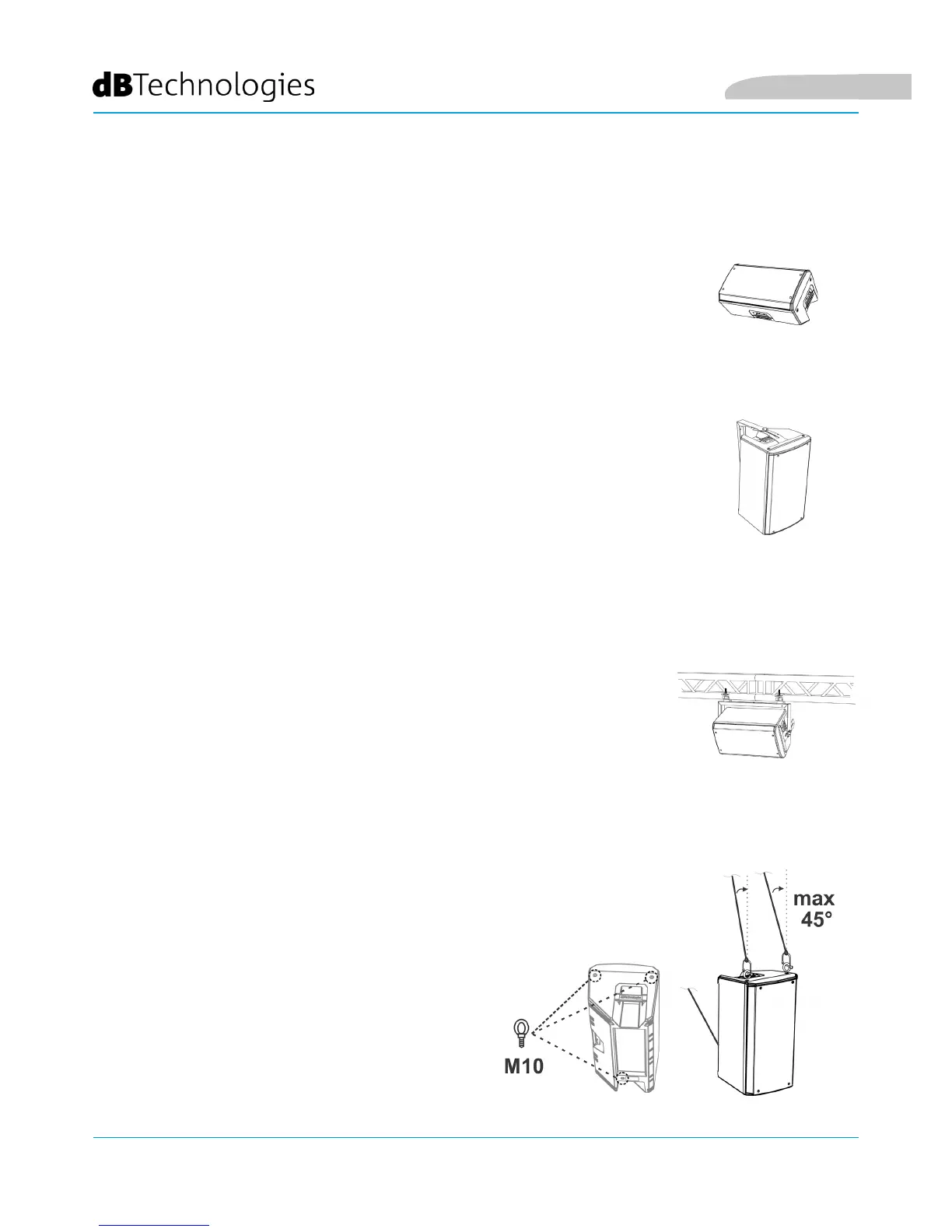
In some cases the OPERA series speakers can be used as monitors for small live
contests. In this case, lay them horizontally on the tilted side. Be reminded of the
sound coverage features reported in the relevant section. Use the suitable DSP
settings as indicated in the "DSP preset" table in wedge mode (W1, W2, or FLAT).
WEDGE (MONITORING) INSTALLATION
The OPERA models can be wall-mounted in vertical or horizontal position through
the WB-OP10, WB-OP12, WB-OP15 accessory, to be used with OPERA10, OPERA12,
OPERA15, respectively.
For further details refer to the instructions relevant to this accessory.
WALL-MOUNTING WITH BRACKETS
The OPERA models can be installed on a truss in vertical or horizontal position,
through the WB-OP10, WB-OP12, WB-OP15 accessory, to be used with OPERA10,
OPERA12, OPERA15, respectively. This accessory allows the use of aliscaff couplers
(not included) for this special conguration.
For further details refer to the instructions relevant to this accessory.
INSTALLATION ON TRUSS WITH BRACKETS AND ALISCAFF COUPLERS
INSTALLATION WITH EYEBOLTS
Is it possible to install the speaker using eyebolts.
Positioning is represented in the opposite gure,
in which the rear eyebolt allows to adjust the nal
angle (MAX 45°).
English



 To Next Page