EasyManua.ls Logo

DBPOWER SBB-036P3 - Troubleshooting Guide

DBPOWER SBB-036P3
16 pages
Print Icon
To Next Page IconTo Next Page
To Previous Page IconTo Previous Page
Loading...
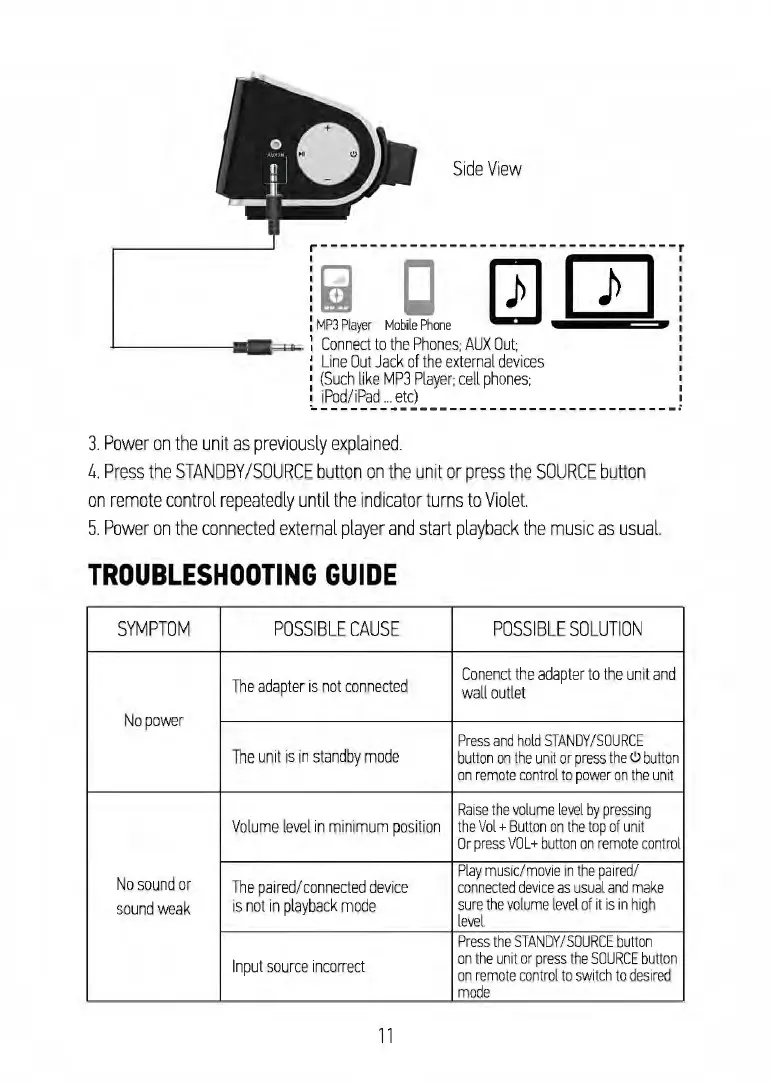
Side
View
·~
CJ
0 m ·
MP3
Player
Mobi
le
Phone
Connect
to
the
Phones;
AUX
Out;
L
in
e
Out
Jack
of
th
e e
xt
e
rnal
de
vic
es
(Such
like
MP
3
Player;
c
ell
phones;
iPod/iPad
...
et
c)
J
Power
on
the
unit
as
previously
explained
.
4.
Press
the
STANDBY
/
SOURCE
button
on
the
unit
or
press
the
SOURCE
button
on
remote
control
rep
e
atedly
until
the
indicator
turns
to
Violet
5.
Power
on
the
connected
external
player
and
start
playback
the
mu
sic
as
usual.
TROUBLESHOOTING
GUIDE
SYMPTOM
POSSIBLE
CAUSE
POSSIBLE
SOLUTION
T
he
adapter
is
not
connected
Con
e
nct
th
e
adap
ter
to
the
unit
and
wall
outlet
No
po
w
er
Press
and
hold
ST
AN
DY
/
SOURCE
The
unit
is
in
standby
mode
button
on the
unit
or
press
the
<'.>
button
on
remote
co
nt
rol
to
power
on
the
unit
Raise
the
volum
e l
ev
el
by
pressing
Volume
level
in
minimum
po
sition
the
Vol
+
Button
on the
top
of
unit
Or
pre
ss
VO
L+
bu
tt
on
on
r
em
o
te
cont
rol
No
so
und
or
Pl
ay
mu
sic/
movi
e in
the
pair
ed/
T
he
paired
/co
nne
c
ted
devic
e
co
nn
ecte
d
de
vice
as
us
ual
a
nd
make
sound
weak
is
not
in
playback
mode
sure
the
volume
lev
el
of
it
is
in
high
level.
Press
the
STAND
Y /S
OURCE
button
In
pu
t
source
incorrect
on
the
un
it
or
pr
ess
the
SOURCE
button
on
remote
co
nt
rol
to
switch
to
desired
mode
11

Related product manuals