EasyManua.ls Logo

dbx 122 - Page 13

dbx 122
45 pages
Print Icon
To Next Page IconTo Next Page
To Previous Page IconTo Previous Page
Loading...
12
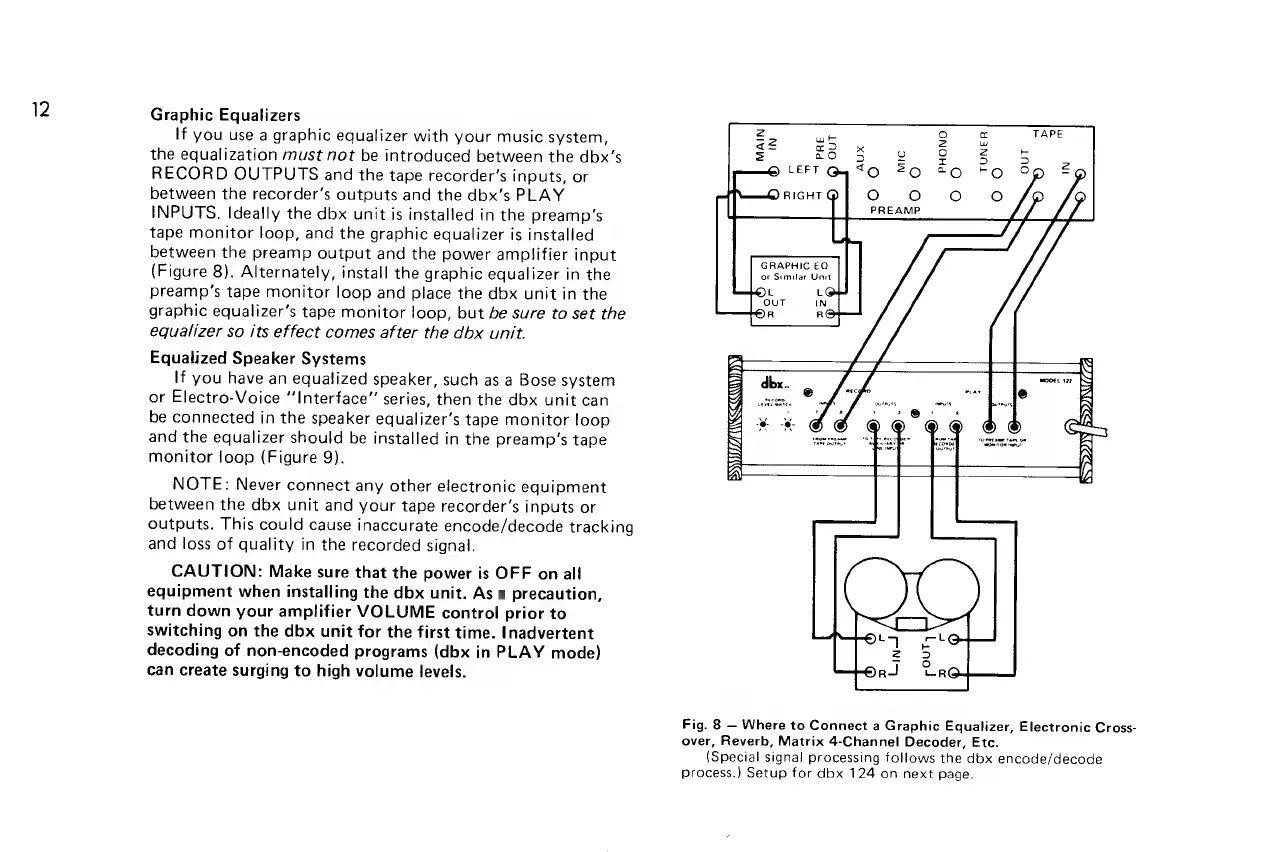
Graphic
Equalizers
If
you
use
a
graphic
equalizer
with
your
music
system,
the
equalization
must
not
be
introduced
between
the
dbx’s
RECORD
OUTPUTS
and
the
tape
recorder’s
inputs,
or
between
the
recorder’s
outputs
and
the
dbx’s
PLAY
INPUTS.
Ideally
the
dbx
unit
is
installed
in
the
preamp’s
tape
monitor
loop,
and
the
graphic
equalizer
is
installed
between
the
preamp
output
and
the
power
amplifier
input
(Figure
8).
Alternately,
install
the
graphic
equalizer
in
the
preamp’s
tape
monitor
loop
and
place
the
dbx
unit
in
the
graphic
equalizer’s
tape
monitor
loop,
but
be
sure
to
set
the
equalizer
so
its
effect
comes
after
the
dbx
unit.
Equalized
Speaker
Systems
If
you
have
an
equalized
speaker,
such
as
a
Bose
system
or
Electro-Voice
“Interface”
series,
then
the
dbx
unit
can
be
connected
in
the
speaker
equalizer’s
tape
monitor
loop
and
the
equalizer
should
be
installed
in
the
preamp’s
tape
monitor
loop
(Figure
9).
NOTE:
Never
connect
any
other
electronic
equipment
between
the
dbx
unit
and
your
tape
recorder’s
inputs
or
outputs.
This
could
cause
inaccurate
encode/decode
tracking
and
loss
of
quality
in
the
recorded
signal.
CAUTION:
Make
sure
that
the
power
is
OFF
on
all
equipment
when
installing
the
dbx
unit.
As
a
precaution,
turn
down
your
amplifier
VOLUME
control
prior
to
switching
on
the
dbx
unit
for
the
first
time.
Inadvertent
decoding
of
non-encoded
programs
(dbx
in
PLAY
mode)
can
create
surging
to
high
volume
levels.
GRAPHIC
EQ
or
Similar
Unit
Fig.
8
Where
to
Connect
a
Graphic
Equalizer,
Electronic
Cross-
over,
Reverb,
Matrix
4-Channel
Decoder,
Etc.
(Special
signal
processing
follows
the
dbx
encode/decode
process.)
Setup
for
dbx
124
on
next
page.

Related product manuals