EasyManua.ls Logo

dbx 122 - Page 17

dbx 122
45 pages
Print Icon
To Next Page IconTo Next Page
To Previous Page IconTo Previous Page
Loading...
16
2.
Setup
your
tape
recorder
for
tape
recording,
but
do
not
record
a
tape
(use
the
recorder’s
PAUSE
switch).
Play
the
source
through
your
system
at
an
average
listening
level
and
adjust
the
tape
recorder’s
input
level
controls;
with
a
test
tone,
levels
should
be
set
for
“OVU”
ona
reel
to
reel
recorder
or
““-3VU”
on
a
cassette
recorder.
With
program
material,
only
the
peaks
should
reach
these
recommended
levels;
the
average
VU
meter
readings
should
be
—2dB
to
—3dB
for
reel-to-reel
and
—4dB
to
—7dB
for
cassette
recordings.
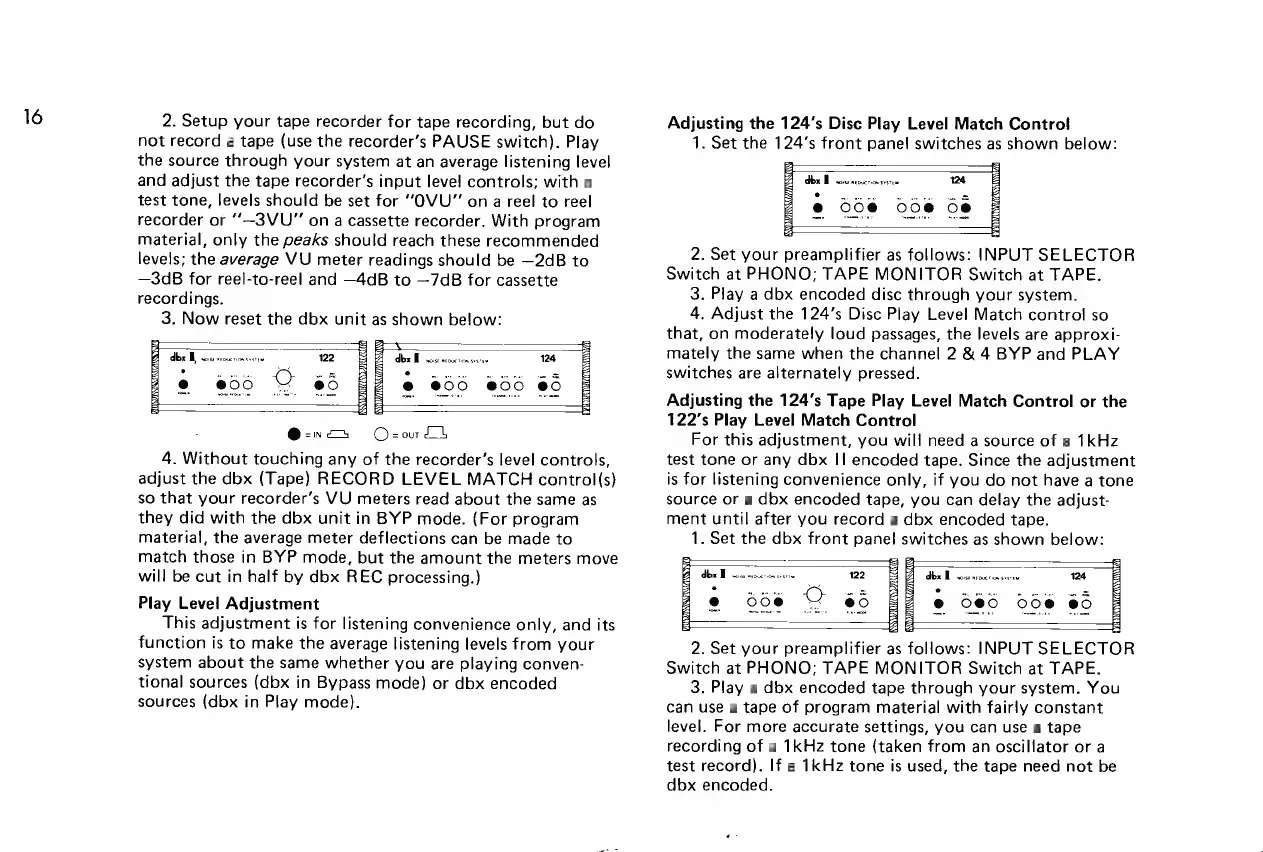
3.
Now
reset
the
dbx
unit
as
shown
below:
ey
eee
122
dhox
M
ssarsieuevioxsven
124
e
006
©
68
@
@00
@0°
@0
Oe,
OsrorLh
4.
Without
touching
any
of
the
recorder’s
level
controls,
adjust
the
dbx
(Tape)
RECORD
LEVEL
MATCH
control(s)
so
that
your
recorder’s
VU
meters
read
about
the
same
as
they
did
with
the
dbx
unit
in
BYP
mode.
(For
program
material,
the
average
meter
deflections
can
be
made
to
match
those
in
BYP
mode,
but
the
amount
the
meters
move
will
be
cut
in
half
by
dbx
REC
processing.)
Play
Level
Adjustment
This
adjustment
is
for
listening
convenience
only,
and
its
function
is
to
make
the
average
listening
levels
from
your
system
about
the
same
whether
you
are
playing
conven-
tional
sources
(dbx
in
Bypass
mode)
or
dbx
encoded
sources
(dbx
in
Play
mode).
Adjusting
the
124’s
Disc
Play
Level
Match
Control
1.
Set
the
124’s
front
panel
switches
as
shown
below:
2.
Set
your
preamplifier
as
follows:
INPUT
SELECTOR
Switch
at
PHONO;
TAPE
MONITOR
Switch
at
TAPE.
3.
Play
a
dbx
encoded
disc
through
your
system.
4.
Adjust
the
124’s
Dise
Play
Level
Match
control
so
that,
on
moderately
loud
passages,
the
levels
are
approxi-
mately
the
same
when
the
channel
2
&
4
BYP
and
PLAY
switches
are
alternately
pressed.
Adjusting
the
124’s
Tape
Play
Level
Match
Control
or
the
122’s
Play
Level
Match
Control
For
this
adjustment,
you
will
need
a
source
of
a
1kHz
test
tone
or
any
dbx
Ii
encoded
tape.
Since
the
adjustment
is
for
listening
convenience
only,
if
you
do
not
have
a
tone
source
or
a
dbx
encoded
tape,
you
can
delay
the
adjust-
ment
until
after
you
record
a
dbx
encoded
tape.
1.
Set
the
dbx
front
panel
switches
as
shown
below:
dbx
Wo
woissnrovction
soso
2.
Set
your
preamplifier
as
follows:
INPUT
SELECTOR
Switch
at
PHONO;
TAPE
MONITOR
Switch
at
TAPE.
3.
Play
a
dbx
encoded
tape
through
your
system.
You
can
use
a
tape
of
program
material
with
fairly
constant
level.
For
more
accurate
settings,
you
can
use
a
tape
recording
of
a
1kHz
tone
(taken
from
an
oscillator
or
a
test
record).
If
a
1kHz
tone
is
used,
the
tape
need
not
be
dbx
encoded.

Related product manuals