EasyManua.ls Logo

dbx 122 - Page 16

dbx 122
45 pages
Print Icon
To Next Page IconTo Next Page
To Previous Page IconTo Previous Page
Loading...
WWD
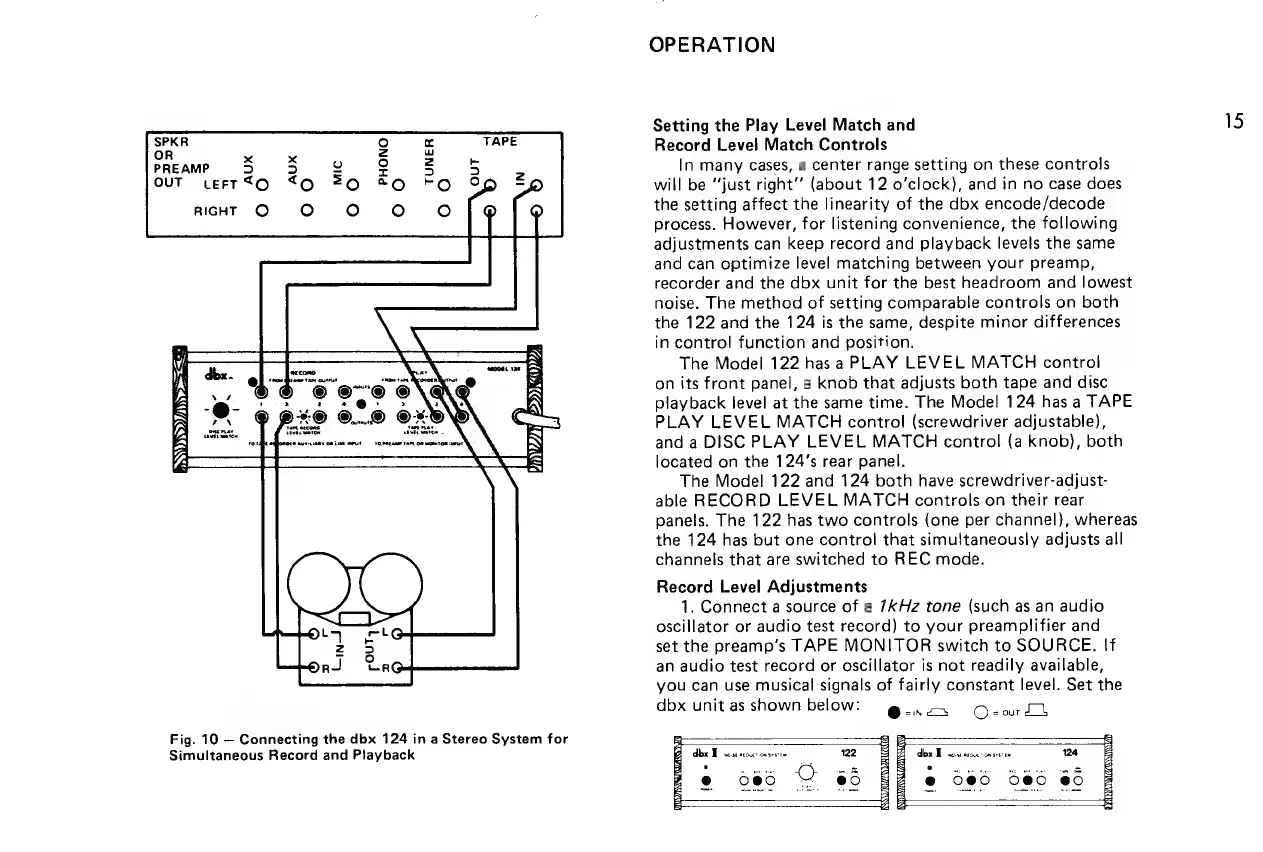
Fig.
10
Connecting
the
dbx
124
in
a
Stereo
System
for
Simultaneous
Record
and
Playback
OPERATION
Setting
the
Play
Level
Match
and
15
Record
Level
Match
Controls
In
many
cases,
a
center
range
setting
on
these
controls
will
be
“just
right’
(about
12
o’clock),
and
in
no
case
does
the
setting
affect
the
linearity
of
the
dbx
encode/decode
process.
However,
for
listening
convenience,
the
following
adjustments
can
keep
record
and
playback
levels
the
same
and
can
optimize
level
matching
between
your
preamp,
recorder
and
the
dbx
unit
for
the
best
headroom
and
lowest
noise.
The
method
of
setting
comparable
controls
on
both
the
122
and
the
124
is
the
same,
despite
minor
differences
in
control
function
and
position.
The
Model
122
has
a
PLAY
LEVEL
MATCH
control
on
its
front
panel,
a
knob
that
adjusts
both
tape
and
disc
playback
level
at
the
same
time.
The
Model
124
has
a
TAPE
PLAY
LEVEL
MATCH
control
(screwdriver
adjustable),
and
a
DISC
PLAY
LEVEL
MATCH
control
(a
knob),
both
located
on
the
124’s
rear
panel.
The
Model
122
and
124
both
have
screwdriver-adjust-
able
RECORD
LEVEL
MATCH
controls
on
their
rear
panels.
The
122
has
two
controls
(one
per
channel},
whereas
the
124
has
but
one
control
that
simultaneously
adjusts
all
channels
that
are
switched
to
REC
mode.
Record
Level
Adjustments
1.
Connect
a
source
of
a
7kKHz
tone
(such
as
an
audio
oscillator
or
audio
test
record)
to
your
preamplifier
and
set
the
preamp’s
TAPE
MONITOR
switch
to
SOURCE.
If
an
audio
test
record
or
oscillator
is
not
readily
available,
you
can
use
musical
signals
of
fairly
constant
level.
Set
the
dbx
unit
as
shown
below:
g.,=.
Q-eourtd
doz
To
cscatce:
msi
124
@
585 085
85

Related product manuals