EasyManua.ls Logo

dbx 122 - Page 19

dbx 122
45 pages
Print Icon
To Next Page IconTo Next Page
To Previous Page IconTo Previous Page
Loading...
18
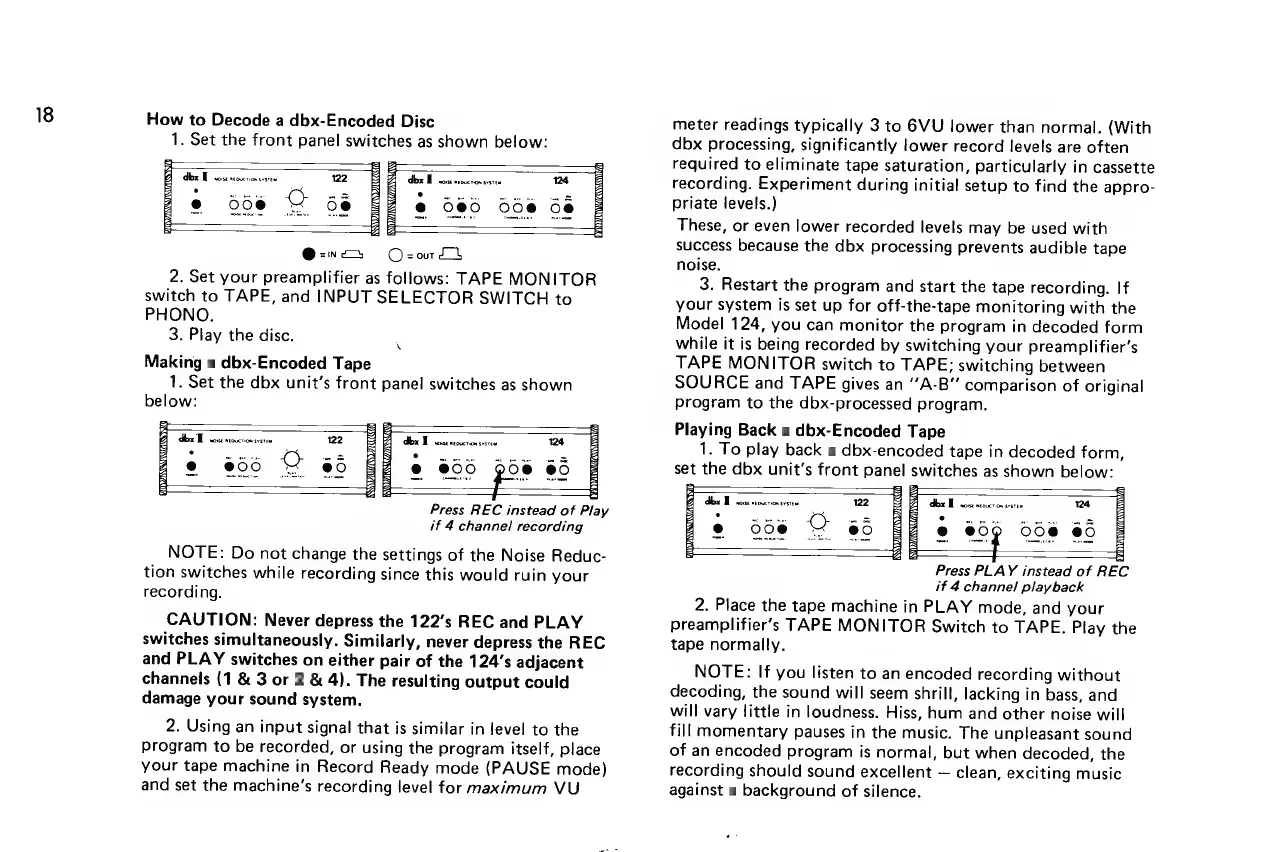
How
to
Decode
a
dbx-Encoded
Disc
1.
Set
the
front
panel
switches
as
shown
below:
dbx
We
wose
tocrion
orsten
122
dbx
B
woise
neous
©
068
©
88
°
@-n—
O-zord
2.
Set
your
preamplifier
as
follows:
TAPE
MONITOR
switch
to
TAPE,
and
INPUT
SELECTOR
SWITCH
to
PHONO.
3.
Play
the
disc.
Making
a
dbx-Encoded
Tape
1.
Set
the
dbx
unit's
front
panel
switches
as
shown
below:
%
dix
E
imac
122
e
06
Ce
Ax
Done
neouction
svsrew
124
@
06
pes
e
Press
REC
instead
of
Play
if
4
channel
recording
for
{or
NOTE:
Do
not
change
the
settings
of
the
Noise
Reduc-
tion
switches
while
recording
since
this
would
ruin
your
recording.
CAUTION:
Never
depress
the
122’s
REC
and
PLAY
switches
simultaneously.
Similarly,
never
depress
the
REC
and
PLAY
switches
on
either
pair
of
the
124’s
adjacent
channels
(1
&
3
or
2
&
4).
The
resulting
output
could
damage
your
sound
system.
2.
Using
an
input
signal
that
is
similar
in
level
to
the
Program
to
be
recorded,
or
using
the
program
itself,
place
your
tape
machine
in
Record
Ready
mode
(PAUSE
mode)
and
set
the
machine’s
recording
level
for
maximum
VU
meter
readings
typically
3
to
6VU
lower
than
normal.
(With
dbx
processing,
significantly
lower
record
levels
are
often
required
to
eliminate
tape
saturation,
particularly
in
cassette
recording.
Experiment
during
initial
setup
to
find
the
appro-
priate
levels.)
These,
or
even
lower
recorded
levels
may
be
used
with
success
because
the
dbx
processing
prevents
audible
tape
noise.
3.
Restart
the
program
and
start
the
tape
recording.
If
your
system
is
set
up
for
off-the-tape
monitoring
with
the
Model
124,
you
can
monitor
the
program
in
decoded
form
while
it
is
being
recorded
by
switching
your
preamplifier’s
TAPE
MONITOR
switch
to
TAPE;
switching
between
SOURCE
and
TAPE
gives
an
“A-B”
comparison
of
original
program
to
the
dbx-processed
program.
Playing
Back
a
dbx-Encoded
Tape
1.
To
play
back
a
dbx-encoded
tape
in
decoded
form,
©
007
008
8
for
Press
PLAY
instead
of
REC
if
4
channel
playback
2.
Place
the
tape
machine
in
PLAY
mode,
and
your
preamplifier’s
TAPE
MONITOR
Switch
to
TAPE.
Play
the
tape
normally.
NOTE:
If
you
listen
to
an
encoded
recording
without
decoding,
the
sound
will
seem
shrill,
lacking
in
bass,
and
will
vary
little
in
loudness.
Hiss,
hum
and
other
noise
will
fill
momentary
pauses
in
the
music.
The
unpleasant
sound
of
an
encoded
program
is
normal,
but
when
decoded,
the
recording
should
sound
excellent
clean,
exciting
music
against
a
background
of
silence.

Related product manuals