EasyManua.ls Logo

dbx 122 - Page 20

dbx 122
45 pages
Print Icon
To Next Page IconTo Next Page
To Previous Page IconTo Previous Page
Loading...
Bypass
Mode
To
listen
to
a
conventional
disc,
tape
or
FM
broadcast
without
dbx
processing,
simply
set
your
preamplifier’s
TAPE
MONITOR
Switch
to
SOURCE.
If
your
system
has
no
tape
monitor
loop,
or
if
you
wish
to
bypass
the
dbx
rrocessing
for
any
other
reason,
set
the
front
panel
switches
as
shown
below:
$i
ee
A,
AS
ae
na
22.
2
at
salted
ead
124
2
C@
32
@
0@0
C@0
Ce
2B
—2e
a
Dubbing
(Copying)
an
Encoded
Disc
onto
a
Tape
in
Encoded
Form
1.
Set
the
front
panel
switches
as
shown
below:
AEM
iwcaieienisectocie
122
e
Zo
dx
cates
e
casas
124
:
é
e
006
©
06
ae
d@6 O60
66
ta
2.
Set
your
preamplifier
as
follows:
TAPE
MONITOR
switch
to
TAPE,
and
INPUT
SELECTOR
switch
to
PHONO.
3.
Set
your
tape
recorder
to
Record,
and
record
normally.
4.
The
tape
copy
will
be
dbx
encoded.
With
the
124,
you
will
hear
the
program
in
decoded
form
while
mon-
itoring
this
operation
off
tape.
Dubbing
an
Encoded
Disc
onto
a
Tape
in
Non-Encoded
Form
This
process
is
for
transferring
a
dbx-encoded
disc
in
non-encoded
form
onto
a
tape
for
future
playback
without
dbx
processing
(such
as
in
an
automobile
tape
player).
1.
Connect
the
122’s
PLAY
OUTPUTS
(or
the
124’s
Channels
2
&
4
PLAY
OUTPUTS)
to
your
tape
recorder’s
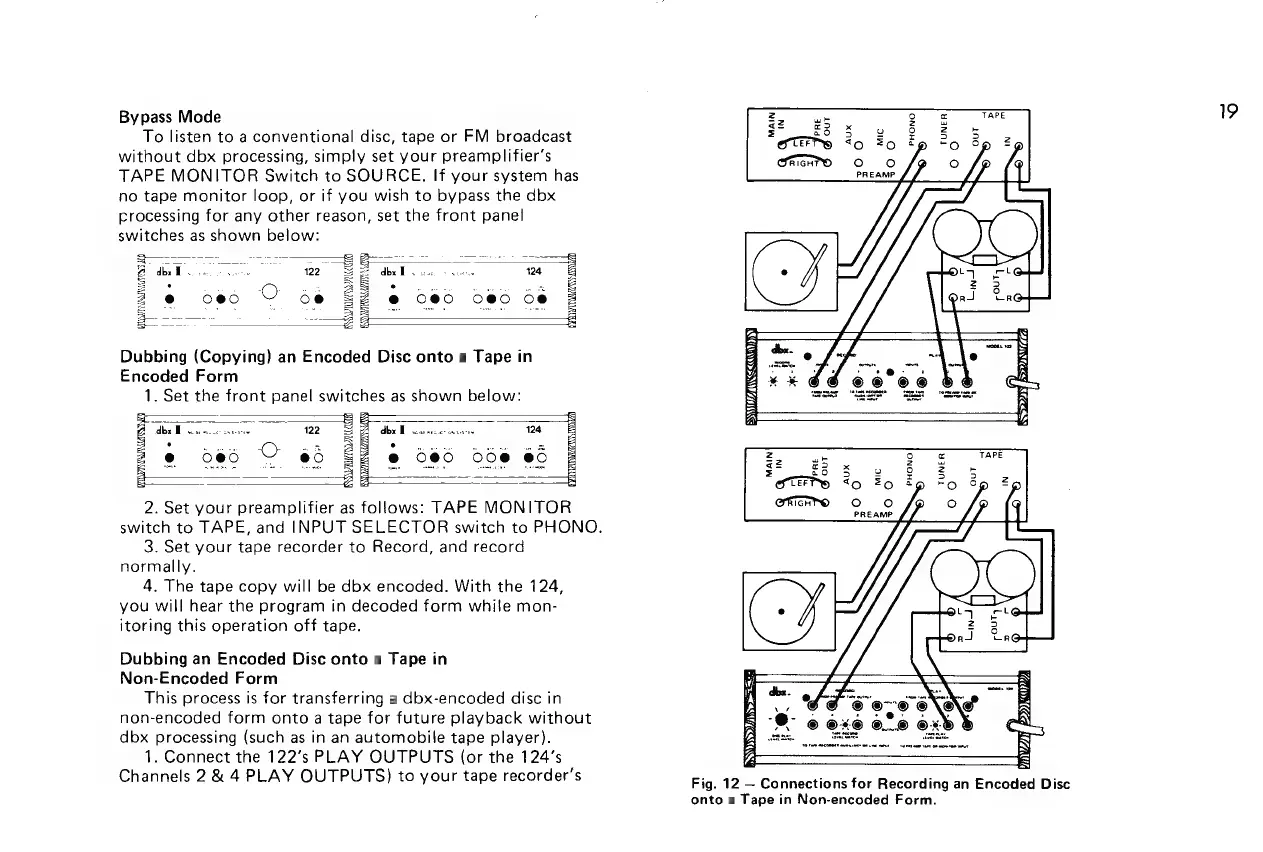
Fig.
12
Connections
for
Recording
an
Encoded
Disc
onto
a
Tape
in
Non-encoded
Form.
19

Related product manuals