Instruction manual VERI60 AIR COOLER WITH REMOTE CONTROL
dcg16.it
16
indicates selected current wind speed. The wind speeds change on
rotating basis.
ANION
Press ANION
button on the control panel or the remote control to
turn on ANION mode, press ANION button again, the system will
stop ANION Function. (ANION is used for air purier)
TIMER
Press TIMER button on the control panel or the remote control to
set the timer for automatic switch off between 1-7 hours. Once it is 7
hours, press TIMER
button one more time to turn off TIMER mode.
MOSQUITO REPELLENT
Press MOSQUITO button on the control panel or the remote
control to enter the mosquito repellent mode and the machine emits
ultrasonic wave to repel mosquito. Press MOSQUITO button again
to stop the mosquito repellent mode.
Cleaning, Filling and Draining
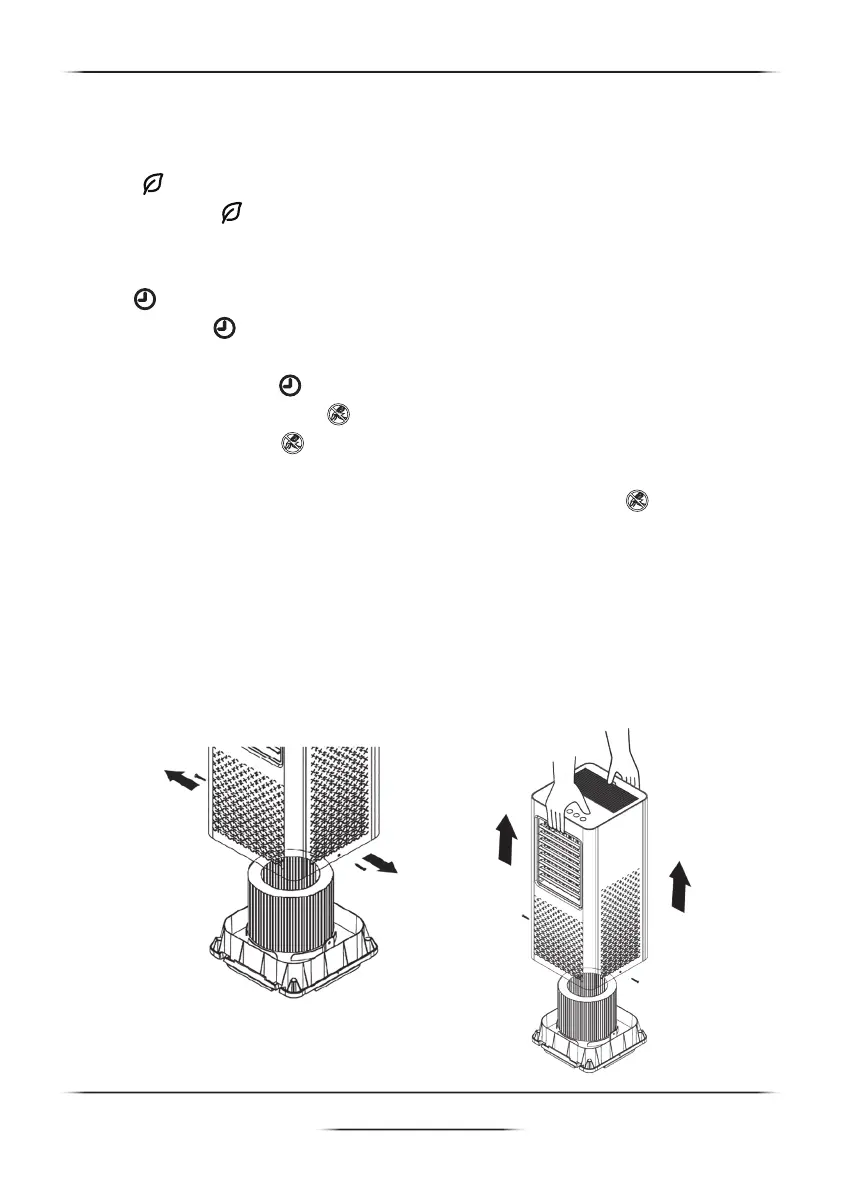
This is how to disassemble the unit correctly
After unscrew the water tray at the bottom of the unit, insert one hand
into the front air outlet
and insert another hand into the back holder ,then lift the top part up as
per below image.
Unscrew and remove the water tray
and the cooling pad


 To Next Page