13
3 USING THE INTERNAL MONITOR
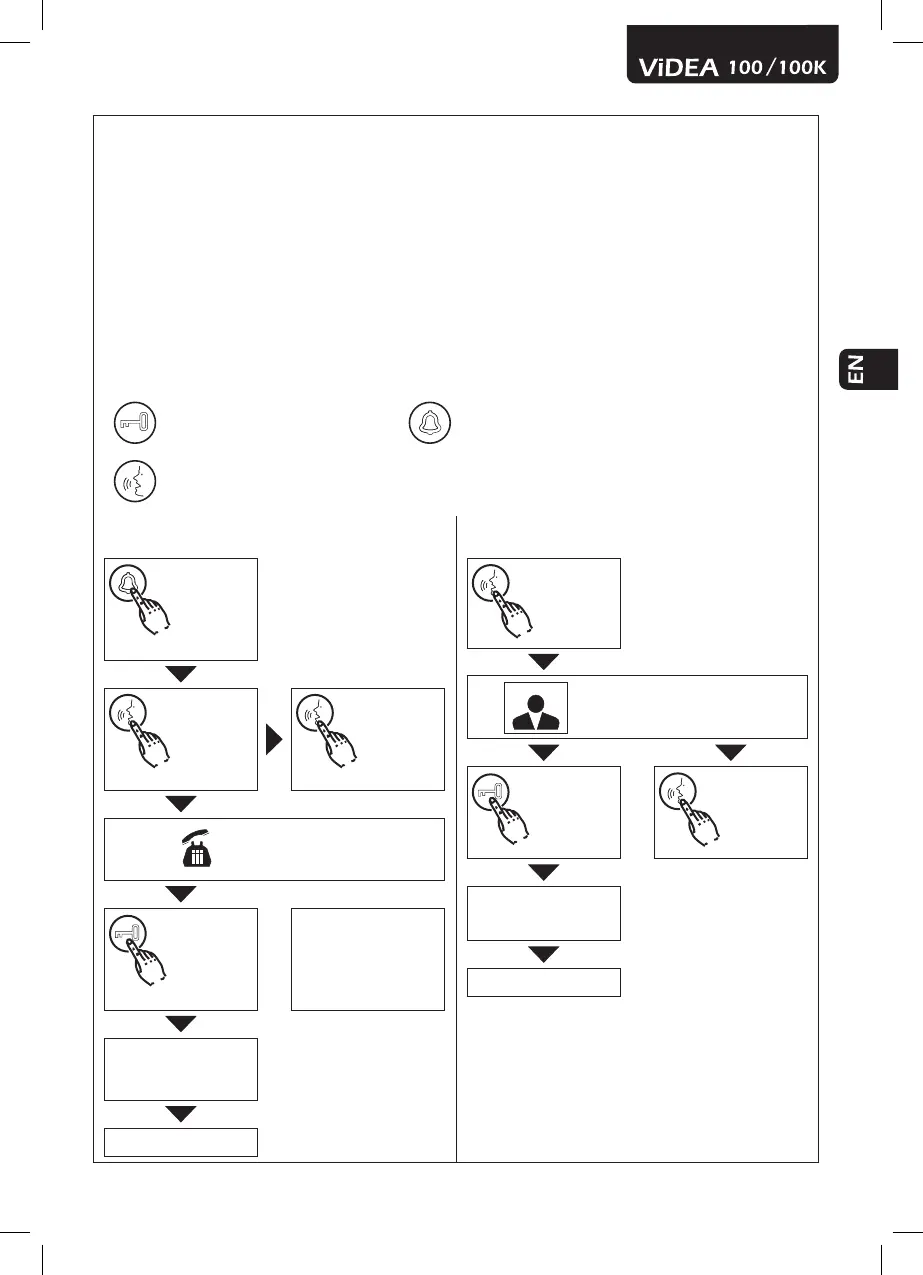
• When a visitor presses the intercom’s doorbell, an acoustic signal will sound inside and the visi-
tor’s image will appear on the monitor’s screen. At this point, the image is visible, but the visitor
hears nothing. The person inside therefore has the choice of speaking with the visitor by pressing
the “talk” button, opening the electric lock by pressing the “unlock” button, or ignoring the call
altogether (in this case, the monitor will turn off automatically).
• If the decision should be made to speak with the visitor, the image on the intercom’s screen will
automatically disappear after about 120 seconds. To make the image reappear, simply press the
“talk” button once again.
• After having pressed the “unlock” button, the monitor turns off automatically.
• The image from the intercom’s video camera can be displayed at any time by simply pressing the
“talk” button: this will cause the area within the video camera’s eld of vision to appear on the
monitor’s screen. The screen will turn off after about 120 seconds.
Legend
Unlock button Call button
Talk button
CALL
The visitor
presses the
“Call” button.
An acoustic signal sounds and
the visitor’s image appears on
the internal screen.
Press the
“Talk” button.
Press the
“Talk” button
to shut off the
monitor.
The conversation begins.
Press the “Un-
lock” button.
The monitor automatically
shuts off after 120 sec.
The door opens.
The monitor shuts off after
the door
End of the call
MONITOR
Press the
“Talk” button.
The image appears and the conversation can
begin.
Press the “Un-
lock” button.
Press the
“Talk” button
to shut off the
monitor.
The door opens.
The monitor shuts off after
the door opens.
End of the call


 To Next Page