6
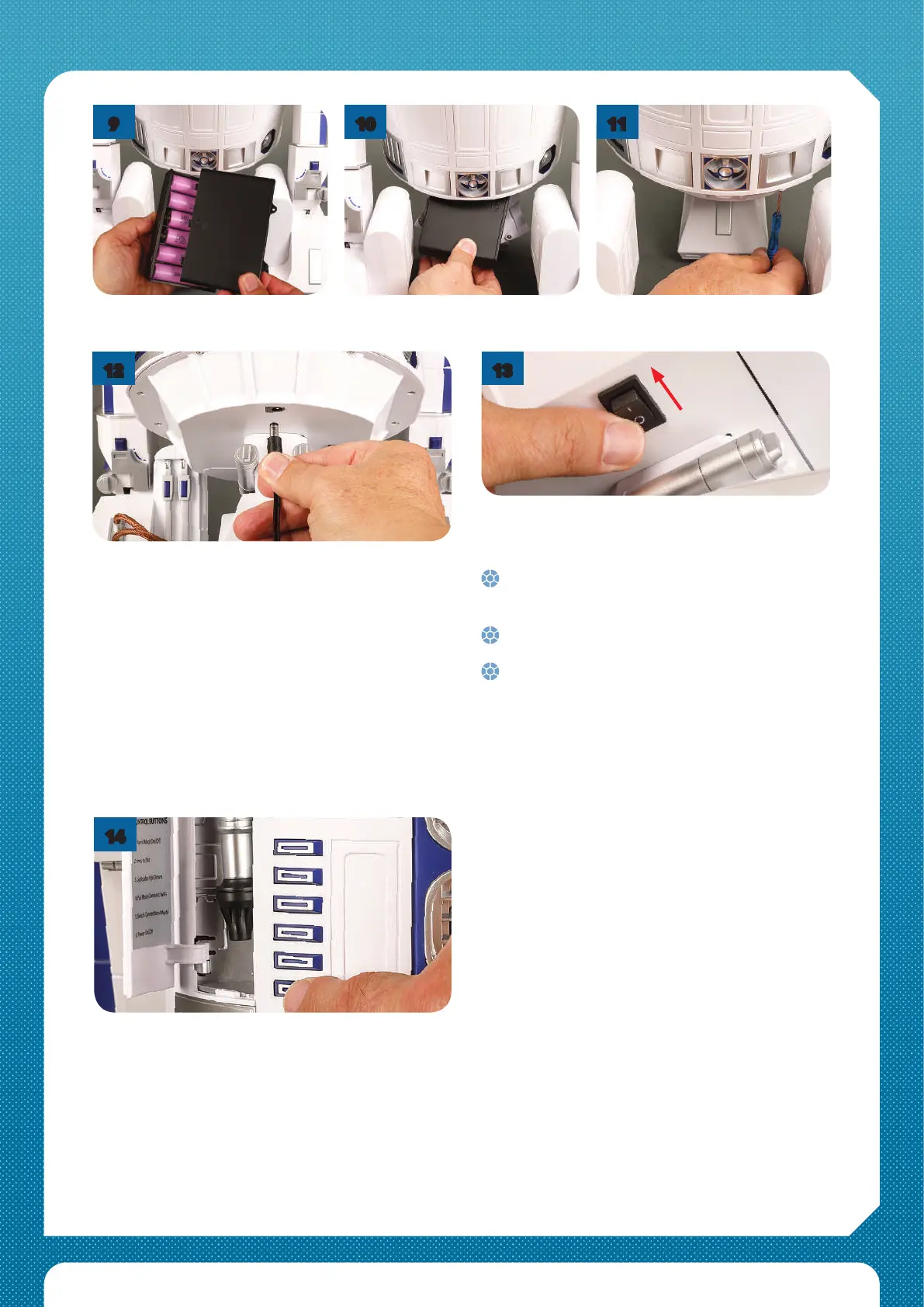
Ret the battery box cover and its
screws.
Slide the battery box back into its
mount.
Screw the access panel back in
place.
Press Button 6 on R2-D2’s front panel as shown.
14
11
9
10
11
12
Be aware that when you take step 14;
So please make sure R2-D2 has some room to
move and that nothing will restrict his head
from turning.
The red light on R2-D2’s front status display will
come on and he will jerk forward.
His head will rotate left and right, then centre.
The front status display will turn purple and the
rear status display will go green or yellow, then
R2-D2 will make a noise to indicate his readiness.
Plug the mains adaptor into R2-D2. Plug the other end
into the mains and turn it on. Leave it for a couple of
seconds, then turn o and unplug both ends. This is a
protection procedure to activate the battery, and
without doing this, R2-D2 won’t turn on.
When it’s time to recharge the batteries you do not
need to repeat this step. Simply connect to the mains
to recharge. If R2-D2 is turned on when you connect to
the mains, his front red/blue status light will change
colour and ashing sequence to indicate the charge
level. See the online User Guide for more details.
When you remove and replace the batteries, you will
need to repeat step 12 to activate the new batteries.
Turn on the main power switch under R2-D2’s body.
13


 To Next Page