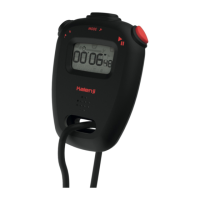
S1 – Mode Button
S2 – Set Button
DISPLAY MODES:
The watch has three display modes:
TIME, CALENDAR and SECONDS.
To change from one display mode to
another, press S1 button once.
NOTE: In CALENDAR mode, the watch
will automatically return to TIME mode,
if there is no buttons pressed for ap-
proximately 3 seconds.
TO SET THE TIME AND CALENDAR:
1. Press S1 button to select TIME
mode.
2. Press S2 button twice, the month
digits will be displayed.
3. Press S1 button to set the month
digits. Holding down the button will
speed up the process.
4. Press S2 button, the date digits will
be displayed.
5. Press S1 button to set the date
digits.
6. Press S2 button, the hour digits will
be displayed.
7. Press S1 button to set the hour
digits.The hour digits are displayed
in the 12-hour format, then in the
24-hour format and then again
in the 12-hour format. Therefore,
please press S1 button so many
times that the hour digits are
displayed in the required format. In
the 12-hour format, the hour digits
are identied by “A” for 12:00 A.M.
– 11:59 A.M. and by “P” for 12:00
P.M. – 11:59 P.M.; whereas in the
24-hour format, the hour digits are
identied by “H”.
8. Press S2 button, colon and the
minute digits will be displayed.
9. Press S1 button to set the minute
digits.
10. Press S2 button, the hour digits,
colon and the minute digits will be
displayed.
11. When nished making all the set-
tings, press S1 button to conrm.
The colon will blink.
TO SET THE SECONDS:
1. Press S1 button to select SECONDS
mode.
2. Press S2 button to reset the second
digits to zero.
To reduce carbon foot print, these
instructions are printed with soy inks
on recycled paper.
ENGLISH
S1S2
DECATHLON_SLIM DIGITAL_AG9289-R00

 Need help?

 To Next Page
 General