Digitale Positions-Anzeige
Digital position readout
ґ
X
Y
Ľ
\
Π 1Γ~Π
l_ı,Lı ı l Lı
Γ fl ІЈ ΓЈ
,Lı U U
Γl Π fl Γ
lЈ.Ј1 J Lı
,
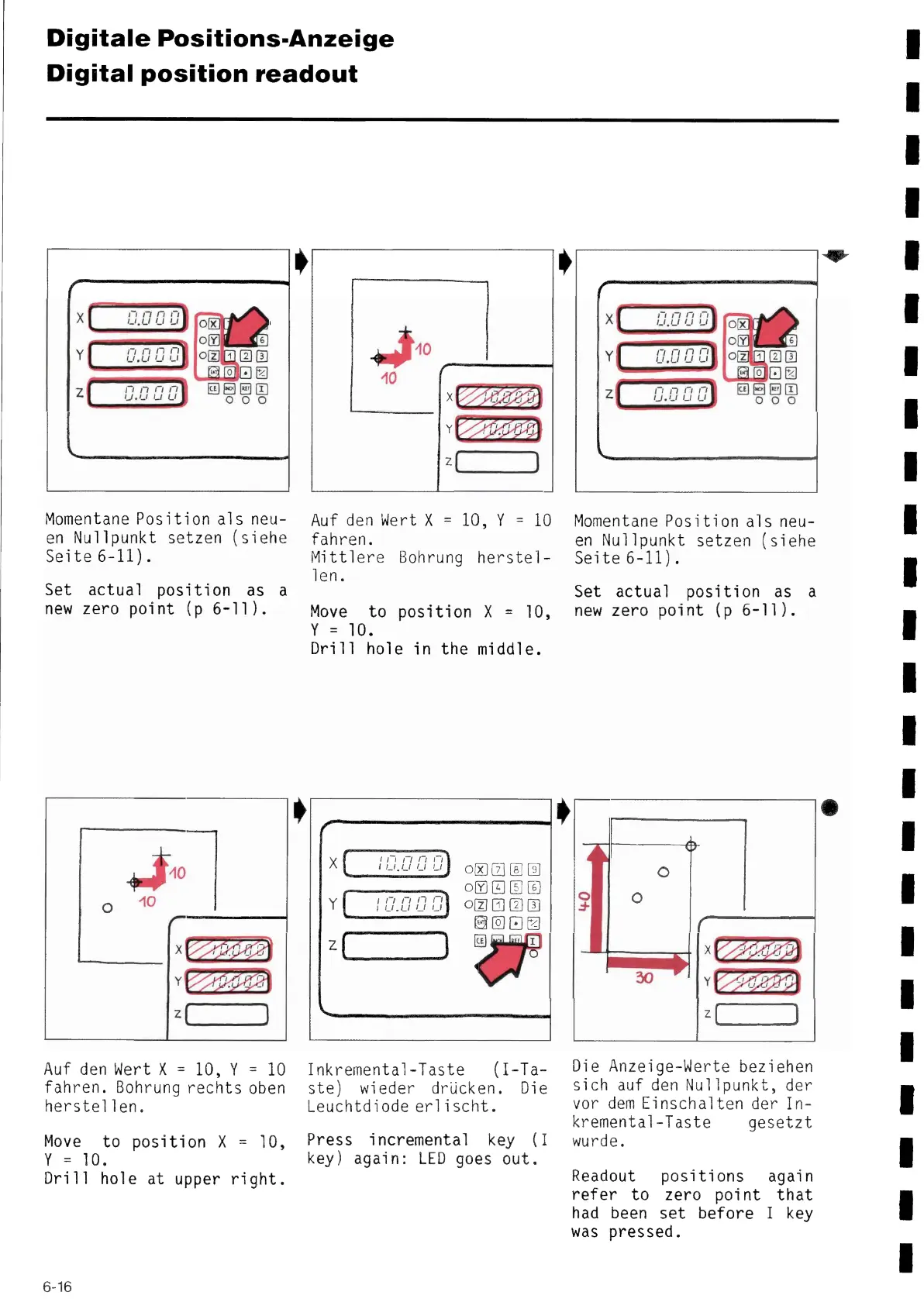
Momentane Position a1s neu-
en Nullpunkt setzen (siehe
Seite 6-11).
Set actual position as a
new zero point (p 6-11).
~d0
~ 10
X
Y
Z
/
Auf den Wert X= 10, Y= 10
fahren. Bohrung rechts oben
herstellen.
Move to position X= 10,
Y = 10.
Dri11 hole at upper right.
~
,
~,0
ІО
ñ
Y
z
Auf den Wert X= 10, Y= 10
fahren.
Míttlere Bohrung herstel-
1en.
Move to posi ti on X= 10,
Y = 10.
Dri11 hole in the middle.
/
X
Y
2
\
1 1 Γ ~ Γ1 Γ1
I I_I, ι I І І Lı
1 Γ, П,,,,
rLı.Lrııir
)
oo®a©
oC]OO~
®σaa
~E
Inkremental-Taste (I-Ta-
ste) wieder drücken. Die
Leuchtdiode erlischt.
Press incremental key (I
key) again: LED goes out.
,
,
,-
X
Y
z
\
Π Π Π Π
Ll.Ll Ll u
~ ~,~ І i Ì1
fl Π fl Π
ıJ,Lı rJ Lı
,
Momentane Position a1s neu-
en Nullpunkt setzen (siehe
Seíte 6-11).
Set actual position as a
new zero point (p 6-11).
Z
l / 1
I ~
Die Anzeige-Werte beziehen
sich auf den Nullpunkt, der
vor dem Eínschalten der In-
kremental-Taste gesetzt
wurde.
Readout positions again
refer to zero point that
had been set before I key
was pressed.
6-16


 To Next Page
 Loading...