Digitale Posítions-Anzeíge
Digital position readout
Zäh1-Ríchtung eínstellen
settíng the counting directíon
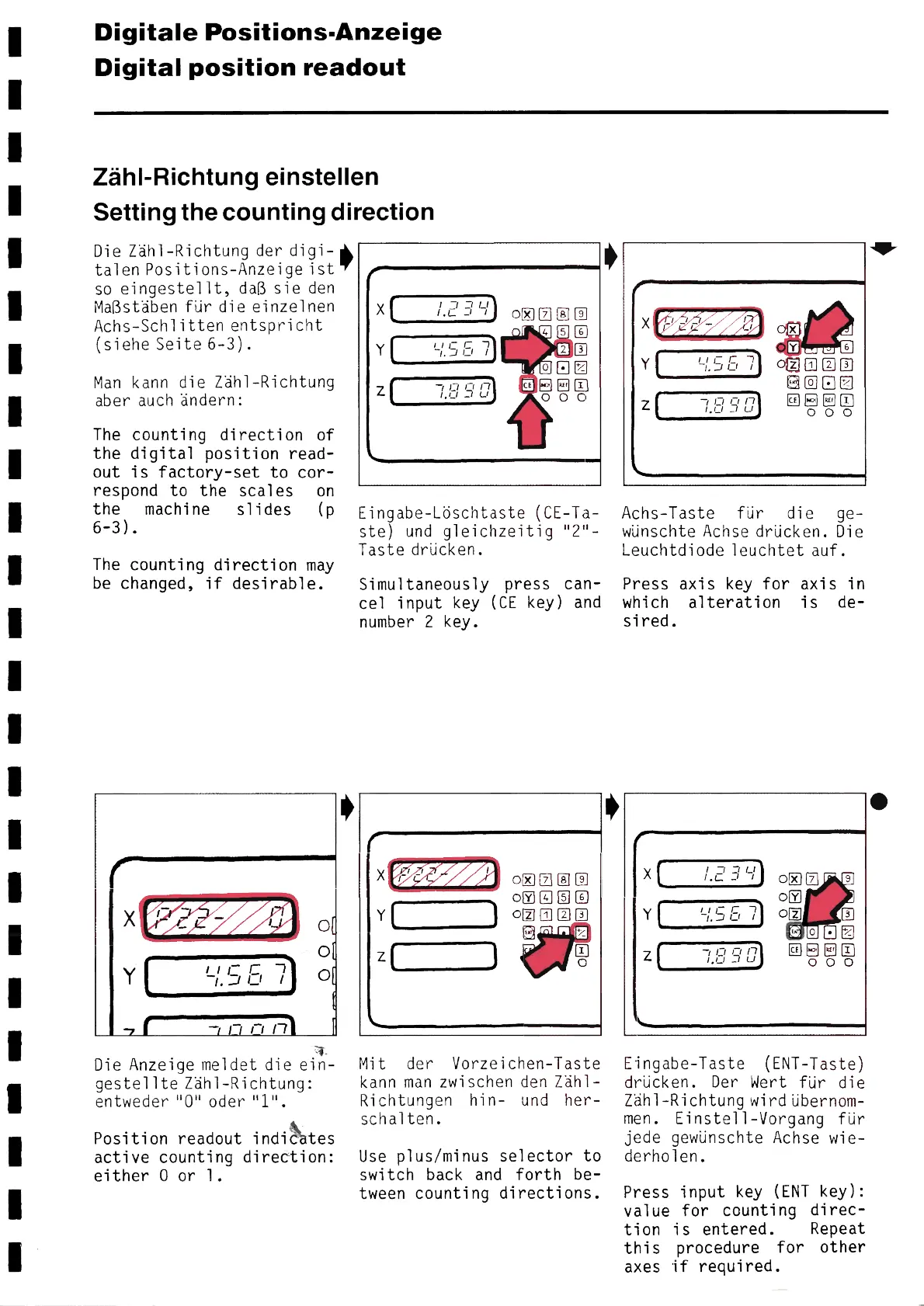
Die Zäh1-Richtung der digi-
talen Positions-Anzeige ist
so eingestellt, daβ sie den
Maβstäben für die einzelnen
Achs-Schlítten entspricht
(siehe Seíte 6-3).
Man kann die Zäh1-Richtung
aber auch ändern:
The counting direction of
the digital position read-
out is factory-set to cor-
respond to the scales on
the machine slides (p
6-3).
The counting direction may
Ьe changed, if desirable.
X ľ - l
Y ~~.~~~ ~
— —ľіΠ
0
O
~.
Die Anzeige meldet die ein-
gestellte Zäh1-Richtung:
e n tw e d e r 11011 o d e r 1 1 1 1 .
Position readout índi~tes
active counting dírectíon:
either 0 or 1.
,
,
r
X
Y
z
.—
`
l
17?~_~
I.L
іІς Γ_ -1
ľ. J lJ /
,ι,nґ
Eíngabe-Löschtaste (CE-Ta-
ste) und gleíchzeítíg "2"-
Taste drücken.
Símultaneously press can-
ce1 input key (CE key) and
number 2 key.
X
Y
z
\
(
J
)
ooaaσ
oσa®©
oσσo®
®
Mit der Vorzeichen-Taste
kann man zwischen den Zäh1-
Richtungen hin- und her-
schalten.
Use plus/minus selector to
switch back and forth be-
tween counting directions.
,
,
r
ñ
Y
z
~
\
\
ıı[ Γ_ 1
ľ . J U l
~,~_~ П ü
0 ~
®oaσ
~Eρöρ
Achs-Taste für die ge-
wünschte Achse drücken. Die
Leuchtdiode leuchtet auf.
Press axís key for axis in
which alteration is de-
sired.
, —
X
Y
z
`
C
\
1 -1 , U
1.0 L
~ і L Γ 1
-1. J C1 /
-7 • ~
oxQQQ
oσ
O~Z
0
~
~Epo ~p
Eingabe-Taste (ENT-Taste)
drücken. Der Wert für die
Zäh1-Richtung wirdübernom-
men. Einstell-Vorgang für
jede gewünschte Achse wie-
derholen.
Press input key (ENT key):
va1ue for counting direc-
tion is entered. Repeat
this procedure for other
axes if required.
.
6-19


 To Next Page
 Loading...