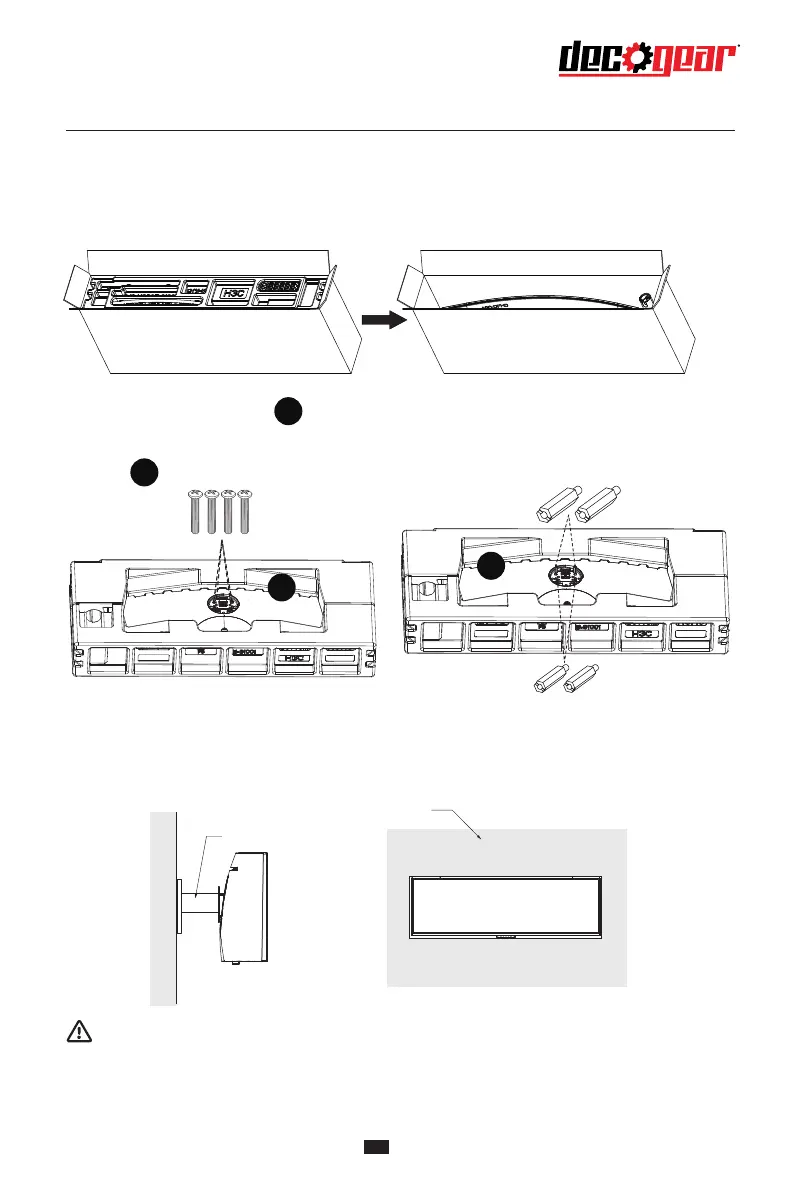
Installation of mount
Mount hexagon irons
Mount hexagon irons
Screws
5. During padlocking of the monitor, do not pinch the screen with the hands to avoid damaging
the screen. Install the mount to the mount stud by referring to the user manual of the mount
(purchased separately).Tips: The mounting hole distance of the mount for the product is75x75mm.
Mount (not supplied)
Wall
Notes: To prevent the monitor on the mount from failing, please install it firmly and protect it fully.
Do not place or hang any object on the mount, and the using height of the mount should be less
than 2 meters.
5
2. Remove the original screws ( ) from the opening in the back of the monitor. Follow the directions
received with your mount, stand, or accessory and install the monitor on the wall or fixture as desired.
Remember to use the included screws when attaching anything to the back of the monitor. Refer to the
image( ) for correct screw placement.
1. Open the package, take out the product with foam still attached, and gently place it on a
desktop or table.
1
1
2
2


 To Next Page