21
123 4
PROGRAMMING
Select product
Ready for use
Energy saving *
Rinsing
Rinsing *
Language
Language *
Contrast
Contrast *
Water hardness
Water hardness *
Waterfilter
Waterfilter *
Temperature
Temperature *
Aroma espresso
Aroma espresso *
Aroma coffee
Press the MENU button in the main page to enter the programming pages.
Press the OK button to switch to the ENERGY SAVING mode so as to
reduce the energy costs. Press OK to reactivate the machine.
After the warming phase, the appliance will automatically eliminate the
remaining water in the internal circuits so as to ensure that the coffee is
brewed with fresh water only.
This setting allows choosing the message display language.
This function allows adjusting the display contrast for an easy reading.
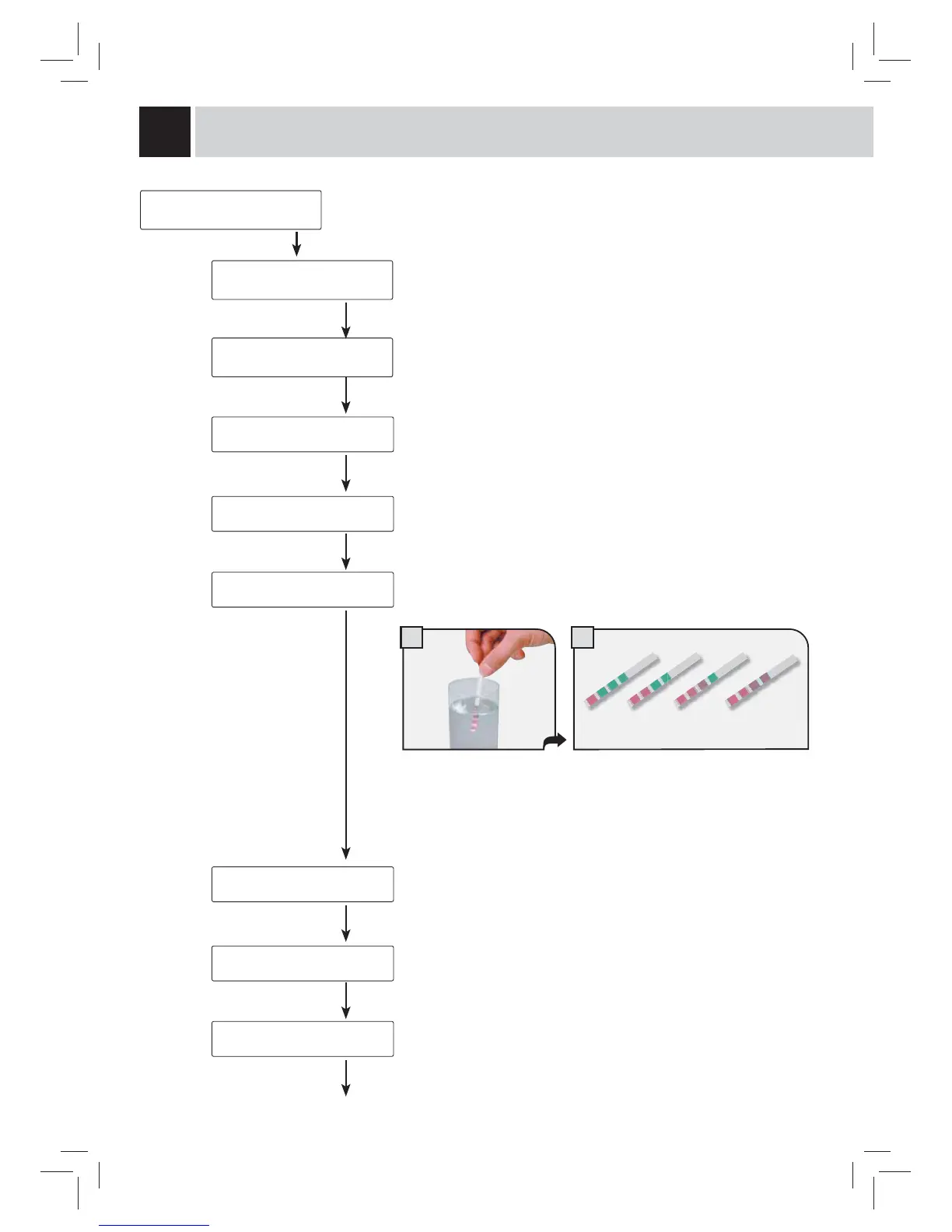
The hardness of the water used for beverage dispensing may vary
according to the area. For this reason, set the machine according to the
correct hardness level of the used water.
This function allows a better water fi lter management (when provided) as it
informs the user when the fi lter must be replaced.
The “RESET” command must be performed every time a new cartridge
fi lter is installed.
This function allows obtaining a more or less hot coffee, adjusting the water
temperature (high, medium and low).
This function allows adjusting the coffee quantity to be ground for the
espresso brewing (strong, normal or mild).
38
Immerse the water
hardness tester included
with the machine in water
for one second.
Check the value. Set the water hardness
obtained from the test and save it.


 To Next Page