- 8 -
Chapter Two Quick Guide
With the help of the community, KC901V’s designers have tried their best to make the
it easily and straightaway to operate the instrument. User who has basic related
knowledge can be familiar with using KC901V within two days. Therefore, this user
manual is simplified and will not detail the settings of every function. It only contains
some instructions and explanations for some special parts.
2.1 Power switch and Keyboard
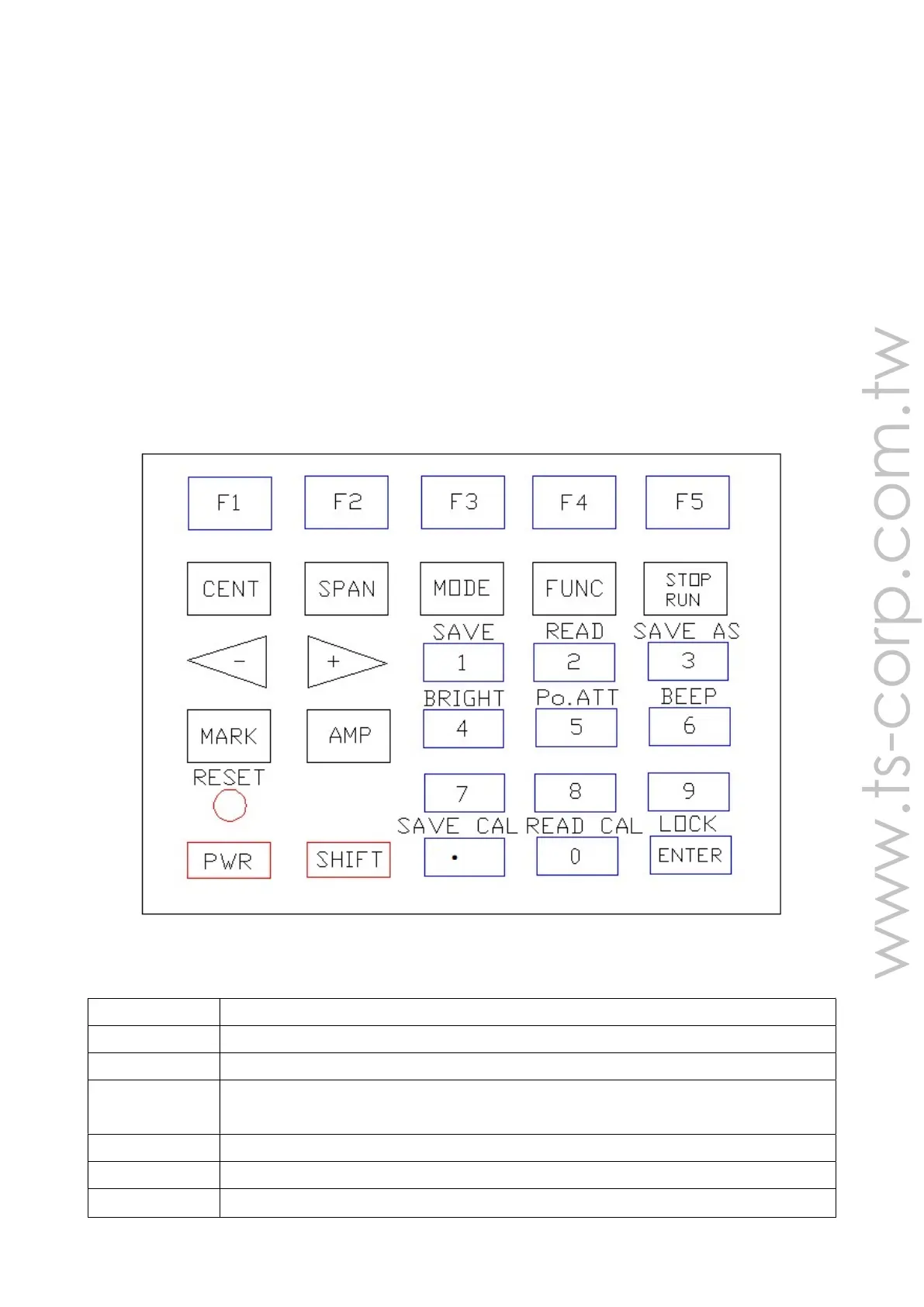
Chart 2-1 shows the layout of keyboard. Keep pressing the power button
(POWER, PWR), which is on the bottom left, for 0.5 seconds. After start up the in-
strument, what the instrument displays is the same information as it was used last
time. The menu displays related settings in its current mode.
Chart 2-1: The keyboard’s Layout
Chart of Keyboard’s primary functions
Name Functions
CENT Setting sweeping central frequency
SPAN Setting the span width (frequency span)
MODE Entering function selection. Pressing repeatedly can switch between
function selection menu and function menu.
FUNC Entering system setup and exiting system setup
STOP/RUN Stop sweeping, start sweeping
+、-
Same as rotating knob, but the step is larger than the knob.


 To Next Page