EasyManua.ls Logo

deeper PRO - User Manual

deeper PRO
5 pages
Print Icon
To Next Page IconTo Next Page
Loading...
Basics for Ice Fishing
The Deeper PRO/PRO+ and CHIRP are both suitable for ice fishing they operate at
temperatures down to -20°C / -4°F. The Deeper START is not designed for ice fishing
it operates at temperatures down to 0°C / 32°F. When you are using your Deeper for ice
fishing, enable the Ice Fishing Mode (Settings > Ice Fishing). Enabling this setting gives
you the best display options for ice fishing and automatically configures the best sonar
settings for ice fishing.
Drill and Drop
Once you have drilled your ice hole, you can simply drop your Deeper Sonar in to start
scanning. It is not necessary to attach a line to your Deeper, although you may choose
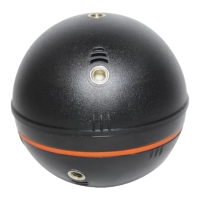
to do so for easy removal from the ice hole in this case, use the top attachment point
for attaching a line. Your Deeper will switch on automatically once in the water, then
sync your smartphone and it will begin scanning. Please note, in very cold conditions
ice can build up on the two electric nodes on the bottom of your Deeper, and this can
prevent the device from switching on. Simply clean off the ice from the two nodes and
drop your Deeper back into the ice hole and this should solve the problem.
Ice Thickness
Deeper Sonars float on the surface of the water (rather than being submerged like other
ice flashers). This means that when the ice is very thick, the sonar may not scan
correctly because the sonar cone hits the sides of the ice hole and the sonar pulses are
reflected back. To avoid this, there are two things you can do:
o drill larger ice holes if the ice is very thick. This will reduce the chance of the
sonar cone hitting the side of the ice hole
o ensure your Deeper Sonar is positioned directly in the center of the ice hole
o drill vertical ice holes, keep the ice hole clean from ice and snow
o if you are using CHIRP, make sure you are using Narrow CHIRP beam (7°)
Question and Answer IconNeed help?

Do you have a question about the deeper PRO and is the answer not in the manual?

Summary

Basics for Ice Fishing

Drill and Drop Ice Fishing Method

How to deploy the Deeper Sonar in an ice hole for scanning, including notes on cold conditions.

Ice Thickness Considerations

Explains how ice thickness affects sonar scanning and provides solutions for accurate readings.

Battery Management for Ice Fishing

Deeper Device Battery Care

Tips for charging and maintaining the Deeper device battery in cold conditions.

Smartphone Battery Life

Advice on managing and preserving smartphone battery life during ice fishing.

Finding the Right Fishing Spot

Ice Fishing Display Modes and Features

Sonar Display Overview

Details the standard sonar display, showing ice, bottom, fish, and lure.

Traditional Circular Flasher

Describes the circular flasher display, showing depth, temperature, and targets.

Vertical Flasher Display

Explains the vertical flasher showing sonar readings as white bands against a black background.

Using the Zoom Feature

How to enable and adjust the zoom feature on the vertical flasher for detailed observation.

Map and GPS Ice Hole Marking

Advanced Ice Fishing Operations

Fishing Multiple Ice Holes

Utilizing Deeper's wireless range to monitor multiple ice holes simultaneously.

Sonar Interference Mitigation

Tips for minimizing sonar interference from other ice flashers.

deeper PRO Specifications

General IconGeneral
Beam Angle15° / 55°
Target Separation2.5 cm
Depth Range80 m
Operating Temperature-20°C to 40°C
CompatibilityiOS, Android
Wireless Range100 m
DisplaySmartphone or Tablet
ConnectionWi-Fi
BatteryLithium-ion 3.7V 2600mAh

Related product manuals