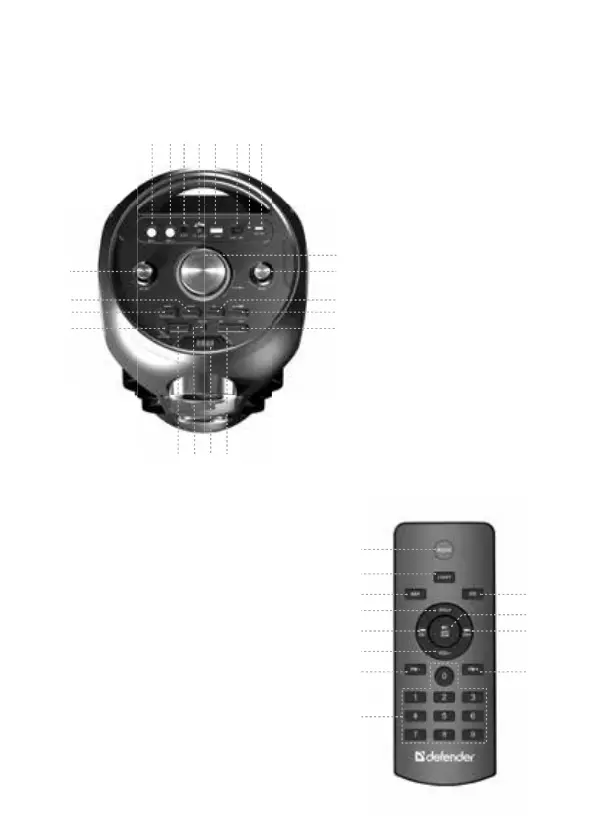
❷ Remote control
1
1. Change mode Bluetooth-USB-mi-
croSD-FM-AUX
2. Backlight Mode/Long press - on/o
backlight
3. MP3 repeat mode
4. Increase volume
5. Previous track/Previous FM station
6. Decrease volume
7. Decrease FM fequency
8. MP3 track number input / FM station
number input
9. Sound eect control, Bass/Treble
10. Play-Pause/FM auto searching
11. Next track/Next FM station
12. Increase FM frequency
2
3
4
5
6
7
8
9
10
11
12
2345 678
9
10
11
12
13
151617
18
19
20
21
1
14
❶ Functions
1. MIC 1 slot
2. MIC 2 slot
3. AUX
4. TF card slot
5. USB drive slot
6. On/O
7. Charging indicator
8. USB Type-C 5V charging
connector
9. Volume control
10. ECHO control
11. Sound eect control,
Bass/Treble, long press - reset
all settings
12. TWS mode
13. Next track/Increase
FM fequency
14. Previous track/Decrease
FM fequency
15. Display
16. Microphone Priority
17. Repeat mode/Bluetooth
Device Remove/FM Channel
and Frequency Switch
18. Play-Pause/FM auto searching
19. Change mode
Bluetooth-USB-microSD-FM-AUX
20. Backlight Mode/Long press
-on/o backlight
21. MIC volume control



 To Next Page