FUNCTIONS
Box front middle button
Power on/off: Long press 3-4 seconds
Play/pause: Short press
Next track: Double press
Previous track: Triple press
Answer/end call: Short press
Box front top button
Volume up: Short press or press and hold.
Box front bottom button
Volume down: Short press or press and hold.
Box back top button: MicMute
™
control
Mute/unmute microphone: Short press.
Box back bottom button: EQ-control
Switch sound modes: Short press to select surround, compressor or
normal sound.
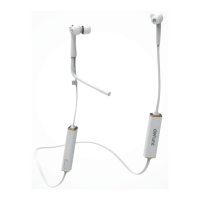
Bendable cable microphone: FlexMic
™
Choose mic position: Bend cable along your cheek area towards your
mouth. Use as in-line mic: Bend cable straight and fasten onto mic clip.
Microphone clip
Choose in-line mic position: Bend cable mic straight and fasten onto clip.
Earbud tips: ComfiTips
™
Position earbuds securely: Put earbuds into ears with slightly turned
angle, then turn again to first angle. If you prefer other tips than memory
foam ComfiTips, choose your size of the included extra silicone tips.


 To Next Page