Note:
-When the alarm is ringing, press the button to close the alarm
-If you don't need to use the alarm function on the weekend, you can identify it by icon , whether the
alarm clock is turned on. The screen shows the icon which means that the alarm function is turned on.
On the contrary, it means that the alarm function is turned off.
09
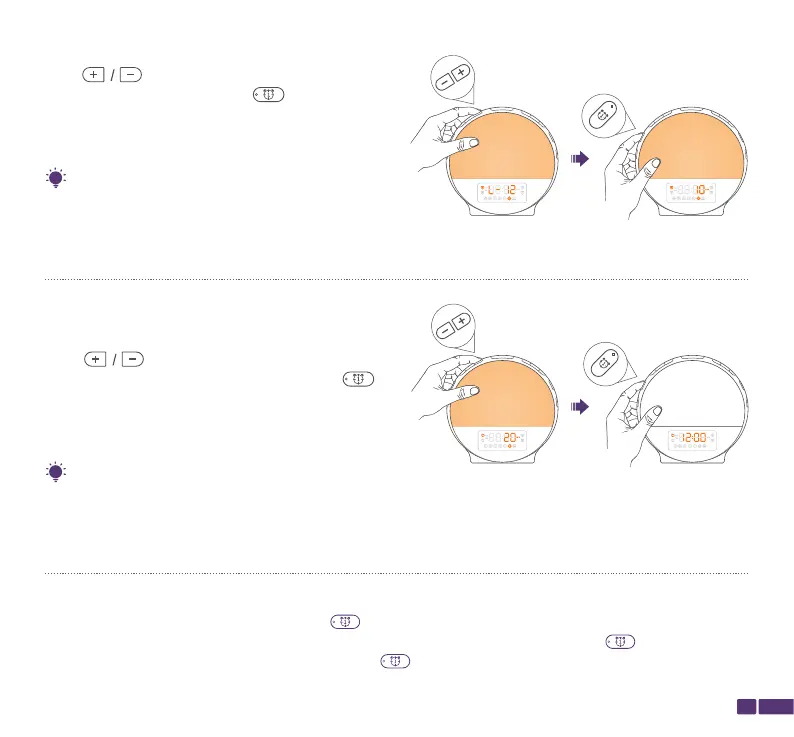
L-00: Light off
L-01 to L-20: Brightness levels
lf you select L-00, there will be no sunrise light (but only ringtone) when Alarm 1 rings.
Tip:
If you set the duration to 10 minutes and the alarm time to 7:00 AM, the light will turn on at 6:50
AM and slowly increase in brightness. By the time the alarm goes off at 7:00 AM, the light will be
at the brightness level you selected in Step 6.
Tip:
Step 6:
Press to adjust the brightness level for the
light, Once done, press Alarm 1/ to confirm
your selection and start setting the sunrise time that
is the lighting time before the alarm ringing.
Step 7:
Press to select the sunrise time from 10,
20, 30, 40, 50 and 60 MIN, then press Alarm 1/
to confirm and complete all the settings for Alarm 1.
Alarm 1 is on after setup.
Alarm 1
Alarm 1


 To Next Page