14
OPERATING INSTRUCTIONS
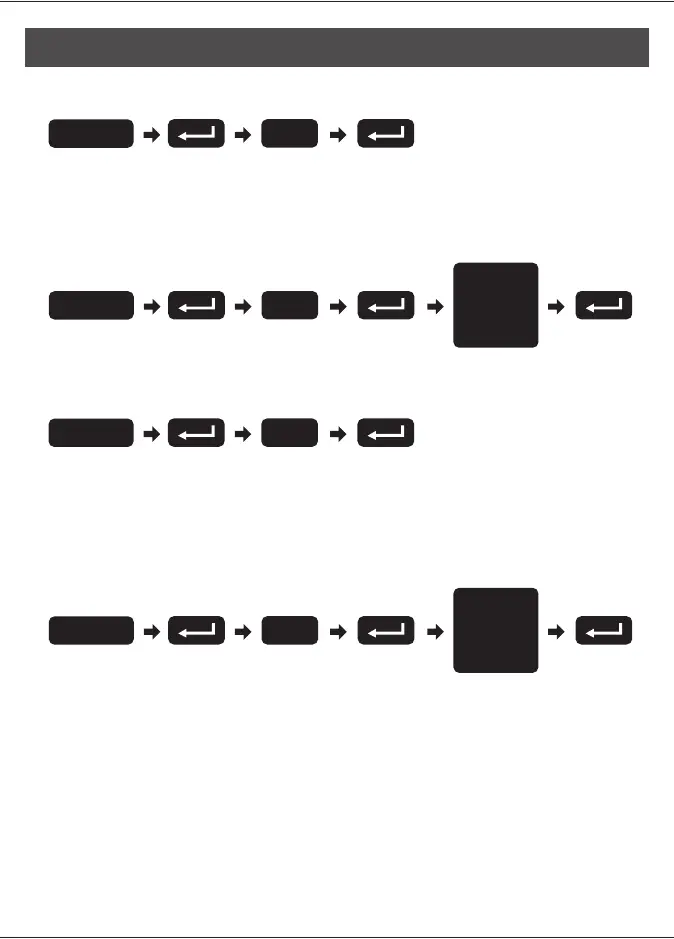
8. Enable/Disable All User Codes
Note:
user codes are disabled. The lock can only be operated by key
during the time. Repeat the steps to enable the user codes again.
Auto-locking and keypad locking functions will be invalid when
9. Create a One-Time User Code 4–10 Digits Long
Note: The one-time user code will automatically cancel after it is used
one time.
6. Toggle Auto-Lock On/Off
Note:
following instructions #7.
Repeat the steps in #6 to cancel the auto-locking function.
The preset delay-time is 30 seconds, you can change the time by
7. Set Auto-Lock Time Delay
Note: 10–99 seconds delay-time available.
5
Enter PC
6
Enter PC
Enter
Seconds
(10~99)
7
Enter PC
8
Enter PC
Enter
One Time
Code



 To Next Page