Delem
V0802, 4.4
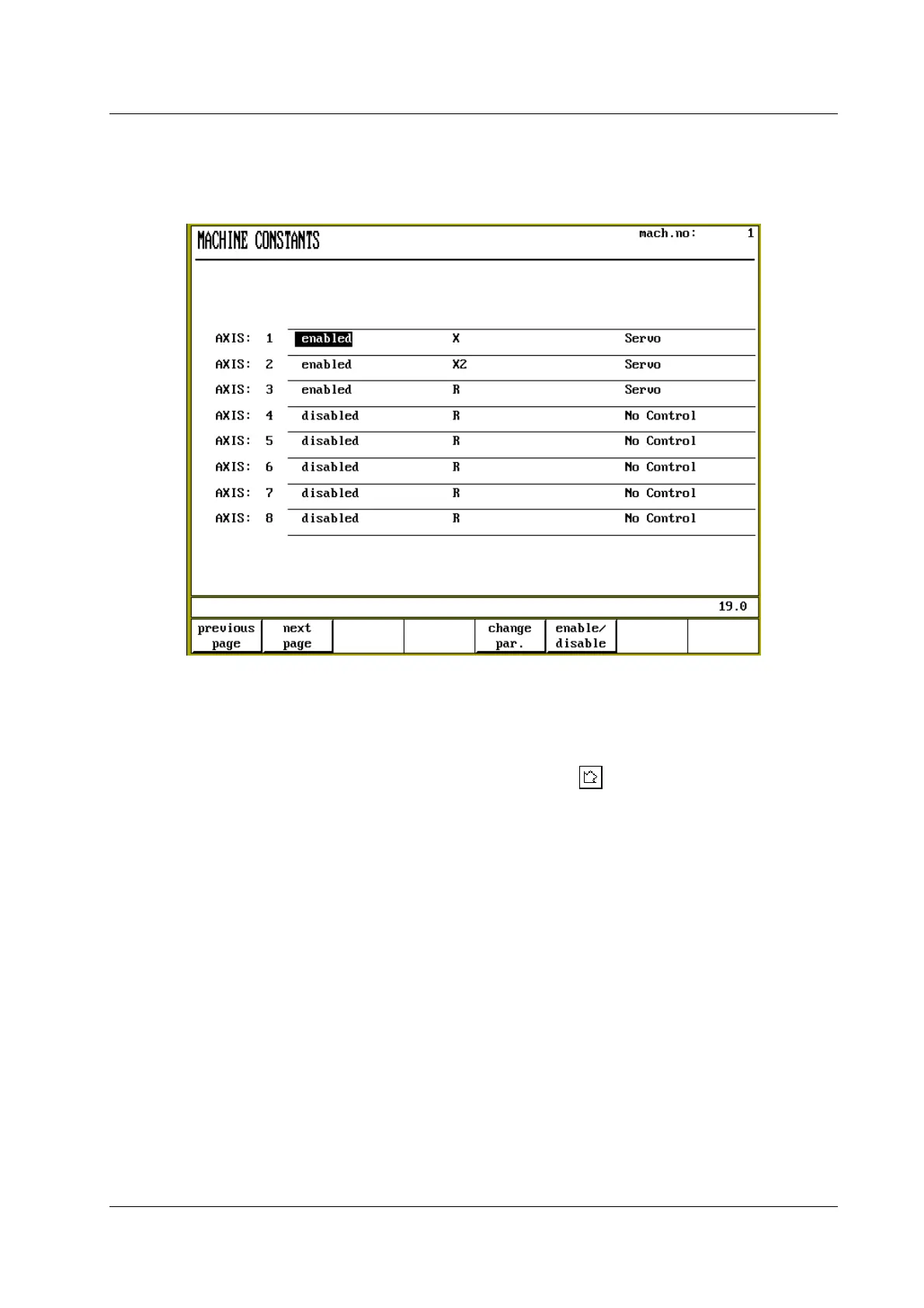
Step 2 is done with option 2 of the parameters menu: Auxiliary axis. The following screen
appears:
Figure 4.2.b
A maximum of 24 axis can be configured through this menu.
• In the first column is indicated whether an axis is switched on or off. Use the softkey S6
‘enable/disable’ to change its setting.
• In the second column the axis type is selected with the key . A pop-up menu appears, in
which all known axis types are listed. Select the correct type.
• In the last column the drive type for the axis is selected. Available choices are Servo, AC or
No Control. If ‘No Control’ is selected, the axis values are calculated and displayed in the
user screens, but no ‘real’ axis is controlled: a so-called ‘dummy axis’.
Once an axis has been configured in this menu, press softkey S5 ‘change par.’ to program the
parameters of the axis.
When the machine parameters menu is left, the control checks if the axes are configured
properly. If this is not the case, the control will issue a warning:
** Warning: Not all axes are mapped on a module. **
Continue ? 1/0:
Press 1 to continue or 0 to return to the machine parameters menu. To solve this issue, repeat
steps 1 and 2 and check your axis/module configuration.


 To Next Page
 Loading...
