Delem
V0802, 4.5
4.3 R-axis specific parameters
The following R-axis specific parameters are explained:
• backgauge-die collision detection with R-axes;
• automatic R-axis adjustment.
Backgauge-against-die collision detection
When you have enabled a R-axis (also R1 and R2) then the collision detection for backgauge-
against-die is active. A collision can occur when the R-axis position is negative. This means that
the backgauge finger lower is than the die height.
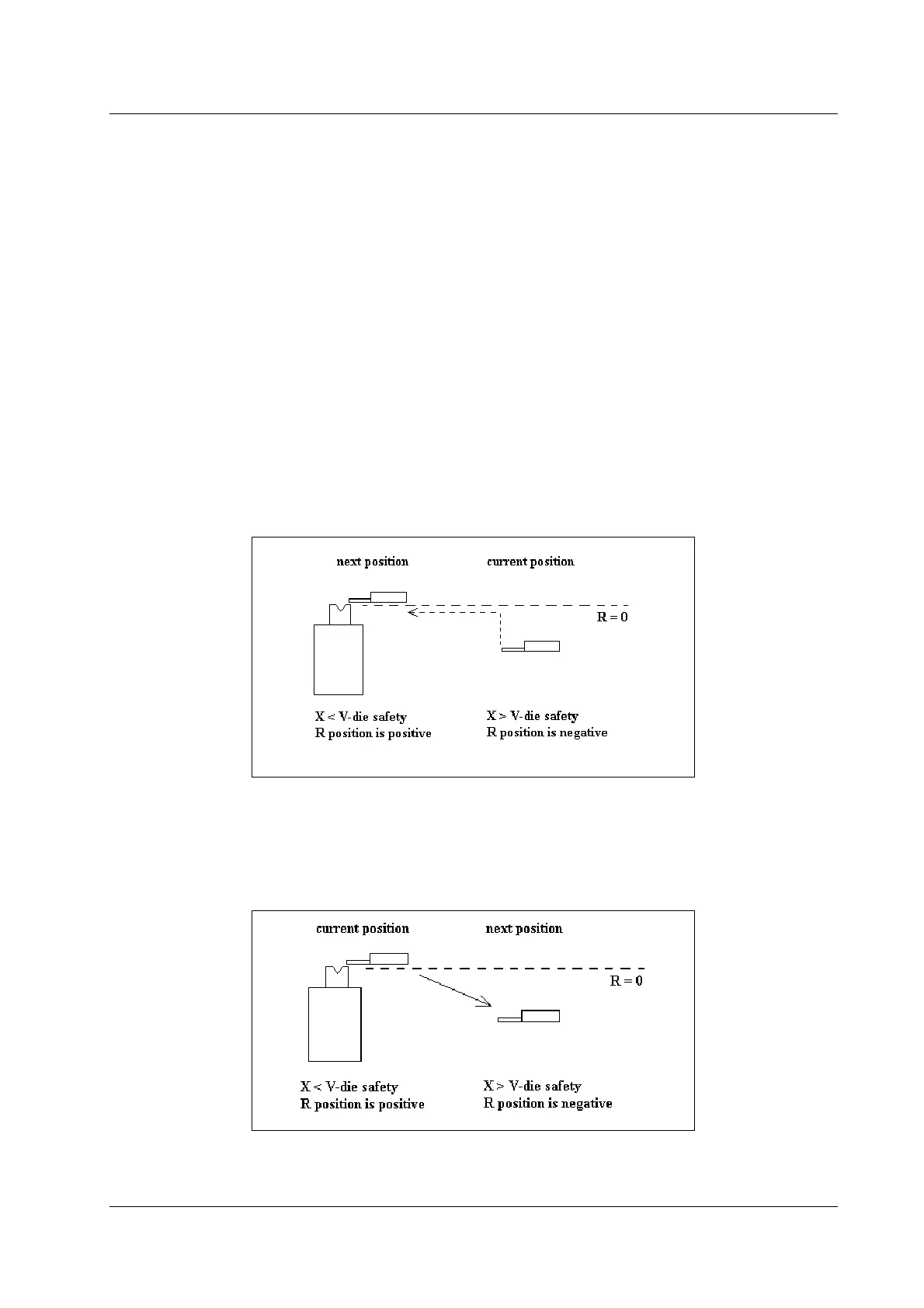
There are three critical situations. For all these situations a necessary condition is that the R-in
input has to be active to be able to move the X-axis into the safety zone!
• The X-axis has to move into the V-die safety zone. The R-axis will first move to a positive
position before the X-axis moves to the programmed position.
Figure 4.3.a
• When the R-axis has to move from positive to negative, the X-axis must move out of the V-
die safety zone. The X-axis starts moving backwards but the R-axis does not move until the
X-axis is out of the safety zone.
Figure 4.3.b


 To Next Page
 Loading...
