Using Your Projector 31
CUSTOM COLOR ADJUST—Allows you to manually adjust the colors red, green, and
blue.
C
OLOR SPACE—Allows you to select the color space, options are: RGB, YCbCr, and
YPbPr.
DISPLAY (in PC Mode)
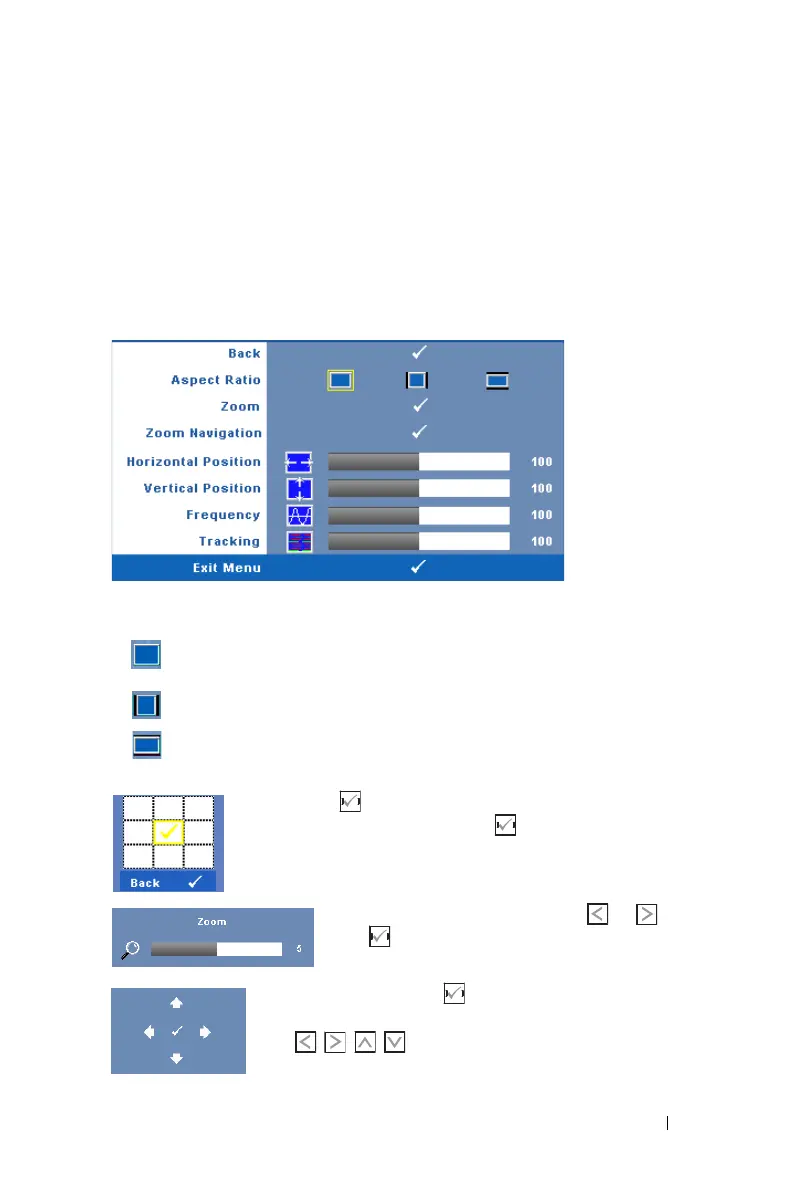
Using the Display menu, you can adjust the display settings of your projector. The
Picture menu, provides the following options:
A
SPECT RATIO—Allows you to select the aspect ratio to adjust how the image
appears.
• Original — Select Original to maintain the aspect ratio of image projected
according to input source.
• 4:3 — The input source scales to fit the screen and projects a 4:3 image.
• Wide — The input source scales to fit the width of the screen to project a
wide screen image.
ZOOM—Press to activate Zoom menu.
Select the area to zoom and press to view zoomed image.
Adjust the image scale by pressing or and
press to view.
Z
OOM NAVIGATION—Press to activate Zoom Navigation
menu.
Use to navigate projection screen.


 To Next Page