Loading Envelopes Identifying the Location of Paper Jams
Printing the Printer Settings Page
1
Ensure that the green LED on the (Ready/Data) indicator is on and not blinking, and
then press and hold the
(Start) button for over three seconds.
The printer settings page is printed.
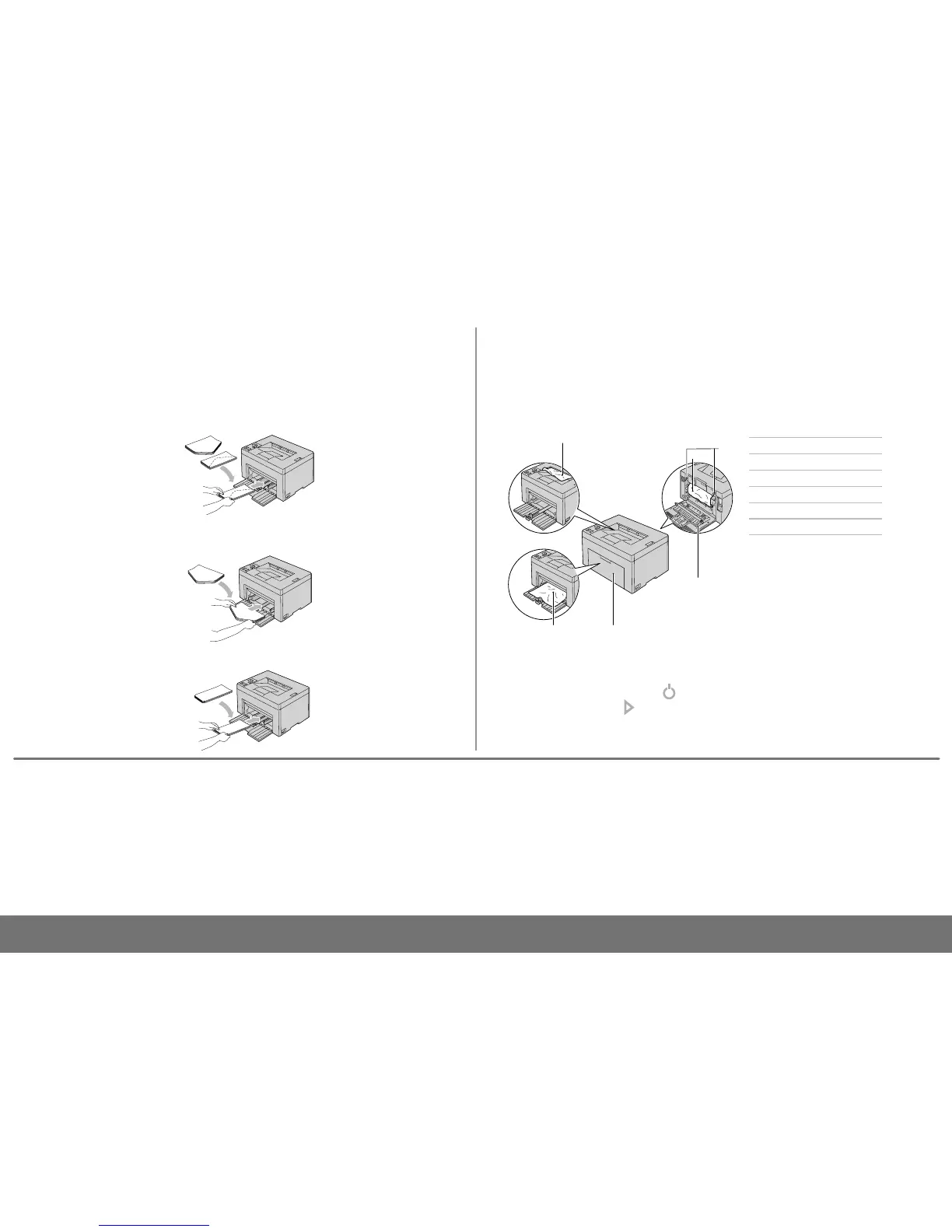
Load envelopes in the printer as shown below:
NOTE: When you print on envelopes, be sure to specify the envelope setting on the printer
driver. If not specified, the print image will be rotated 180 degrees.
The paper jams may occur at any of the locations shown below:
CAUTION: To avoid permanent damage to your printer, do not attempt to clear paper
jams using any tools or instruments.
1 Output Tray
2 Transfer Belt
3
Fuser Release lever
4 Rear Cover
5 Front Cover
6 Multipurpose Feeder (MPF)
support.dell.com
Envelope#10
C5, Monarch, or DL
Finding Information
For more information, see the following documents
available on the
Drivers and Utilities
disc.
•
Setup Guide
Setup instructions for printer hardware. Access to
software and drivers.
•
User’s Guide
Additional information about printer components,
paper jam clearance, and consumable replacement.
Cleaning the Printer
Vertical blanks in prints
Æ
See "Maintaining Your Printer" in the
User's Guide
An alert for the CTD sensor appears
Æ
See "Maintaining Your Printer" in the
User's Guide
Troubleshooting
Clearing jams
Æ
See "Clearing Jams" in the
User's
Guide
Print quality and other printing
problems
Æ
See "Troubleshooting" in the
User's
Guide
Common error messages
Æ
See "Understanding Printer Messages"
in the
User's Guide
Replacing Toners
To replace toners
Æ
See "Maintaining Your Printer" in the
User's Guide
To prevent DL and Monarch from being wrinkled, they are recommended to be loaded with
the print-side facing up, flap opened, and facing you.











 To Previous Page