Back to Contents Page
Setting Up Your Monitor
Dell™ 1707FP AIO Color Monitor For Dell™ OptiPlex™ USFF Computer
Cable Connections on the Back of the Monitor and the Computer
Removing the Cable Cover and Cables from the Computer
Detaching the Monitor from the Stand
Using the OSD
Setting the Optimal Resolution
Using the Dell Soundbar (Optional)
Cable Connections on the Back of the Monitor and the Computer
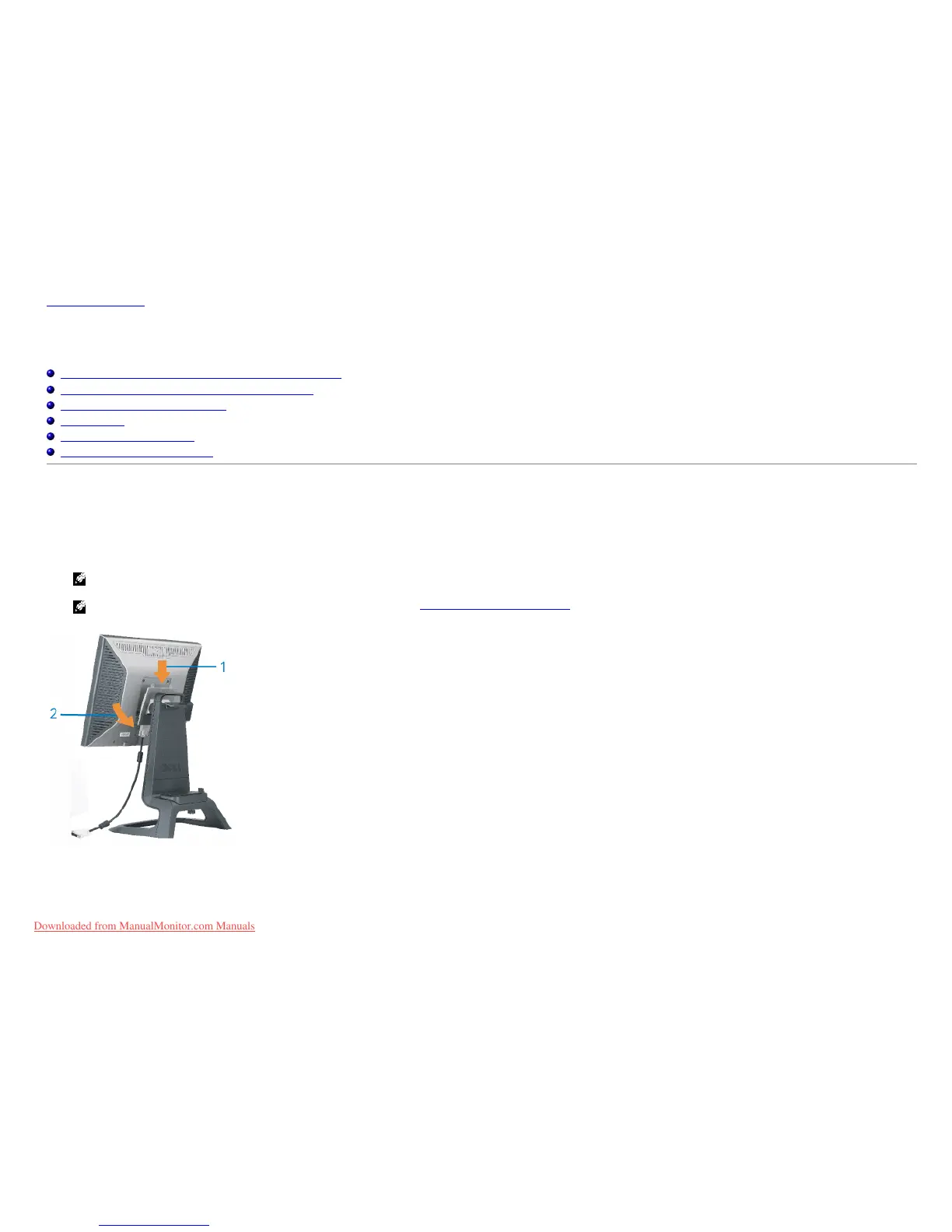
1. Attach the monitor to the stand.
a) Fit the groove on the back of the monitor onto the two metal tabs on stand.
b) Lower the monitor until it locks in to place on the stand.
NOTE: The stand is detached and extended when the monitor is shipped from the factory.
NOTE: If you want to mount your AIO stand to a desk top, see the AIO Stand Template Sheet (*.pdf)
2. Slide the computer onto the stand. Push it in until the computer touches the locating tab in the stand.
Downloaded from ManualMonitor.com Manuals










 To Next Page