It is recommended that you clear the entire paper path when a paper jam occurs.
Paper jam in the paper path
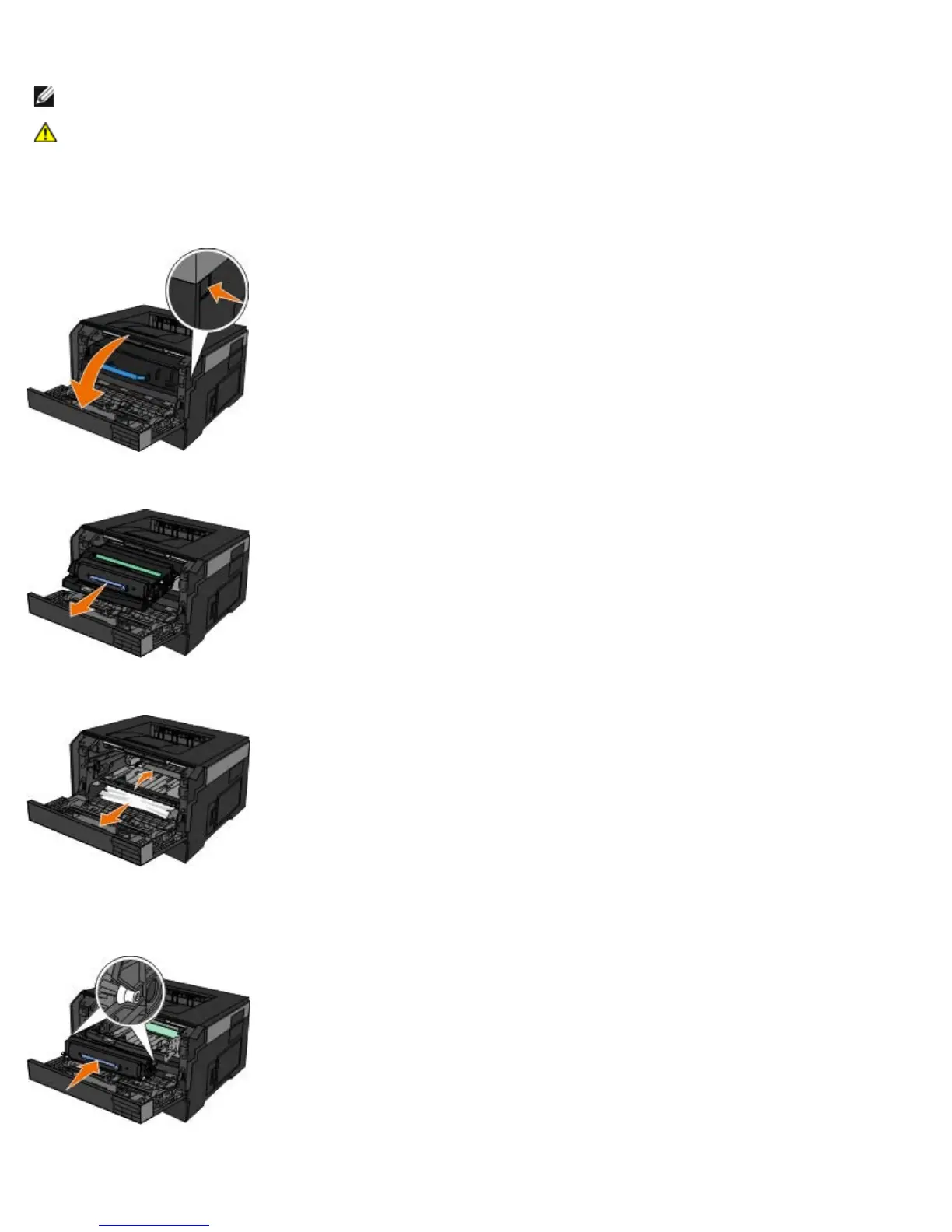
1. Pull the paper firmly to remove it. If you cannot reach the paper because it is too far into the printer, open the front
cover of the printer by pressing the button on the right side of the printer and lowering the cover.
2. Press the button on the toner cartridge assembly, and then pull the toner cartridge up and out using the handle.
3. Pull the paper out.
4. Reinstall the toner cartridge by aligning the white rollers on the toner cartridge with the white arrows on the tracks of
the imaging drum and pushing the toner cartridge in as far as it will go. The cartridge clicks into place when correctly
installed.
5. Close the front cover.
NOTE: Turn the printer off before checking the printer.
CAUTION: To reduce the risk of injury when clearing paper jams allow the surface to cool before touching.












 To Next Page