first
fold
first
fold
Dell™ 7700FullHD Projector
Quick Setup Guide
快速设置指南
快速安裝指南
クイックセットアップガイド
www.dell.com | support.dell.com
Printed in China
在中国印刷
印於中國
中国で印刷
About Your Projector
关于投影仪 | 關於投影機
プロジェクタについて
CAUTION: Before you setup and operate your Dell projector, follow the safety information that
shipped with your projector.
警告:在设置和使用Dell投影仪前,阅读
产品信息指南
中的安全注意事项。
注意:設定與操作 Dell 投影機前,請遵循《產品資訊指南》中的安全資訊。
注意:Dellプロジェクタをセットアップし操作する前に、プロジェクタに付属する
安全情報に従ってください。
March 2012
2012年3月 2012年3月
2012年3月
Information in
this document
is subject to
change without
notice.
© 2012 Dell Inc. All
rights reserved.
Reproduction of these
materials in any manner
whatsoever without
the written permission
of Dell Inc. is strictly
forbidden.
Dell and the DELL logo
are trademarks of
Dell Inc.
Dell disclaims any
proprietary interest in
the marks and names
of others.
本文档中的信息如
有变更,恕不另行
通知。
© 2012 Dell Inc. 保
留所有权利。
未经Dell Inc.的书面许
可,严禁任何人以
任何方式复制这些
资料。
Dell 和DELL 标志是
Dell Inc. 的商标。
Dell对于归他人所有
的标志和名称没有
任何所有权收益。
本文件中的資訊若
有變更恕不另行
通知。
© 2012 Dell Inc.保留
所有權利。
若未事先獲得 Dell
Inc. 的書面許可,嚴
禁以任何方式重製
本文件。
Dell 及 DELL 標誌是
Dell Inc. 的商標。
對於其他標誌與名
稱之業主權益,Dell
概不負責。
この文書の情報
は、将来予告なしに
変更することがあ
りま す 。
© 2012 Dell Inc. All
rights reserved.
Dell Inc. 社の書面に
よる許諾を受ける
ことなく、どのよう
な形態であっても、
本書を複製するこ
とは固く禁じられて
います。
Dell および DELL ロ
ゴ、Dell Inc. の商標
です。
Dellは、その他のマー
クや名称に対する
所有権を主張するこ
とはありません。
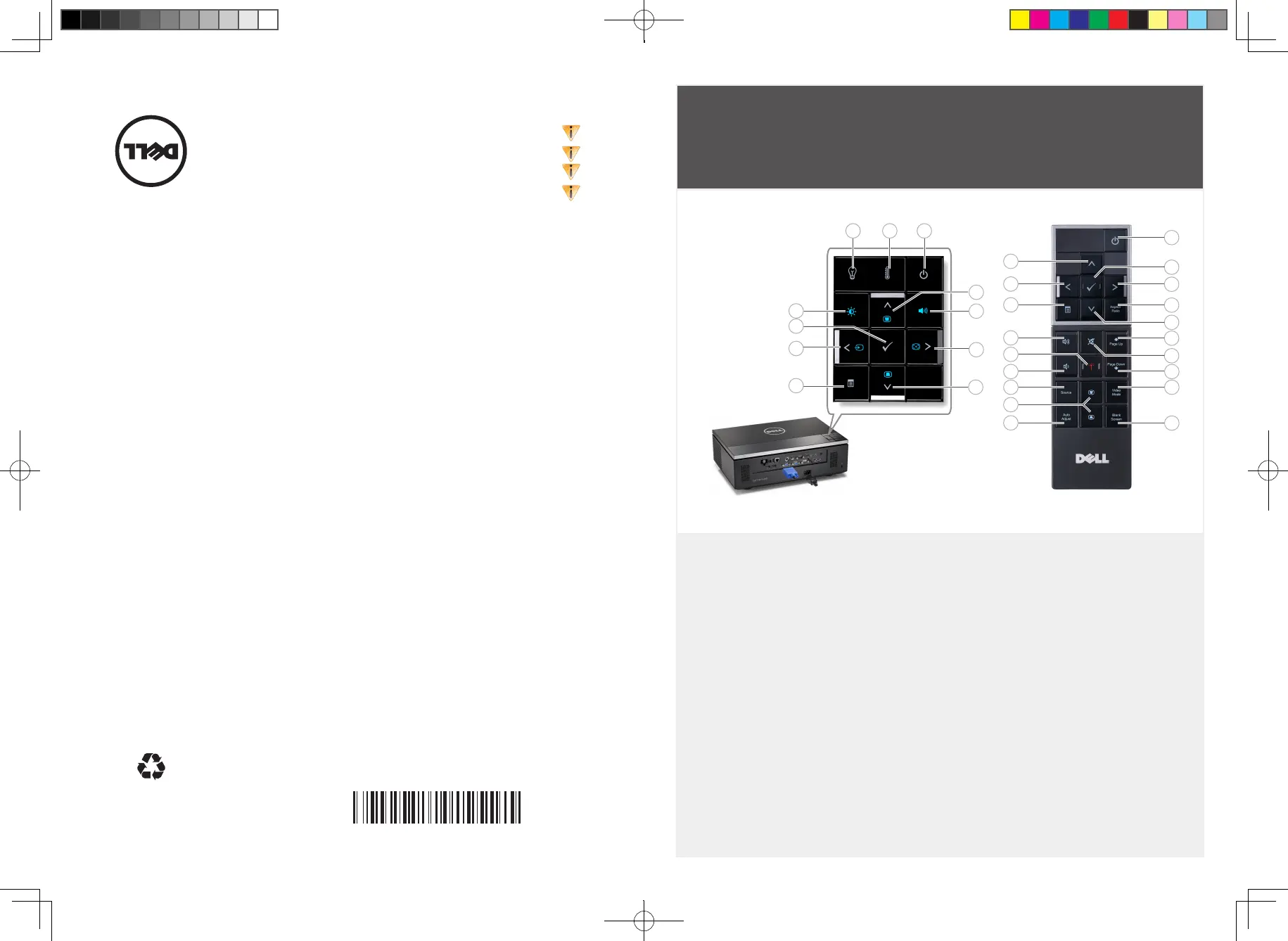
Projector Control Panel
LAMP warning light1.
TEMP warning light2.
Power3.
Up / Keystone adjustment4.
Volume Control5.
Right / Auto adjust6.
Down / Keystone adjustment7.
Menu8.
Left / Source9.
Enter10.
Brightness and Contrast Control11.
Remote Control
Power button12.
Enter button13.
Right button14.
Aspect Ratio15.
Down button16.
Page Up17.
Mute18.
Page Down19.
Video Mode20.
Blank Screen21.
Up button22.
Left button23.
Menu24.
Volume +25.
Laser button26.
Volume -27.
Source28.
Keystone adjustment29.
Auto Adjust30.
投影机控制面板
灯泡警告灯1.
温度警告灯2.
电源3.
向上/梯形失真调整4.
音量控制5.
向右/自动调整6.
向下/梯形失真调整7.
菜单8.
向左/输入源9.
确定10.
亮度和对比度控制11.
遥控器
电源按钮12.
确定按钮13.
向右按钮14.
图像比例15.
向下按钮16.
向上翻页17.
静音18.
向下翻页19.
视频模式20.
空白屏幕21.
向上按钮22.
向左按钮23.
菜单24.
音量+25.
激光按钮26.
音量-27.
输入源28.
梯形失真调整29.
自动调整30.
投影機控制面板
LAMP 警示燈1.
TEMP 警示燈2.
電源3.
上 / 梯形修正調整4.
音量調整5.
右 / 自動調整6.
下 / 梯形修正調整7.
選單8.
左 / 訊號源9.
Enter10.
亮度與對比控制11.
遙控器
電源按鈕12.
Enter 按鈕13.
向右按鈕14.
長寬比15.
向下按鈕16.
上一頁17.
靜音18.
下一頁19.
視訊模式20.
空白畫面21.
向上按鈕22.
向左按鈕23.
選單24.
音量 +25.
雷射按鈕26.
音量 -27.
訊號源28.
梯形修正調整29.
自動調整30.
プロジェクタのコントロール
パネル
ランプ警告ライト1.
温度警告ライト2.
電源3.
上 / キーストーン調整4.
音量コントロール5.
右 / 自動調整6.
ダウン / キーストーン調整7.
メニュー8.
左 / ソース9.
入力10.
明るさとコントラストコント11.
ロール
リモコン
電源ボタン12.
入力ボタン13.
右ボタン 14.
縦横比15.
ダウンボタン 16.
ページ上17.
消音18.
ページ下19.
ビデオモード20.
何もうつっていない画面21.
アップボタン 22.
左ボタン 23.
メニュー24.
音量 +25.
レーザーボタン26.
音量 -27.
ソース28.
キーストーン調整29.
自動調整30.
12
13
14
15
16
17
18
19
20
21
22
23
24
30
29
28
27
26
25
1 2 3
4
6
7
5
8
9
10
11


 To Previous Page
 Loading...