3 | P a g e This document is for regulatory purpose only.
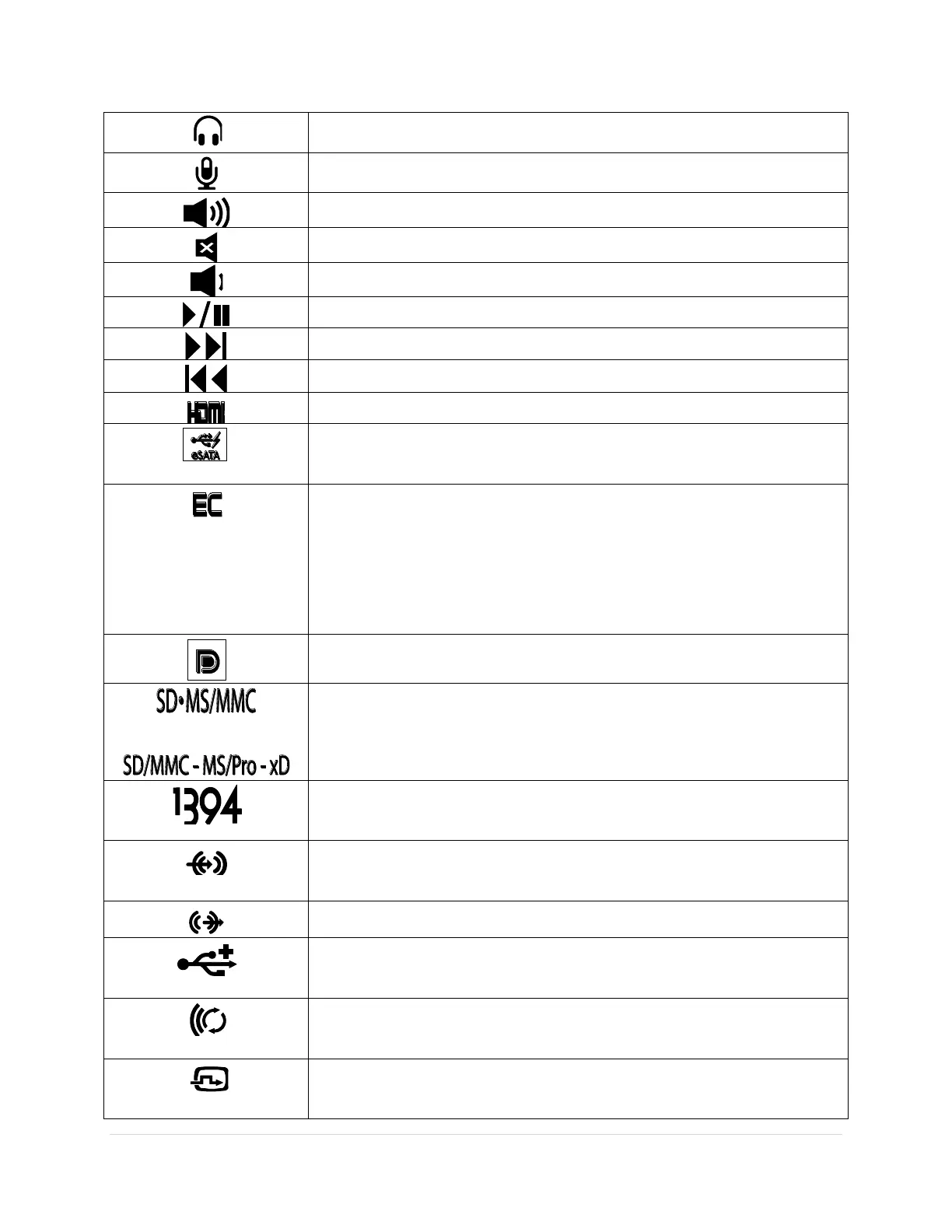
Audio out/Headphone connector – Connects one pair of
headphones, or sends audio to a powered speaker or sound system.
Audio in/Microphone connector – Connects to a microphone or
input signal for use with audio programs.
Play the next track or chapter
Play the previous track or chapter
HDMI connector – connects to a monitor, projector, or television.
eSATA – connects to external devices such as hard drives and
media bays, this connector also supports standard USB devices.
ExpressCard slot – Supports one 34 mm wide ExpressCard. The
computer ships with a plastic blank installed in the slot.
NOTE: Blanks protect unused slots from dust and other particles.
Save the blank for use when no ExpressCard is installed in the slot;
blanks from other computers may not fit your computer.
Display Port - connects to a monitor or projector
Provides a fast and convenient way to view and share digital photos,
music, videos, and documents stored on digital memory cards.
1394 Firewire – used for high-speed data connections to external
storage and digital media devices, such as still- and video cameras.
Line in – connects to audio devices such as receivers and MP3
players
Line out – connects to audio devices such as stereos and speakers
USB connector – connects to peripheral devices such as printers,
mice, and keyboards.
Wireless sync – used to synchronize connections with wireless input
devices such as keyboards and mice (for select systems only).
DVI connector – used to connect monitors, projectors, and
televisions.









 To Next Page