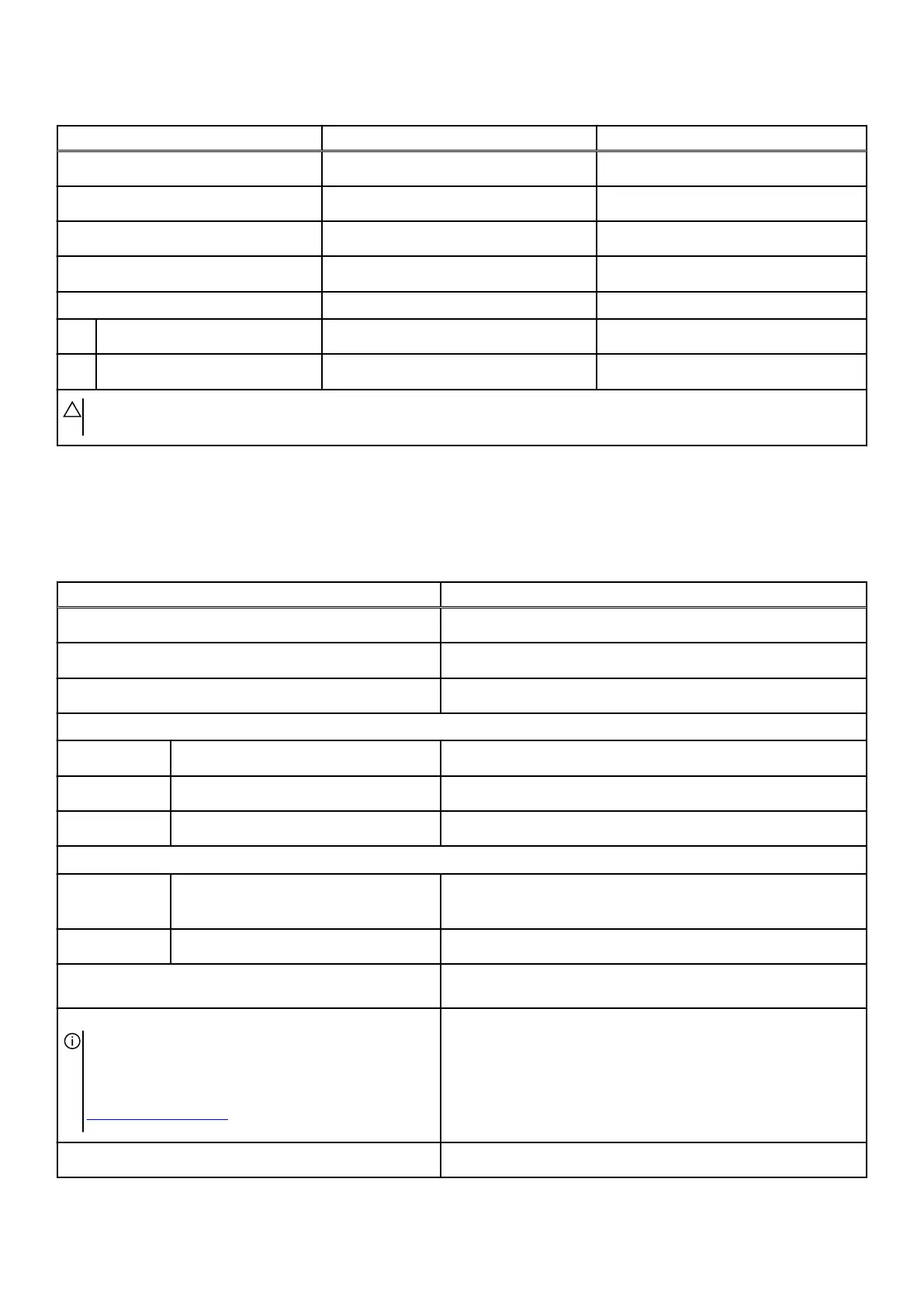
Table 15. Power adapter specifications(continued)
Description Option one Option two
Input frequency
50 Hz–60 Hz 50 Hz–60 Hz
Input current (maximum)
4.40 A 4.40 A
Output current (continuous)
16.92 A 16.92 A
Rated output voltage
19.50 VDC 19.50 VDC
Temperature range:
Operating
0°C to 40°C (32°F to 104°F) 0°C to 40°C (32°F to 104°F)
Storage
-40°C to 70°C (-40°F to 158°F) -40°C to 70°C (-40°F to 158°F)
CAUTION: Operating and storage temperature ranges may differ among components, so operating or storing the device
outside these ranges may impact the performance of specific components.
Battery
The following table lists the battery specifications of your Alienware m16 R1 AMD.
Table 16. Battery specifications
Description Values
Battery type
6-cell lithium-ion (86 Wh)
Battery voltage
11.40 VDC
Battery weight (maximum)
0.34 kg (0.75 lb)
Battery dimensions:
Height
7.56 mm (0.30 in.)
Width
295.20 mm (11.62 in)
Depth
77.70 mm (3.06 in.)
Temperature range:
Operating
● Charging: 0°C to 50°C (32°F to 122°F)
● Discharging: 0°C to 60°C (32°F to 140°F)
Storage
-20°C to 65°C (-4°F to 149°F)
Battery operating time Varies depending on operating conditions and can significantly
reduce under certain power-intensive conditions.
Battery charging time (approximate)
NOTE: Control the charging time, duration, start and
end time, and so on using the Dell Power Manager
application. For more information about Dell Power
Manager, search in the Knowledge Base Resource at
www.dell.com/support.
● Standard charging: 3 hours, when computer is turned off
● ExpressCharge: 2 hours, when computer is turned off
● ExpressChargeBoost: 20 minutes, from 0% up to 35% when
computer is turned off
Coin-cell battery
None
16












 To Next Page