EasyManua.ls Logo

Dell BT-309 - User Manual

Dell BT-309
10 pages
Print Icon
To Next Page IconTo Next Page
Loading...
User Manual
Bluetooth GPS Receiver
BT-309
Ver 1.0
Question and Answer IconNeed help?

Do you have a question about the Dell BT-309 and is the answer not in the manual?

Summary

Introduction to BT-309 GPS Receiver

Package Contents

Lists items included in the BT-309 package for user verification.

Power Switch and Jack Operation

Details the power switch operation and power jack for device charging.

BT-309 Device Operation and Usage

LED Status Indicators Explained

Explains LED light patterns for status updates like Bluetooth connection and GPS fix.

External Antenna Connection Guide

Guides on connecting and positioning an external GPS antenna for improved signal reception.

PDA (Built-in Bluetooth) Connectivity

Instructions for pairing the BT-309 with a PDA that has integrated Bluetooth.

BT-309 Usage Scenarios and Testing

PDA (Bluetooth CF Card) Connectivity

Steps to connect the BT-309 to a PDA using a Bluetooth Compact Flash card.

Notebook Bluetooth Connectivity

Procedure for enabling Bluetooth connection between the BT-309 and a notebook computer.

GPS Receiver Testing Procedure

Step-by-step guide on how to use the GPS Information testing program.

BT-309 System Specifications

Electrical Characteristics and Accuracy

Details on receiver frequency, sensitivity, accuracy, and datum.

Acquisition Rate and Protocol Support

Information on satellite acquisition times and supported communication protocols.

Dynamic Condition Specifications

Device performance specs for acceleration, altitude, and velocity.

Bluetooth V1.1 Specifications

Technical parameters for Bluetooth V1.1 compliance, supply voltage, and range.

FCC Compliance Notices

Overview

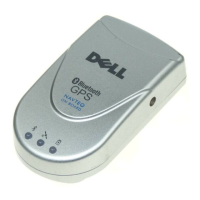
The BT-309 is a Bluetooth GPS Receiver designed for high-sensitivity tracking signals, making it suitable for a variety of navigation and tracking applications. This device features a built-in active antenna and is based on the SiRF star IIe/LP low-power chipset, which supports advanced functions such as SingleSat updates in reduced visibility, superior urban canyon performance, and FoliageLock for weak signal tracking. It is designed to integrate seamlessly with Bluetooth-enabled PDAs, smartphones, tablet PCs, and notebook PCs, catering to users involved in car navigation, personal navigation, touring, tracking, and marine navigation.

Function Description

The primary function of the BT-309 is to receive GPS signals and transmit positioning data via Bluetooth to a connected device. It is equipped with several indicator LEDs to provide real-time status updates:

  • Bluetooth Status LED (Blue): This LED indicates the Bluetooth connection status. A slow blink signifies that the device is not connected to any Bluetooth devices, while a quick blink means it is connected to another Bluetooth device.
  • GPS Status LED (Green): This LED shows the GPS positioning status. A blinking light indicates that a GPS position is fixed, meaning the device has acquired a stable GPS signal. A steady light, on the other hand, means the GPS position is not yet fixed.
  • Battery Status LED (Red/Yellow): This LED provides information about the internal battery's charge level. A red light indicates critically low battery power, prompting immediate charging. A yellow light signifies that the battery is currently charging. If the LED is off, it means the battery is partially full or fully charged.

The BT-309 also features a power switch for turning the device on and off, and a power jack for connecting either a DC car power charger or an AC power charger to recharge the internal battery. The device is compatible with iPAQ-compatible AC adapters, provided they have a rating of 5V, 1.2A, and a positive pole center.

Usage Features

The BT-309 is designed for straightforward use with various Bluetooth-enabled devices:

  • Powering On/Off: To use the device, simply switch the power on using the dedicated power switch. To conserve battery, switch it off when not in use.
  • Connecting to PDAs (with built-in Bluetooth):
    1. Turn on the BT-309.
    2. Enable Bluetooth on your PDA (refer to your PDA's user manual).
    3. When prompted for a Bluetooth passkey, enter "2003".
    4. Identify the COM port used by Bluetooth on your PDA (e.g., COM 8 for iPAQ 3970).
    5. Launch your mapping/navigation software and select the correct COM port and a baud rate of 38400.
  • Connecting to PDAs (with Bluetooth Compact Flash card):
    1. Turn on the BT-309.
    2. Enable the Bluetooth Compact Flash card (refer to its user manual).
    3. If a Bluetooth passkey is required, enter "2003".
    4. Determine the COM port used by Bluetooth (e.g., COM 6).
    5. Open your mapping/navigation software and configure it with the correct COM port and a baud rate of 38400.
  • Connecting to Notebooks (with Bluetooth device):
    1. Turn on the BT-309.
    2. Enable the Bluetooth device on your notebook (refer to its user manual).
    3. If a Bluetooth passkey is needed, enter "2003".
    4. Check the COM port assigned to Bluetooth (e.g., COM 6).
    5. Start your mapping/navigation software and set it to use the correct COM port and a baud rate of 38400.

Many applications feature an "auto-detect" function for Bluetooth devices, which may eliminate the need to manually select the Baud Rate.

External Antenna Support:

While the BT-309 has a built-in active antenna, an external antenna port is available for situations where the device cannot "see" the sky, such as in environments where GPS signals are blocked. To use an external antenna:

  1. Plug the external antenna with an MMCX connector into the port on the BT-309.
  2. Place the magnetic external antenna on the roof of a car or in an outdoor open space.
  3. Ensure the antenna is oriented correctly, with the magnetic side facing down and the upper side facing the sky, to optimize signal reception.
  • Important Note: Always hold the antenna connector when plugging or unplugging the external antenna from the BT-309 to avoid damaging the cable line.

Testing Program:

A testing program, "GPSinfo.exe," is provided on the included CD for Microsoft Windows CE and Pocket PC-based PDA platforms.

  1. Install "GPSinfo.exe" via PC and ActiveSync.
  2. Run the "GPS Information" program from the "Start → Program files" menu on your PDA.
  3. Within the program, select the COM port and Baud Rate (38400), then click the [Start GPS] button to begin receiving GPS data. This program allows users to verify GPS data reception and monitor various parameters.

Maintenance Features

  • Battery Recharging: The BT-309 includes an internal rechargeable battery. It can be recharged using either the provided DC car power charger or AC power charger. The battery status LED will indicate when charging is in progress (yellow light) and when the battery is critically low (red light).
  • Power Management: The device offers a power-off function to conserve battery life when not in active use. Additionally, it supports a "trickle power mode" for extended operation, allowing for more than 10 hours of use after a full charge.
  • Durability: The BT-309 is designed to operate within a wide temperature range of -20°C to 70°C and can be stored in temperatures from -30°C to 80°C. It also tolerates humidity up to 95% non-condensing, indicating a robust design for various environmental conditions.

Dell BT-309 Specifications

General IconGeneral
ChipsetSiRF Star III
Channels20
FrequencyL1, 1575.42 MHz
Update Rate1 Hz
AntennaBuilt-in patch antenna
InterfaceBluetooth
Bluetooth ProfileSPP
Battery Life8 hours

Related product manuals