74 Removing and Installing Parts
4
If you are replacing a card that is already installed in the computer, remove the card.
If necessary, disconnect any cables connected to the card. Grasp the card by its top corners, and ease it
out of its connector.
5
Prepare the card for installation.
See the documentation that came with the card for information on configuring the card, making
internal connections, or otherwise customizing it for your computer.
CAUTION: Some network adapters automatically start the computer when they are connected to a network. To
guard against electrical shock, be sure to unplug your computer from its electrical outlet before installing any
cards.
6
Place the card in the connector and press down firmly. Ensure that the card is fully seated in the slot.
7
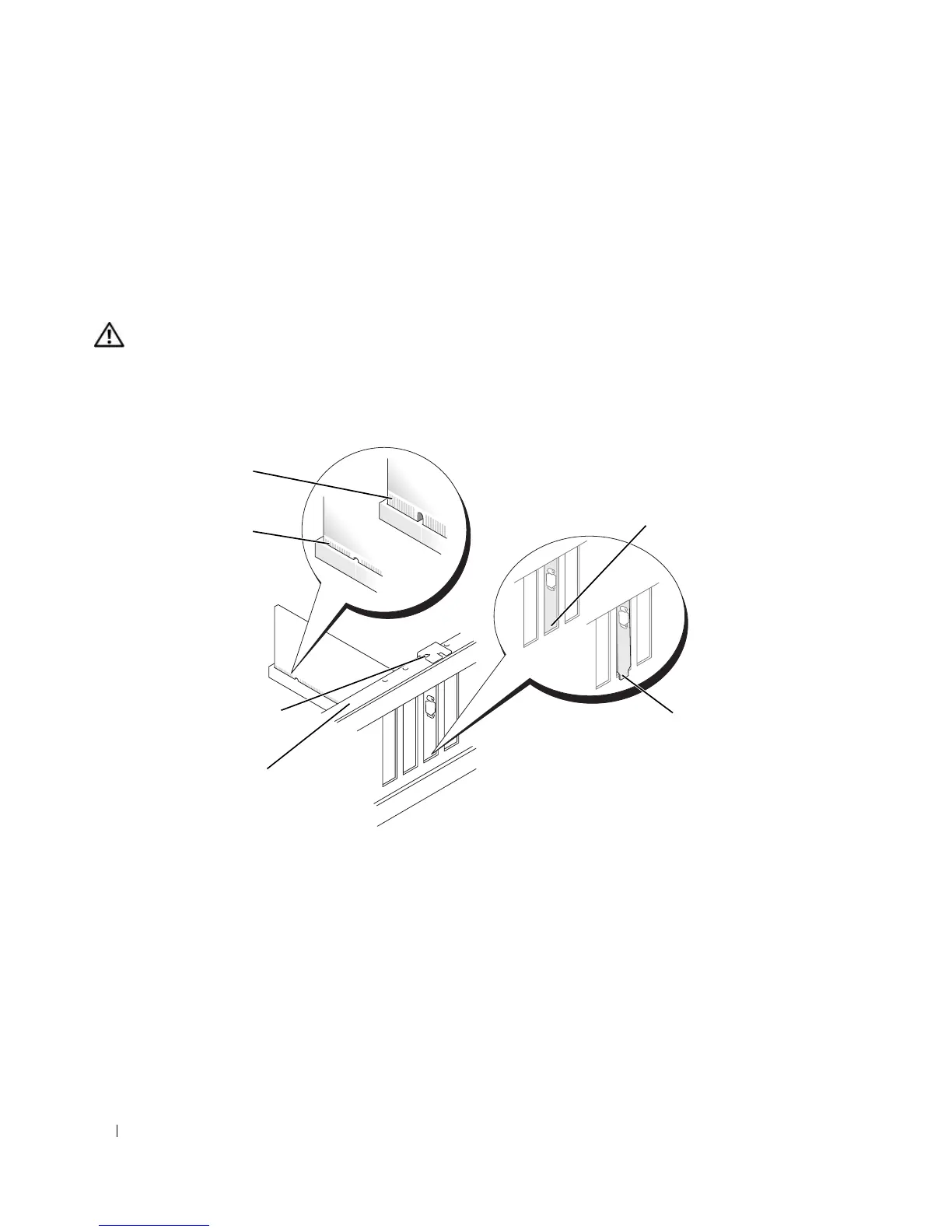
Before you close the card retention door, ensure that:
• The tops of all cards and filler brackets are flush with the alignment bar.
• The notch in the top of the card or filler bracket fits around the alignment guide.
fully seated
card
not fully seated
card
bracket caught
outside of slot
bracket within slot
alignment guide
alignment bar











 To Next Page