2
Mounting the Base Extension to the 22- and 23-inch
E Series Monitor
You can skip this step if you are using an E Series Monitor of a different size.
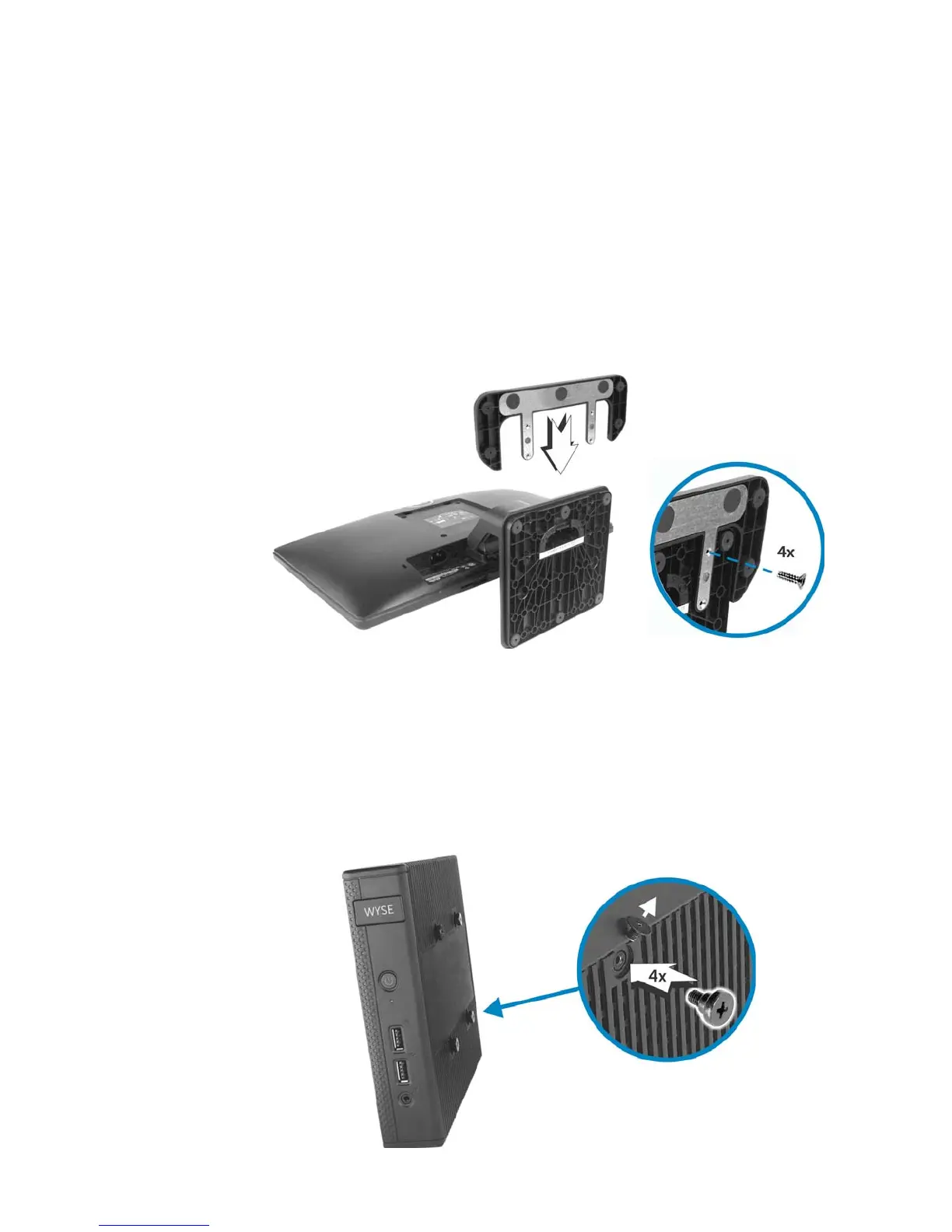
1. Place the E Series Monitor face down on a padded table, with the foot of the stand
hanging over the table’s edge.
2. Slide the Base Extension onto the monitor stand as shown and firmly attach the
provided screws.
Important: The bottom of the stand has either a plastic base (as shown) or a metal
base. If your stand has the metal base, use the longer screws from the Base
Extension kit. If your stand has the plastic base, use the shorter screws.
Mounting the D Class to the E Series Monitor
Use the following instructions to mount the D class cloud client to the Dell E Series
Monitor VESA Mounting Bracket.
1. Remove the cloud client from its horizontal or vertical stand. Using a Phillips-head
screwdriver, remove the four (4) filler screws from the side of the cloud client and
replace them with the provided four (4) shoulder screws. Discard the filler screws.


 To Next Page