EasyManua.ls Logo

Dell E170S - Organizing Your Cables; Attaching the Soundbar (Optional); Removing the Stand

Dell E170S
29 pages
Print Icon
To Next Page IconTo Next Page
To Previous Page IconTo Previous Page
Loading...
1. Plugthepowercablesforyourcomputerandmonitorintoanearbyoutlet.
2. Turn on the monitor and the computer.
If your monitor displays an image, installation is complete. If it does not display an image, see Solving Problems.
Organizing Your Cables
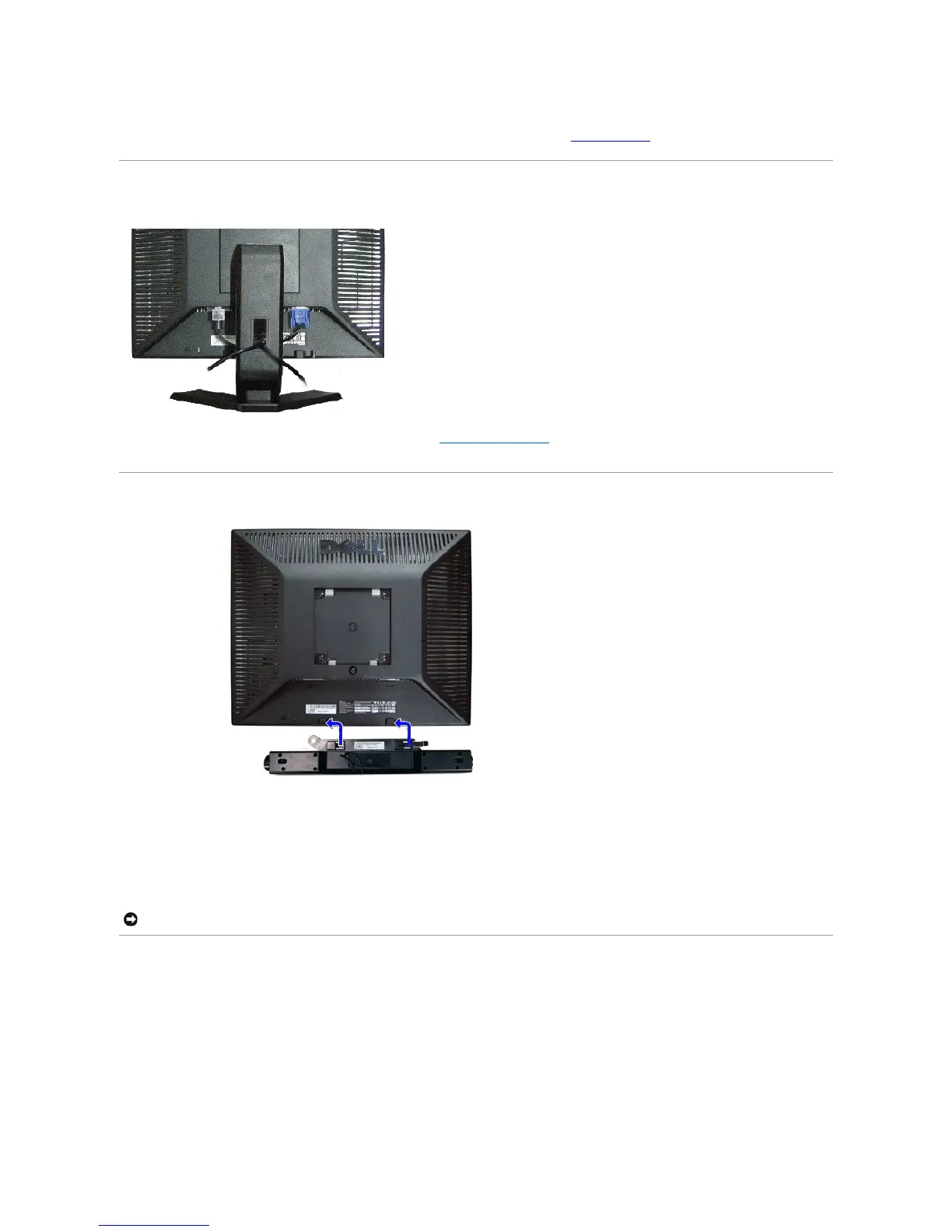
After attaching all necessary cables to your monitor and computer (see Connecting Your Monitor),usethecablemanagementslottoorganizeallcablesas
shown above.
Attaching the Soundbar (Optional)
Removing the Stand
After placing the monitor panel on a soft cloth or cushion, press and hold the stand removal button, and then remove the stand.

1.
Working from the rear of the monitor, attach the Soundbar by aligning the two slots with the two tabs along the bottom rear of the monitor.
2.
Slide the Soundbar to the left until it snaps into place.
3.
Connect the Soundbar with the DC power connector.
4.
Insert the mini stereo plug from the rear of the Soundbar into the computer's audio output jack.
NOTICE: Do not use with any device other than the Dell Soundbar

Other manuals for Dell E170S

Related product manuals