20 │ Setting up the monitor
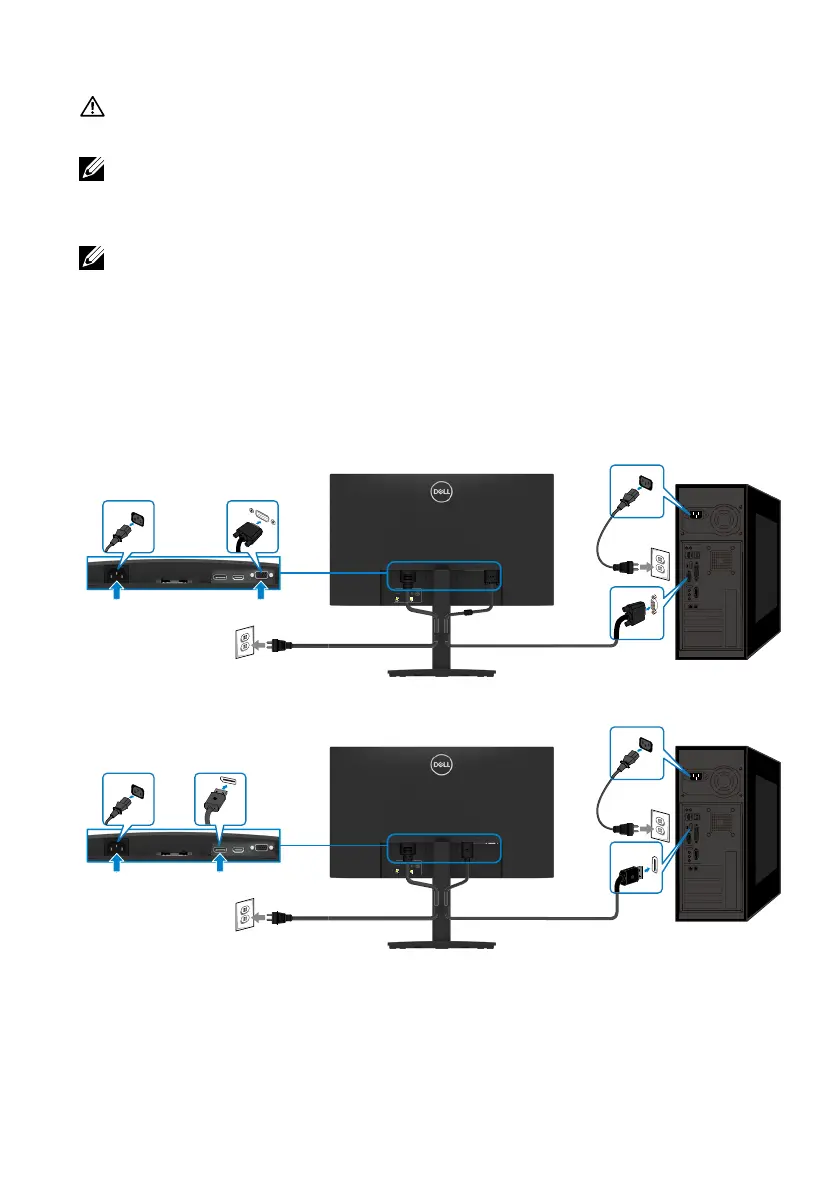
Connecting your monitor
WARNING: Before you begin any of the procedures in this section, follow
the Safety instructions.
NOTE: Do not connect all cables to the computer at the same time. It is
recommended to route the cables through the cable-management slot
before you connect them to the monitor.
NOTE: Dell monitors are designed to work optimally with Dell supplied
inbox cables. Dell does not guarantee the video quality and performance
when using non-Dell cables.
To connect your monitor to the computer:
1. Turn off your computer and disconnect the power cable.
2. Connect VGA or DP or HDMI cable from your monitor to the computer.
Connecting VGA cable
3C0181Y00-xxx-G(A)xx
DELL E2222HS
Flat Panel Monitor/液晶显示器
型号:E2222HS
输入电源:
100-240V ~ 50/60Hz, 0.7A
Made in China /
中国制造
BBC1234
CN012345FCC00951001LA00
BBC1234
CN012345FCC00951001LA00
Manufactureddate/製造日期/制造日期: MAY 2019
Service Tag:
BBC1234
Express SVC Code
246 299 383 84
S/N:
CN-012345-
FCC00-951-
001L-A00
VGA
VGA
Connecting DP cable
3C0181Y00-xxx-G(A)xx
DELL E2222HS
Flat Panel Monitor/液晶显示器
型号:E2222HS
输入电源:
100-240V ~ 50/60Hz, 0.7A
Made in China /
中国制造
BBC1234
CN012345FCC00951001LA00
BBC1234
CN012345FCC00951001LA00
Manufactureddate/製造日期/制造日期: MAY 2019
Service Tag:
BBC1234
Express SVC Code
246 299 383 84
S/N:
CN-012345-
FCC00-951-
001L-A00
DP
DP



 To Next Page