22
About the Home Screen
À propos de l'écran d'Accueil | Acerca de la pantalla de inicio
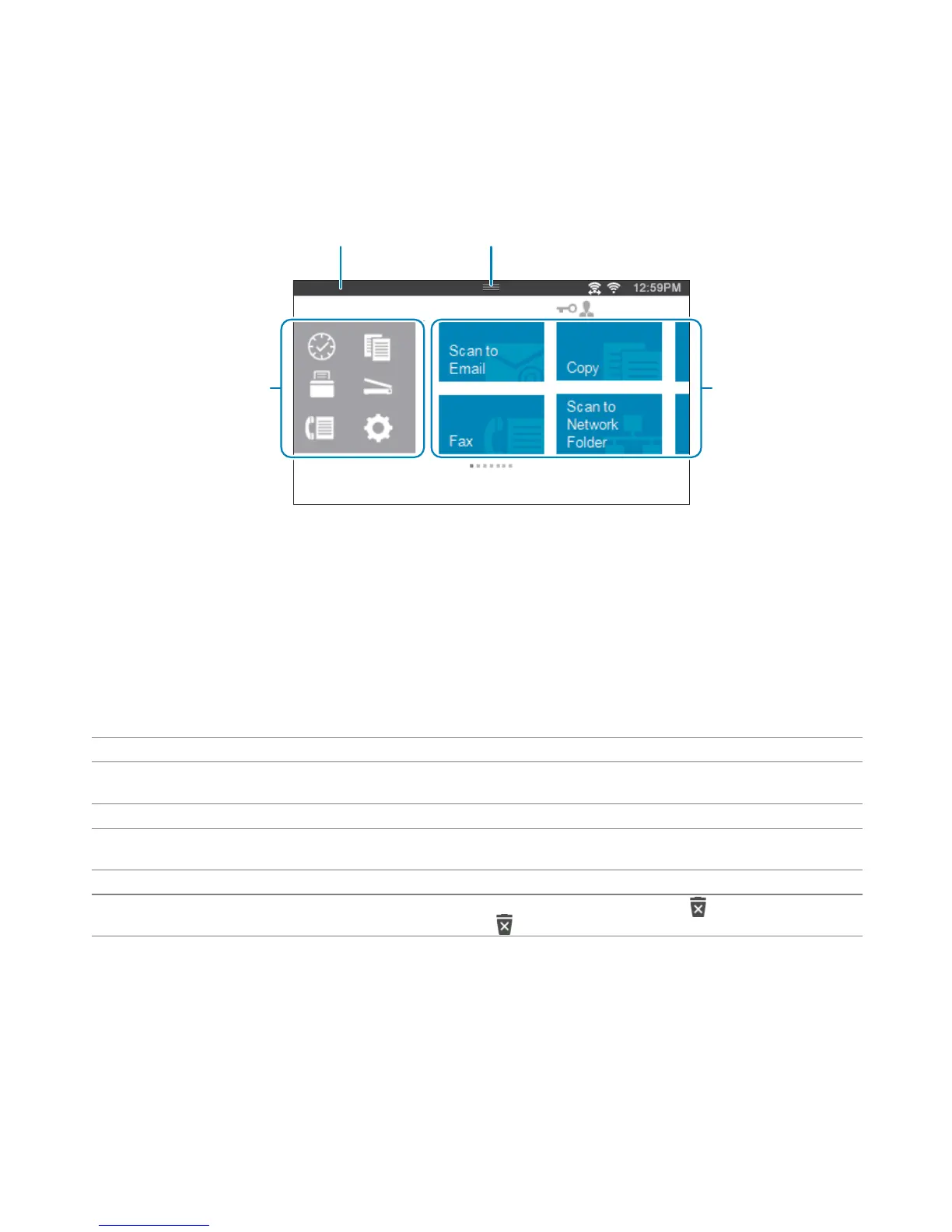
The Home screen is the default screen of the printer. See the following table for basic operations.
L'écran d'Accueil est l'écran par défaut de l'imprimante. Reportez-vous au tableau suivant pour connaître les opérations
de base.
La pantalla de inicio es la pantalla predeterminada de la impresora. Consulte la siguiente tabla para las operaciones
básicas.
1 Notification Bar 3 Tiles
2 Handle 4 Dock Menu
1 Barre de notification 3 Mosaïque
2 Poignée 4 Menu du Dock
1 Barra de notificaciones 3 Mosaicos
2 Controlador 4 Menú Dock
To select a tile Tap the tile.
To scroll the screen Swipe the screen by dragging your finger on the screen. To scroll faster,
flick the screen.
To display the status of the printer Drag down the handle of the Notification Bar.
To move a tile Tap and hold the tile you want to move, and then drag the tile to the
desired place.
To add a tile Tap the Add App tile.
To delete a tile Tap and hold the tile you want to delete until appears, and then
drag the tile to . Tap OK to delete the tile.



 To Next Page