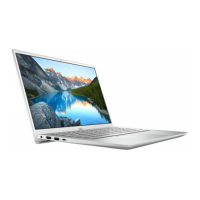
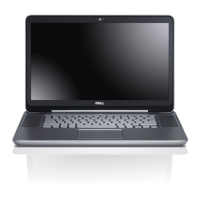
The Dell Inspiron 5405 is a laptop designed for general computing tasks, offering a balance of performance, portability, and user-friendly features. It supports various operating systems including Windows 10 Pro, Home, and Home in S mode (all 64-bit versions).
Physical Overview:
The laptop has a sleek design with dimensions of 16.74 mm (0.66 in.) front height, 17.90 mm (0.70 in.) rear height, 321.30 mm (12.65 in.) width, and 216.20 mm (8.51 in.) depth. Its maximum weight is 1.40 kg (3.09 lb), though this can vary based on configuration.
Ports and Connectors:
On the right side, the Inspiron 5405 features a microSD-card slot that supports micro-Secure Digital (mSD), micro-Secure Digital High Capacity (mSDHC), and micro-Secure Digital Extended Capacity (mSDXC) card types. It also includes a USB 3.2 Gen 1 port for connecting peripherals with data transfer speeds up to 5 Gbps, and a headset port for headphones or a headset (headphone and microphone combo).
The left side provides a power-adapter port for charging and powering the computer. A power and battery-status light indicates the power state (solid white for charging, solid amber for low/critical battery, off for fully charged). This light also serves for system diagnostics on some models. An HDMI 1.4b port allows connection to external displays or TVs, providing video and audio output. There's another USB 3.2 Gen 1 port for peripherals, and a versatile USB 3.2 Gen 1 (Type-C) port with Power Delivery/DisplayPort capabilities. This Type-C port supports two-way power supply up to 7.5 W and can connect external displays (requires a separate USB Type-C to DisplayPort adapter). The Dell Adapter USB-C to USB-A 3.0 is shipped with the computer to connect legacy USB 3.0 accessories.
The laptop features a touchpad for mouse pointer control, with distinct left-click and right-click areas. The power button, located on the base, can also integrate an optional fingerprint reader for secure login. Pressing the power button turns on the computer, puts it to sleep, or, if held for 4 seconds, forces a shutdown. Power button behavior can be customized in Windows.
The keyboard is available in standard or backlit versions, with a QWERTY layout. It has 81 keys for United States and Canada, 82 keys for United Kingdom, and 85 keys for Japan. The key pitch is 18.70 mm (X) and 18.05 mm (Y). Many keys have dual symbols for alternate characters (accessed with Shift) or secondary functions (accessed with Fn). Function keys (F1-F12) are pre-configured for multimedia control, but their primary behavior can be toggled via Fn + Esc or defined in the BIOS setup. Keyboard shortcuts include mute audio (F1), decrease volume (F2), increase volume (F3), play/pause (F4), toggle keyboard backlight (F5, optional), decrease brightness (F6), increase brightness (F7), switch to external display (F8), print screen (F10), home (F11), end (F12), pause/break (Fn+B), toggle scroll lock (Fn+S), system request (Fn+R), open application menu (Fn+Ctrl), toggle Fn-key lock (Fn+Esc), turn on/off wireless connection (Fn+Insert), emoji (Fn+), page up (Fn+Pg Up), and page down (Fn+Pg Dn).
Display and Camera:
The Inspiron 5405 offers Full High Definition (FHD) displays with Wide-viewing angle (WVA) technology. Display panel dimensions are 173.99 mm (6.85 in.) height, 309.35 mm (12.18 in.) width, and 354.93 mm (13.97 in.) diagonal. The native resolution is 1920 x 1080. Luminance options are 220 nits or 300 nits, both with 2.07 megapixels. Color gamut is 45% (NTSC) or 72% (NTSC), with 157 pixels per inch (PPI). Contrast ratios are 500:1 or 600:1, and response time is 35 ms. The refresh rate is 60 Hz, with horizontal and vertical view angles of 80 +/- degrees. Pixel pitch is 0.16 mm. Power consumption is 3.50 W or 4.50 W. All display options feature an anti-glare finish and no touch functionality.
A front-facing HD RGB camera is integrated, utilizing CMOS sensor technology. It has a resolution of 0.92 megapixels for still images and supports 1280 x 720 (HD) video recording at 30 fps, with a diagonal viewing angle of 74.9 degrees. Dual-array microphones are present for audio input during calls and recording.
Audio:
The audio system is controlled by a Realtek ALC3204 audio controller, supporting stereo conversion and High-definition audio (HDA) via an internal interface. An external universal audio jack is available. The laptop has two internal speakers with an average output of 2 W and a peak output of 2.5 W. Subwoofer output is not supported. External volume controls are managed via keyboard shortcuts.
The Inspiron 5405 is powered by AMD Ryzen processors (3 4300U, 5 4500U, or 7 4700U), all with a 15 W wattage. Processor core counts range from 4 to 8, and thread counts from 4 to 8. Processor speeds vary from up to 3.80 GHz to up to 4.20 GHz. Cache sizes are 4 MB or 8 MB. Integrated graphics are handled by AMD Radeon Graphics, which utilize shared system memory.
The chipset is integrated into the processor, with a 64-bit DRAM bus width, 16 MB Flash EPROM, and PCIe bus up to Gen3.
Memory:
The laptop features two SODIMM slots for DDR4 memory, supporting speeds of 3200 MHz. The maximum memory configuration is 32 GB, with a minimum of 4 GB. Memory sizes per slot can be 4 GB, 8 GB, or 16 GB. Supported configurations include single-channel (1x4 GB, 1x8 GB, 1x16 GB) and dual-channel (2x4 GB, 1x4 GB + 1x8 GB, 2x8 GB, 2x16 GB).
Storage:
Storage options include M.2 2230 and M.2 2280 solid-state drives (SSDs). The M.2 2230 SSD supports PCIe Gen3.0x4 NVMe interface with capacities up to 512 GB. The M.2 2280 SSD also uses PCIe Gen3.0x4 NVMe and offers capacities up to 2 TB. The primary drive depends on the storage configuration.
Wireless Connectivity:
Wireless connectivity is provided by a Wireless Local Area Network (WLAN) module. Options include Qualcomm QCA9377 (DW1810), Qualcomm QCA61x4A (DW1820), or Intel Wi-Fi 6 AX200. Transfer rates range from up to 433 Mbps to up to 2400 Mbps. All modules support 2.4 GHz/5 GHz frequency bands. Wireless standards supported include WiFi 802.11a/b/g, Wi-Fi 4 (802.11n), Wi-Fi 5 (802.11ac), and for the Intel option, Wi-Fi 6 (802.11ax). Encryption methods include 64-bit/128-bit WEP, AES-CCMP, and TKIP. Bluetooth versions 5.0 or 5.1 are also supported.
Power and Battery:
The Inspiron 5405 uses either a 45 W or 65 W power adapter. Both have a 4.50 mm external diameter and 2.90 mm internal diameter connector. Input voltage is 110 VAC-240 VAC, with an input frequency of 50 Hz-60 Hz. Input current is 1.30 A for the 45 W adapter and 1.50 A for the 65 W adapter. Output current is 2.31 A (45 W) or 3.34 A (65 W), with a rated output voltage of 19.50 VDC. Operating temperature for the adapter is 0°C to 40°C (32°F to 104°F), and storage temperature is -40°C to 70°C (-40°F to 158°F).
Battery options include a 3-cell, 40 WHr polymer battery (11.40 VDC, 0.18 kg/0.40 lb) or a 4-cell, 53 WHr polymer battery (15.20 VDC, 0.24 kg/0.53 lb). Battery dimensions are 184.10 mm (7.25 in.) height, 90.73 mm (3.57 in.) width, and 5.75 mm (0.23 in.) depth for both. Operating temperature for the battery is 0°C to 35°C (32°F to 95°F), and storage temperature is -40°C to 65°C (-40°F to 149°F). Battery operating time varies with conditions. Charging time is approximately 4 hours when the computer is off, and can be controlled using the Dell Power Manager application. Battery life span is approximately 300 discharge/charge cycles. A CR2032 coin-cell battery is also included.
Environmental Specifications:
The laptop is designed to operate in temperatures from 0°C to 35°C (32°F to 95°F) and be stored in temperatures from -40°C to 65°C (-40°F to 149°F). Relative humidity (non-condensing) is 10% to 90% for operating and 0% to 95% for storage. Vibration (maximum) is 0.66 GRMS during operation and 1.30 GRMS during storage. Shock (maximum) is 110 G† (operating) and 160 G† (storage), where † indicates a 2 ms half-sine pulse when the hard drive is in use. Altitude (maximum) is -15.2 m to 3048 m (-49.87 ft to 10000 ft) for operating and -15.2 m to 10668 m (-49.87 ft to 35000 ft) for storage. The airborne contaminant level is G1 as defined by ISA-S71.04-1985.
Maintenance and Support:
Dell provides various self-help resources, including www.dell.com for product information, help articles, and warranty status. The My Dell application offers a centralized location for key Dell apps and updates. SupportAssist proactively checks hardware and software health, with an OS Recovery tool for troubleshooting. Dell Update delivers critical fixes and device drivers. Dell Digital Delivery allows downloading purchased software. For more detailed information, users can access the Dell Support website (www.dell.com/support) for knowledge base articles, user manuals, and troubleshooting guides. Contact information for sales, technical support, and customer service is available at www.dell.com/contactdell.



 To Next Page
 General