Configuring Jog Shuttle
You can configure the Jog Shuttle by selecting an application profile and control,
and recording a corresponding macro. The options displayed in the Operation
drop-down list depend on the selection of the Profile and Controls.
The following table displays the controls and corresponding operations.
1
On the
Jog Shuttle
tab, select the application from the
Application Profile
drop-down list.
NOTE: You can also add and delete application profiles if required.
For more information, see "Adding And Deleting Application Profiles" on page 15.
2
Select an option from the
Controls
drop-down list.
3
Select
Key Macro
from the
Operation
drop–down list.
4
Click
Configure
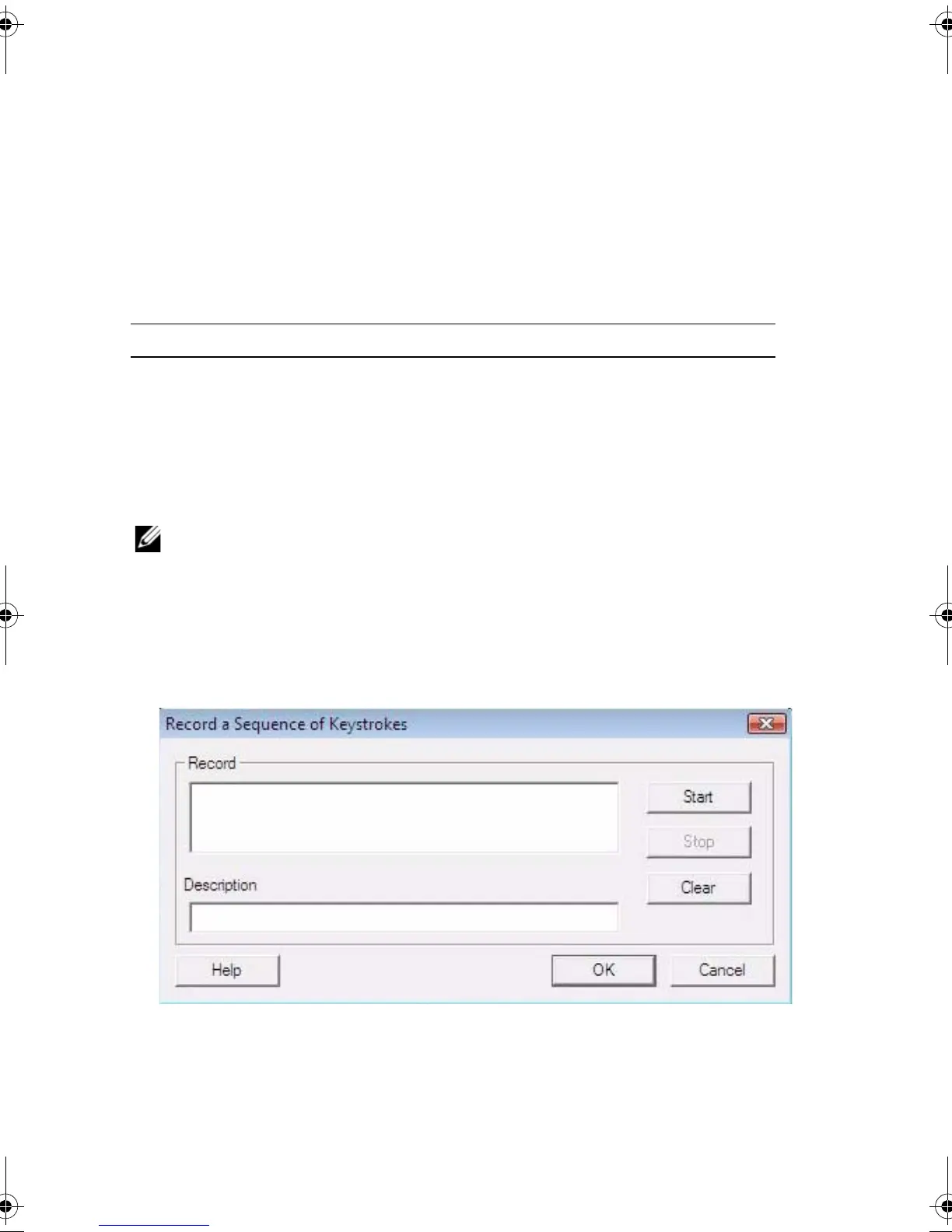
.
Record a Sequence of Keystrokes
dialog box appears.
5
Click
Start
.
6
Press the keystrokes that will perform an action.
Selecting Displays
Button 1 — 4 Key Macro and Mouse Macro
Jog Right, Jog Left, Shuttle Left or Shuttle
Right
Key Macro, Mouse Macro and Scrolling
JogShuttle.fm Page 13 Monday, September 27, 2010 10:01 AM











 To Next Page