Audio
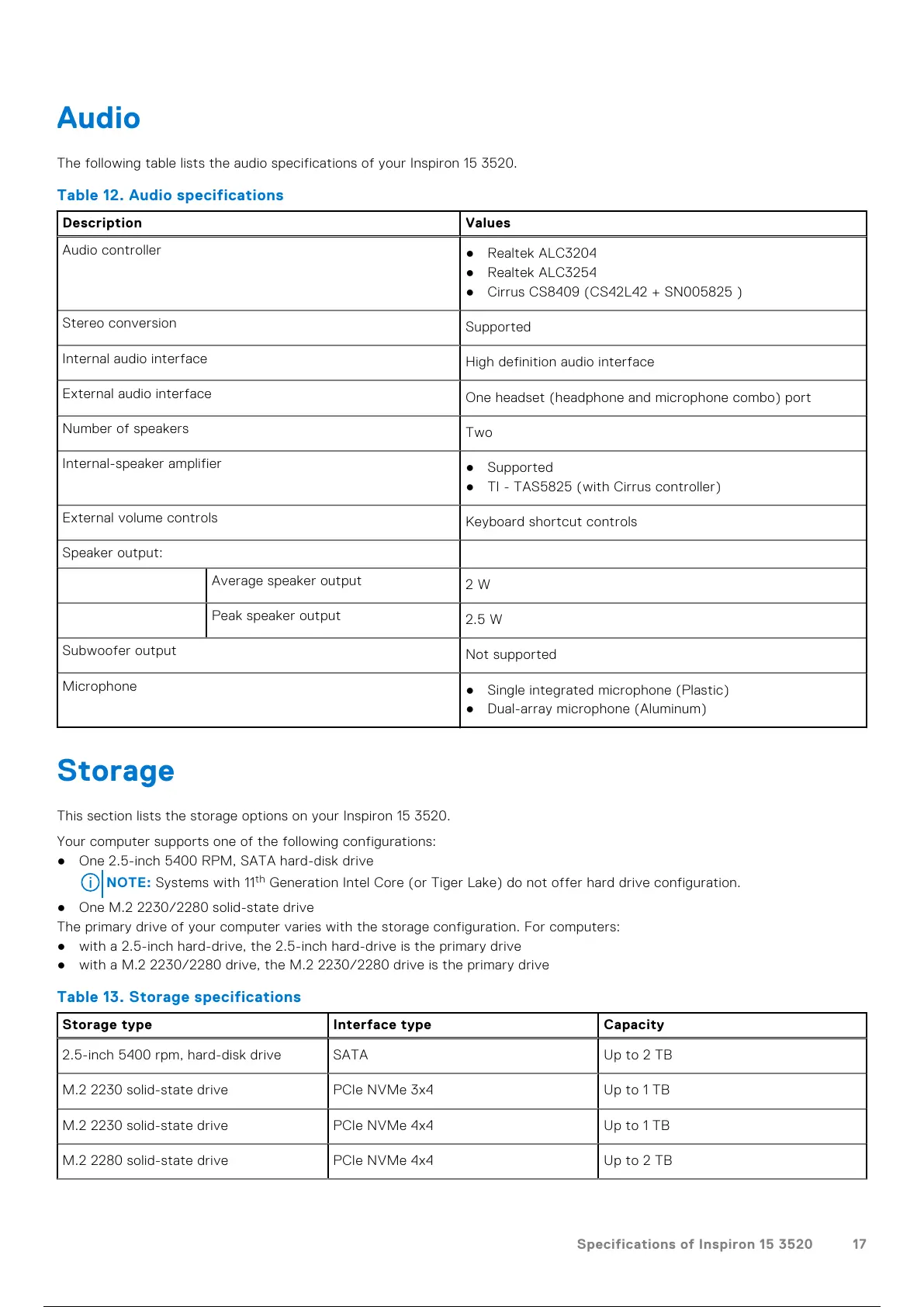
The following table lists the audio specifications of your Inspiron 15 3520.
Table 12. Audio specifications
Description Values
Audio controller
● Realtek ALC3204
● Realtek ALC3254
● Cirrus CS8409 (CS42L42 + SN005825 )
Stereo conversion
Supported
Internal audio interface
High definition audio interface
External audio interface
One headset (headphone and microphone combo) port
Number of speakers
Two
Internal-speaker amplifier
● Supported
● TI - TAS5825 (with Cirrus controller)
External volume controls
Keyboard shortcut controls
Speaker output:
Average speaker output
2 W
Peak speaker output
2.5 W
Subwoofer output
Not supported
Microphone
● Single integrated microphone (Plastic)
● Dual-array microphone (Aluminum)
Storage
This section lists the storage options on your Inspiron 15 3520.
Your computer supports one of the following configurations:
● One 2.5-inch 5400 RPM, SATA hard-disk drive
NOTE: Systems with 11
th
Generation Intel Core (or Tiger Lake) do not offer hard drive configuration.
● One M.2 2230/2280 solid-state drive
The primary drive of your computer varies with the storage configuration. For computers:
● with a 2.5-inch hard-drive, the 2.5-inch hard-drive is the primary drive
● with a M.2 2230/2280 drive, the M.2 2230/2280 drive is the primary drive
Table 13. Storage specifications
Storage type Interface type Capacity
2.5-inch 5400 rpm, hard-disk drive SATA Up to 2 TB
M.2 2230 solid-state drive PCIe NVMe 3x4 Up to 1 TB
M.2 2230 solid-state drive PCIe NVMe 4x4 Up to 1 TB
M.2 2280 solid-state drive PCIe NVMe 4x4 Up to 2 TB
Specifications of Inspiron 15 3520 17
18 / 29 17 / 27 18 / 29 17 / 27 18 / 29



 To Next Page