8. Connect the Dynamic Display Switch (DDS) to the system board.
Next steps
1. Install the rear cover.
2. Install the base cover.
3. Follow the procedure in After working inside your computer.
Keyboard-controller board
Removing the keyboard-controller board
Prerequisites
1. Follow the procedure in Before working inside your computer.
2. Remove the base cover.
3. Remove the battery.
About this task
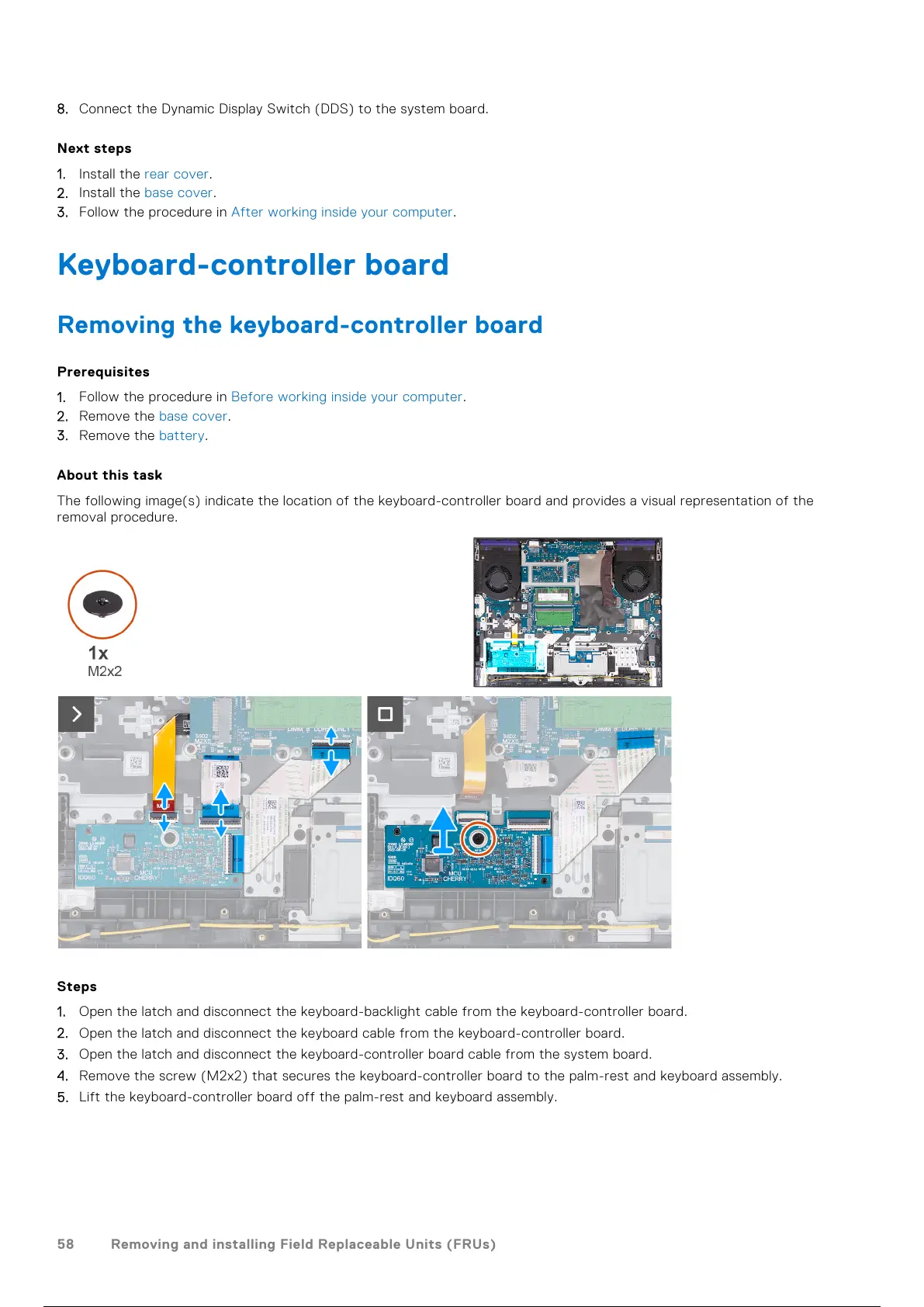
The following image(s) indicate the location of the keyboard-controller board and provides a visual representation of the
removal procedure.
Steps
1. Open the latch and disconnect the keyboard-backlight cable from the keyboard-controller board.
2. Open the latch and disconnect the keyboard cable from the keyboard-controller board.
3. Open the latch and disconnect the keyboard-controller board cable from the system board.
4. Remove the screw (M2x2) that secures the keyboard-controller board to the palm-rest and keyboard assembly.
5. Lift the keyboard-controller board off the palm-rest and keyboard assembly.
58
Removing and installing Field Replaceable Units (FRUs)
59 / 101 58 / 99 59 / 101


 To Next Page