
 Need help?
Do you have a question about the Dell OptiPlex 3070 Micro and is the answer not in the manual?
Explains the risks of ESD damage to sensitive components and methods to prevent it.
Explains the ePSA diagnostics, its purpose, and the options it provides for hardware checks.
Details the step-by-step procedure to initiate and run ePSA diagnostics on the computer.
Lists common diagnostic error messages and their descriptions for troubleshooting.
Details error messages related to hard disk drives, file operations, and input devices.
Lists error messages concerning memory, operating system, and system configuration issues.
Covers error messages related to time, BIOS, unexpected interrupts, and boot device availability.
This document is a service manual for the Dell OptiPlex 3070 Micro, providing essential information for working on, troubleshooting, and maintaining the computer. It emphasizes safety, details key technologies and components, and offers guidance for resolving common issues.
The manual begins with crucial safety instructions, stressing the importance of disconnecting all power sources before opening the computer cover or panels. It advises users to read the safety information that shipped with the computer and to consult the Regulatory Compliance Homepage for best practices. A significant emphasis is placed on electrostatic discharge (ESD) protection, warning that many repairs should only be performed by a certified service technician to avoid voiding the warranty. Users are instructed to ground themselves using a wrist grounding strap or by periodically touching an unpainted metal metal surface to prevent ESD damage. The document also highlights the need to handle components and cards with care, holding them by their edges or mounting brackets, and to pull on connectors or pull-tabs when disconnecting cables, rather than the cables themselves. A specific caution notes that the system will shut down if side covers are removed while it is running and will not power on if the side cover is removed. Before working inside the computer, users are guided to turn off the computer, disconnect all network cables, and unplug the computer and all attached devices from electrical outlets. A final step involves pressing and holding the power button while unplugged to ground the system board.
For maintenance, the manual details the components of an ESD field service kit, which includes an anti-static mat, wrist strap, and bonding wire. It explains how to use these components effectively, emphasizing that the wrist strap should be snug and in full contact with the skin, and connected to the mat and any bare metal on the system. The importance of regularly testing the wrist strap with an ESD wrist strap tester is highlighted to prevent accidental ESD hardware damage. The document also advises keeping ESD-sensitive devices away from insulator elements like Styrofoam and other plastics. Proper ESD packaging for transporting sensitive components is also discussed, recommending the use of static-safe packaging and anti-static bags. For lifting heavy equipment, the manual provides guidelines such as maintaining a firm, balanced footing, lifting with legs, and keeping the load close to the body. After completing any replacement procedure, users are instructed to reconnect all external devices, cards, and cables, and verify that the computer works correctly by running ePSA diagnostics.
The "Technology and components" section delves into various hardware aspects. It describes DDR4 memory, highlighting its higher speed, increased capacity, and lower power consumption compared to DDR3. Key differences, such as the notch location and increased thickness of DDR4 modules, are explained to prevent incorrect installation. The manual also covers USB features, tracing the evolution from USB 2.0 to USB 3.0/3.1 Gen 1 and USB 3.1 Gen 2, detailing their respective data transfer rates and categories. It explains the technical changes in USB 3.0/3.1 Gen 1 that enable higher performance, such as an additional physical bus and bidirectional data interface. The section also discusses USB Type-C, a new, tiny physical connector that supports various USB standards like USB 3.1 and USB Power Delivery (USB PD), and its "alternate modes" for outputting HDMI, VGA, or DisplayPort. The advantages of DisplayPort over USB Type-C are listed, including full A/V performance, reversible plug orientation, and backward compatibility. HDMI 2.0 features, such as the HDMI Ethernet Channel, Audio Return Channel, and 3D support, are also detailed. Finally, Intel Optane memory is introduced as a storage accelerator, with its requirements (7th Generation or higher Intel Core i3/i5/i7 processor, Windows 10 64-bit version 1607 or higher, and Intel Rapid Storage Technology driver version 15.9.1.1018 or higher) and instructions for enabling and disabling it.
The "Troubleshooting" chapter focuses on diagnostic tools and error messages. It introduces the Enhanced Pre-Boot System Assessment (ePSA) diagnostics, an embedded tool within the BIOS that performs a complete hardware check. Instructions are provided on how to run ePSA diagnostics, either by pressing F12 during boot or by holding the Fn key while pressing the power button. The manual explains that ePSA can run tests automatically or interactively, display or save results, and provide detailed information about failed devices and error messages. A note advises user interaction for specific device tests. The document also covers POST (Power On Self Test) diagnostics, explaining that if the computer fails POST, it emits a series of LED codes. Tables are provided to interpret Amber and White LED states, linking them to system states and notes, including various boot failures, memory configuration issues, and CPU problems. A comprehensive list of diagnostic error messages is included, such as "AUXILIARY DEVICE FAILURE," "DISK C: FAILED INITIALIZATION," and "HARD-DISK DRIVE FAILURE," each with a description and suggested actions. System error messages, like "CMOS checksum error" and "No boot device available," are also detailed with their descriptions.
The manual concludes with a "Getting help" section, guiding users on how to contact Dell for sales, technical support, or customer service issues. It directs users to Dell.com/support, where they can select their support category, verify their country or region, and choose the appropriate service or support link. A note clarifies that contact information can also be found on purchase invoices, packing slips, bills, or Dell product catalogs if an active Internet connection is unavailable.
 General
| Graphics | Intel UHD Graphics 630 |
|---|---|
| Power Supply | 65W or 90W external power adapter |
| Weight | 2.6 lbs (1.18 kg) |
| Chipset | Intel H370 |
| Memory | Up to 32GB DDR4 2666MHz |
| Storage Options | 2.5" HDD/SSD, M.2 SSD |
| Networking | Bluetooth 5.0 |
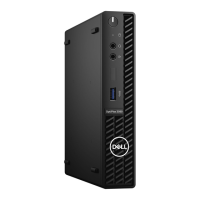
| Dimensions | Height: 182.5 mm, Width: 36 mm, Depth: 178 mm |
| Operating System | Windows 10 Pro, Windows 10 Home, Ubuntu Linux |
| Audio | Realtek ALC3234 |
| Processor Options | 9th Generation Intel Core Processors |
| Ports | 1 HDMI, 1 DisplayPort, 1 USB 3.1 Gen 1 Type-C, 4 USB 3.1 Gen 1, 2 USB 2.0, 1 RJ-45, 1 Universal Audio Jack |









 To Next Page