
 Need help?
Do you have a question about the Dell OptiPlex 7070 Ultra and is the answer not in the manual?
Explains how the system is powered using AC adapter or USB Type-C cable.
Essential safety guidelines for handling the computer and performing service.
Crucial steps to take before beginning any internal work on the device.
Covers ESD protection, standby power, bonding, and general safety rules.
Details components of an ESD field service kit and their usage.
Summary of recommendations for ESD grounding and anti-static mat usage.
Steps to reconnect external devices and cables after servicing.
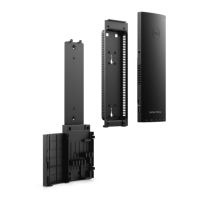
Provides procedures for taking apart and putting back together computer components.
Details the process of removing and installing the hard-drive assembly.
Provides instructions for removing and installing the hard-drive bracket.
Details the procedure for removing the hard drive from its bracket.
Provides instructions for removing and installing the computer's cover.
Guides on removing and installing memory modules (RAM).
Details the procedure for removing and installing the WLAN card.
Guides on removing and installing the M.2 2230 solid-state drive.
Provides instructions for removing and installing the system fan.
Guides on removing and installing the power button assembly.
Details the procedure for removing and installing the coin-cell battery.
Guides on removing and installing the system board.
Provides instructions for removing and installing the heat-sink assembly.
Covers security options like admin password, system password, and TPM settings.
Explains the ePSA diagnostics for hardware checks and error reporting.
Step-by-step guide on how to run the ePSA diagnostics.
Explains diagnostic LED blink patterns and their corresponding problem descriptions and resolutions.











 To Next Page


 General