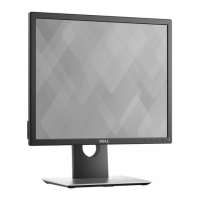
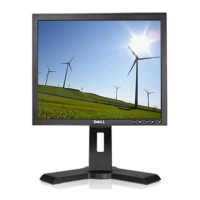
This document is a user's guide for Dell P1917S, P1917SWh, P2017H, P2217, and P2217Wh monitors. It provides information on the monitor's features, setup, operation, and troubleshooting.
Function Description
The Dell P1917S/P1917SWh/P2017H/P2217/P2217Wh flat panel displays are active matrix, Thin-Film Transistor (TFT), Liquid Crystal Displays (LCD) with LED backlights. They are designed for general computing use, offering various connectivity options and ergonomic adjustments to enhance user comfort and productivity. The monitors support Plug and Play functionality, allowing for automatic configuration with compatible systems.
Important Technical Specifications
Models and Viewable Area:
- P1917S/P1917SWh: 48.0 cm (18.9 inch) viewable area (diagonally), 1280 x 1024 resolution.
- P2017H: 49.5 cm (19.5 inch) viewable area (diagonally), 1600 x 900 resolution.
- P2217/P2217Wh: 55.9 cm (22.0 inch) viewable area (diagonally), 1680 x 1050 resolution.
Display Characteristics:
- Screen Type: Active matrix - TFT LCD
- Panel Type: In-Plane Switching Technology (P1917S/P1917SWh, P2017H), Twisted Nematic (P2217/P2217Wh)
- Brightness: 250 cd/m² (typical) for all models.
- Contrast Ratio: 1000:1 (typical), 4 Million:1 (Dynamic) for all models.
- Aspect Ratio: 5:4 (P1917S/P1917SWh), 16:9 (P2017H), 16:10 (P2217/P2217Wh)
- Display Screen Coating: Anti-glare with 3H hardness.
- Backlight: White LED edgelight system.
- Color Depth: 16.7 million colors.
- Color Support: 84% (CIE 1976), 72% (CIE 1931).
Response Time:
- P1917S/P1917SWh, P2017H: 6 ms (gray to gray - fast mode), 8 ms (typical - normal mode).
- P2217/P2217Wh: 5 ms (black to white).
Connectivity:
- 1x DisplayPort (ver 1.2)
- 1x HDMI (ver 1.4)
- 1x VGA
- 1x USB 3.0 upstream port
- 2x USB 3.0 downstream ports (side)
- 2x USB 2.0 downstream ports (bottom)
Electrical Specifications:
- Video Input Signals: Analog RGB (0.7 Volts +/-5%, 75 ohm impedance), HDMI 1.4 (600mV, 100 ohm impedance), DisplayPort 1.2 (600mV, 100 ohm impedance).
- AC Input Voltage/Frequency/Current: 100 VAC to 240 VAC / 50 Hz or 60 Hz ± 3 Hz / 1.5A (typical).
- Inrush Current: 120 V: 30 A (Max.) at 0°C (cold start); 240 V: 60 A (Max.) at 0°C (cold start).
Power Consumption (Typical, without USB load):
- P1917S/P1917SWh: 14 W
- P2017H: 13 W
- P2217/P2217Wh: 18 W
- Sleep Mode: Less than 0.3 W for all models.
Dimensions (with stand, extended height):
- P1917S/P1917SWh: 499.3 mm (19.66 in) Height, 405.6 mm (15.97 in) Width, 180.0 mm (7.09 in) Depth.
- P2017H: 468.8 mm (18.46 in) Height, 461.5 mm (18.17 in) Width, 180.0 mm (7.09 in) Depth.
- P2217/P2217Wh: 497.4 mm (19.58 in) Height, 503.4 mm (19.82 in) Width, 180.0 mm (7.09 in) Depth.
Weight (with stand assembly and cables):
- P1917S/P1917SWh: 5.13 kg (11.31 lb)
- P2017H: 4.73 kg (10.42 lb)
- P2217/P2217Wh: 5.33 kg (11.75 lb)
Environmental Characteristics:
- Operating Temperature: 0°C to 40°C (32°F to 104°F).
- Non-operating Temperature: Storage: -20°C to 60°C (-4°F to 140°F); Shipping: -20°C to 60°C (-4°F to 140°F).
- Operating Humidity: 20% to 80% (non-condensing).
- Non-operating Humidity: Storage: 10% to 90% (non-condensing); Shipping: 10% to 90% (non-condensing).
- Operating Altitude: 5,000 m (16,400 ft).
- Non-operating Altitude: 12,192 m (40,000 ft).
Usage Features
Ergonomics:
- Adjustability: Height adjustable stand (130mm), Tilt (5°/21°), Swivel (45°), Pivot (90°).
- Wall Mounting: VESA™ 100 mm mounting holes for flexible mounting solutions (requires VESA-compatible wall mount kit, M4 x 10 mm screws).
Display Features:
- On-Screen Display (OSD): Intuitive menu for ease of set-up and screen optimization.
- Preset Modes: Standard, ComfortView (minimizes blue light), Multimedia, Movie, Game, Warm, Cool, and Custom Color.
- ComfortView Feature: Optimizes eye comfort by minimizing blue light emission.
- Flicker-Free Screen: Enhances viewing comfort.
- Dynamic Contrast: Automatically adjusts brightness in Game or Movie preset modes.
- DDC/CI (Display Data Channel/Command Interface): Allows monitor parameters to be adjusted via software on the computer.
Power Management:
- Power Save Mode: Automatically reduces power consumption when not in use, if supported by the PC's display card or software.
- Energy Star Certified: Meets ENERGY STAR guidelines for energy efficiency.
- Energy Gauge: Shows real-time energy consumption.
USB Hub:
- Equipped with 1 USB 3.0 upstream port and 4 downstream ports (2x USB 3.0, 2x USB 2.0) for connecting peripherals. USB functionality is active when the monitor is On or in power save mode.
Security:
- Security-Cable Slot: For securing the monitor with a security lock (sold separately).
- Dell Soundbar Mounting Slots: For attaching an optional Dell Soundbar.
Maintenance Features
Cleaning:
- Screen Cleaning: Use a soft, clean cloth lightly dampened with water. Special screen-cleaning tissue or solution suitable for anti-static coating can be used. Avoid benzene, thinner, ammonia, abrasive cleaners, or compressed air.
- Monitor Casing: Use a lightly-dampened, warm cloth. Avoid detergents that may leave a milky film.
- Image Quality Maintenance: Use a dynamically changing screen saver and turn off the monitor when not in use to help maintain image quality and prevent image retention.
Diagnostics:
- Self-Test Feature: Allows users to check if the monitor is functioning properly by disconnecting video cables and observing on-screen messages.
- Built-in Diagnostics: A tool to determine if screen abnormalities are inherent to the monitor or related to the computer/video card. This runs when video cables are unplugged and the monitor is in self-test mode, displaying various solid color screens (gray, red, green, blue, black, white) and a text screen for inspection.
- LCD Conditioning: A program to help reduce minor cases of image retention.
Troubleshooting:
- The guide provides a comprehensive troubleshooting section for common problems (e.g., no video, poor focus, shaky video, missing/stuck pixels, brightness issues, geometric distortion, synchronization problems, missing color, image retention, video ghosting) and product-specific problems (e.g., screen image too small, cannot adjust with buttons, no input signal, picture not filling screen).
- It also includes solutions for Universal Serial Bus (USB) specific problems (e.g., USB interface not working, slow USB 3.0, wireless USB peripherals stopping).
Regulatory Compliance:
- Information on FCC notices and other regulatory compliance is available on the Dell regulatory compliance website.
- The monitor is ENERGY STAR certified, EPEAT registered (where applicable), and TCO-certified.
- It is a BFR/PVC-Free monitor (excluding external cables).

 Need help?

 To Next Page
 General