8 | About Your Monitor
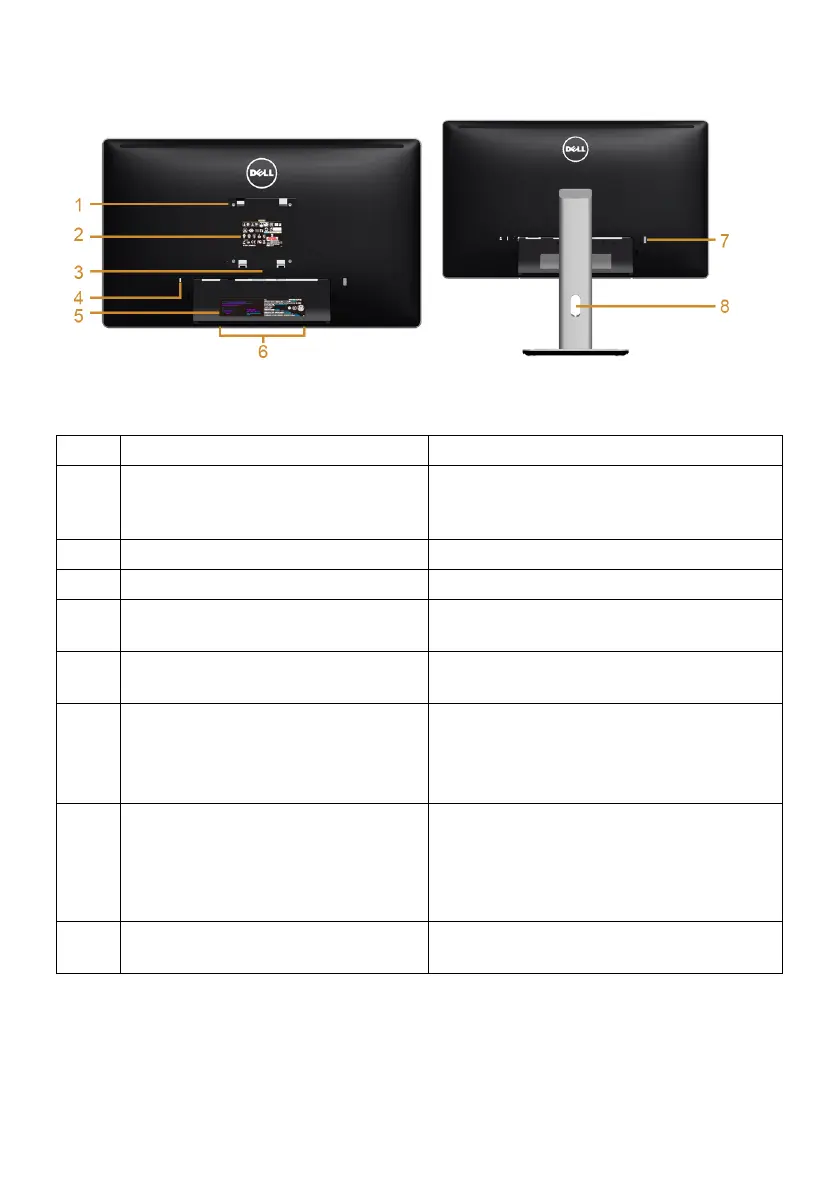
Back View
Back View with monitor stand
Label Description Use
1 VESA mounting holes (100 mm x
100 mm - behind attached VESA
Cover)
Wall mount monitor using VESA-
compatible wall mount kit (100 mm x
100 mm).
2 Regulatory label Lists the regulatory approvals.
3 Stand release button Release stand from monitor.
4 Security lock slot Secures monitor with security lock
(security lock not included).
5 Barcode serial number label Refer to this label if you need to contact
Dell for technical support.
6 Dell Soundbar mounting slots Attaches the optional Dell Soundbar.
NOTE: Please remove the plastic strip
covering the mounting slots before
affixing the Dell Soundbar.
7 USB downstream port Connect your USB device. You can only
use this connector after you have
connected the USB cable to the
computer and USB upstream connector
on the monitor.
8 Cable management slot Use to organize cables by placing them
through the slot.


 To Next Page