3
DELL P2724DEB
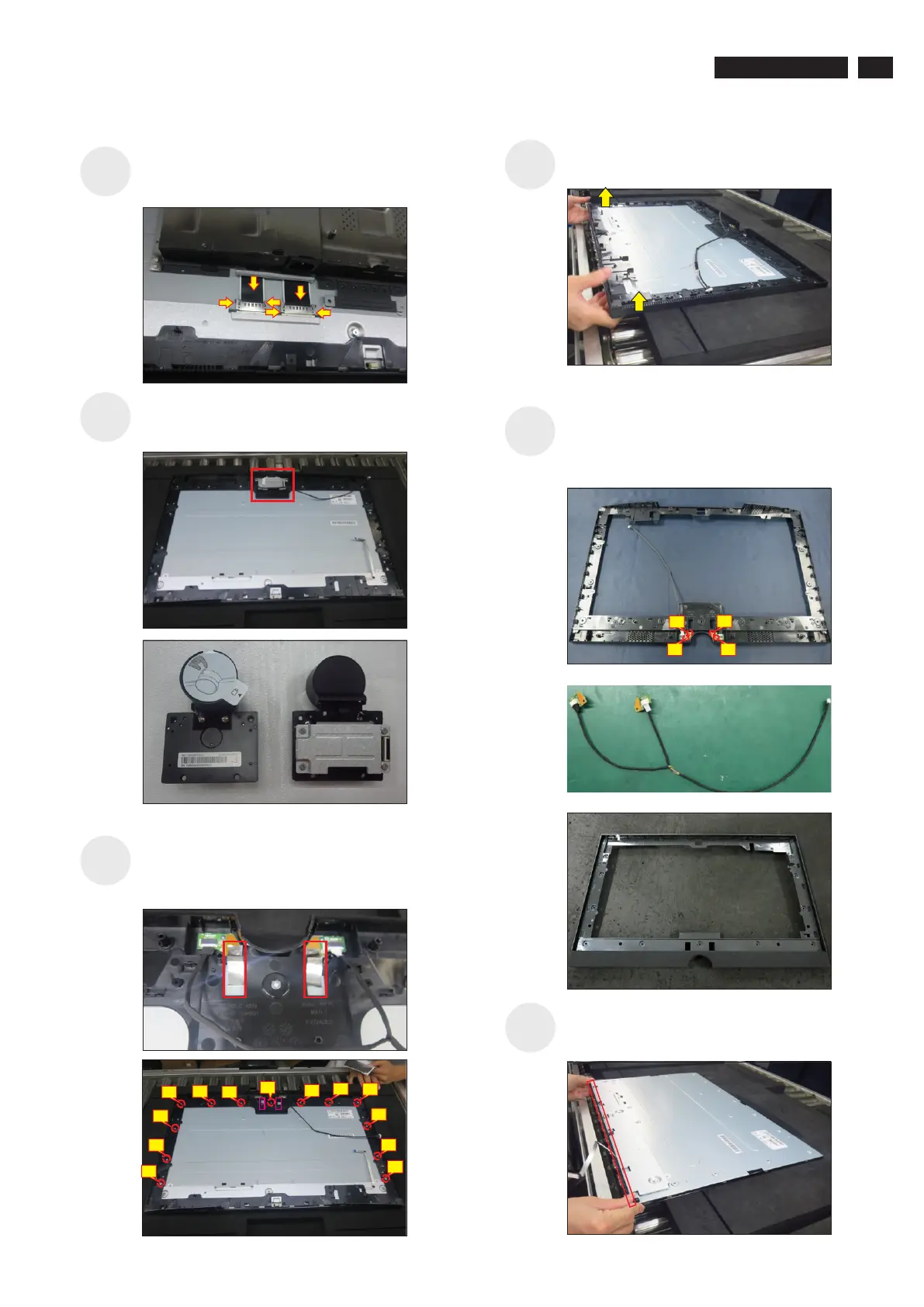
Lift up the middle bezel away from the pane module,
then put it on a cushion foam for later disassembling.
Release the assembled camera unit from the
probers of the middle frame and put it aside for later
disassembling.
S
15
S16
S17
S20
S18
Tear off 2pcs aluminum foil to release the Mic boards
Use a Philips-head screwdriver to remove 13pcs
screws for unlocking the middle frame with the panel.
(No.1~12 screw size=M3x4,Torque=3±0.5kgfxcm)
Disconnect the LVDS cables away from the connectors
of the panel module, then lift up and take away the
bracket chassis and put it on a protective cushion.
Use a Philips-head screwdriver to remove 4pcs
screws for unlocking the left and right Mic boards
with the middle frame, then release the two Mic
boards away from the middle frame.
(No.1~4 screw size=M2x3.3,Torque=1±0.2kgfxcm)
Release the touch key cable away from the panel,
then disassemble the front bezel with the panel, then
tear off the mylar tape and release the touch board.
S19
10
7
9
3
12
13
6
2
1
11
8
4
5
3
1
2
4



 To Next Page