Press to turn on the computer if it is turned o, in sleep state, or in hibernate
state.
When the computer is turned on, press the power button to put the computer
into sleep state; press and hold the power button for 4 seconds to force shut-
down the computer.
If the power button has a ngerprint reader, place your nger on the power
button to log in.
NOTE: Before using the ngerprint reader, congure it in Windows to
recognize your ngerprint as a passcode and enable access. For more
information, see www.dell.com/support/windows.
NOTE: You can customize power-button behavior in Windows. For
more information, see
Me and My Dell
at www.dell.com/support/
manuals.
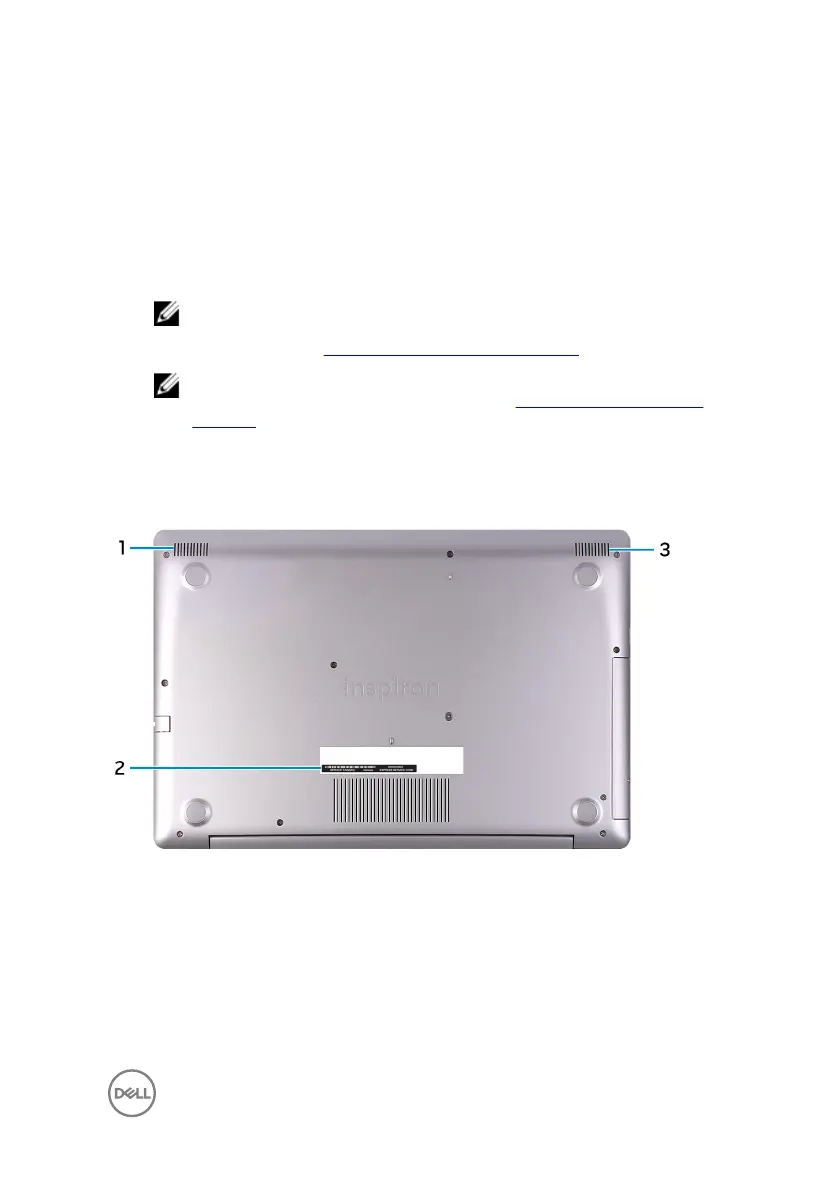
Bottom
1 Left speaker
Provides audio output.
2 Service Tag label
The Service Tag is a unique alphanumeric identier that enables Dell service
technicians to identify the hardware components in your computer and access
warranty information.
13





 To Next Page