Operating your Monitor | 27
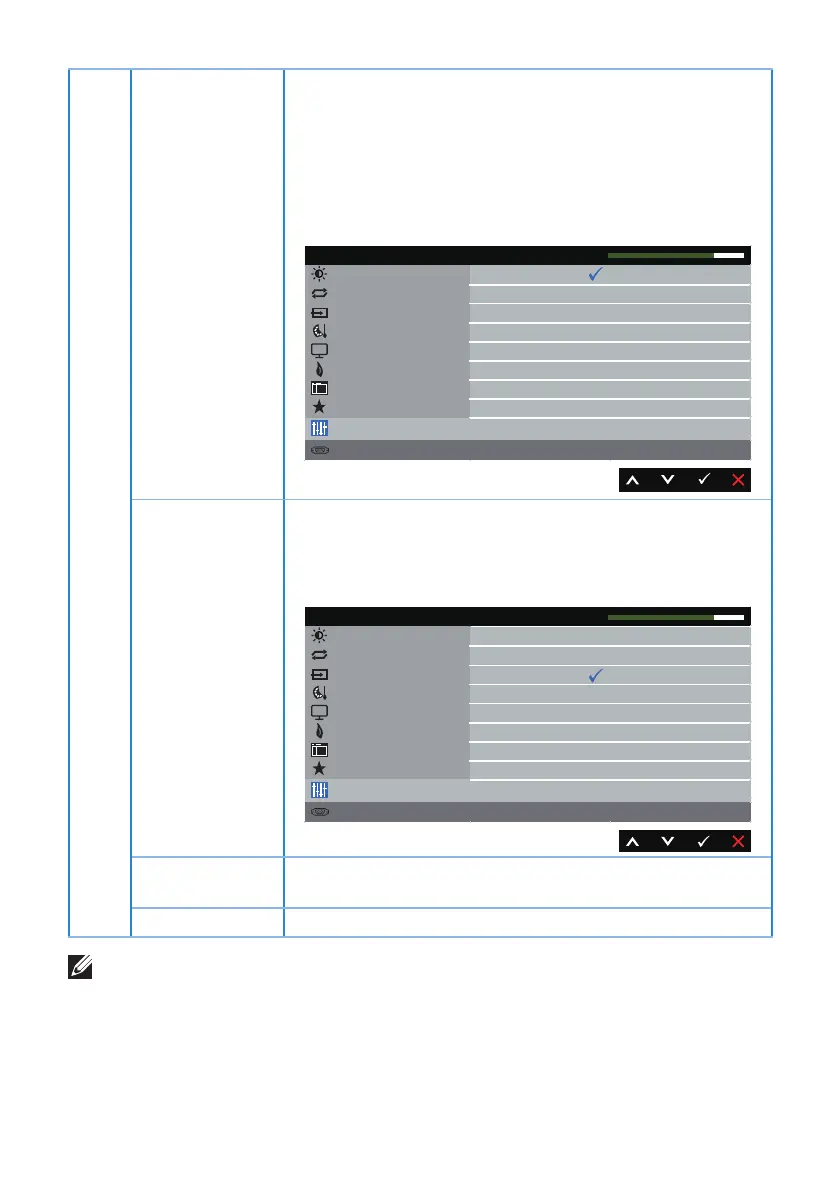
DDC/CI DDC/CI (Display Data Channel/Command Interface)
allows your monitor parameters (brightness, color
balance and etc.) to be adjustable via the software on
your computer.
You can disable this feature by selecting Disable Enable
this feature for best user experience and optimum
performance of your monitor.
Brightness / Contrast
Energy
Personalize
Resolution: 1920x1080, 60Hz
Dell S2X18M Energy Use
Auto Adjust
Input Source
Color
Enable
Disable
Display
DDC/CI
LCD Conditioning
Reset Other
Factory Reset
Menu
Others
LCD
Conditioning
Helps reduce minor cases of image retention. Depending
on the degree of image retention, the program may
take some time to run. To start LCD conditioning, select
Enable.
Brightness / Contrast
Energy
Personalize
Resolution: 1920x1080, 60Hz
Dell S2X18M Energy Use
Auto Adjust
Input Source
Color
Enable
Disable
Display
DDC/CI
LCD Conditioning
Reset Other
Factory Reset
Menu
Others
Reset Other Reset all settings under the Others setting menu to the
factory preset values.
Factory Reset Reset all settings to the factory preset values.
NOTE: Your monitor has a built-in feature to automatically calibrate the
brightness to compensate for LED aging.



 To Next Page