Operating Your Monitor | 23
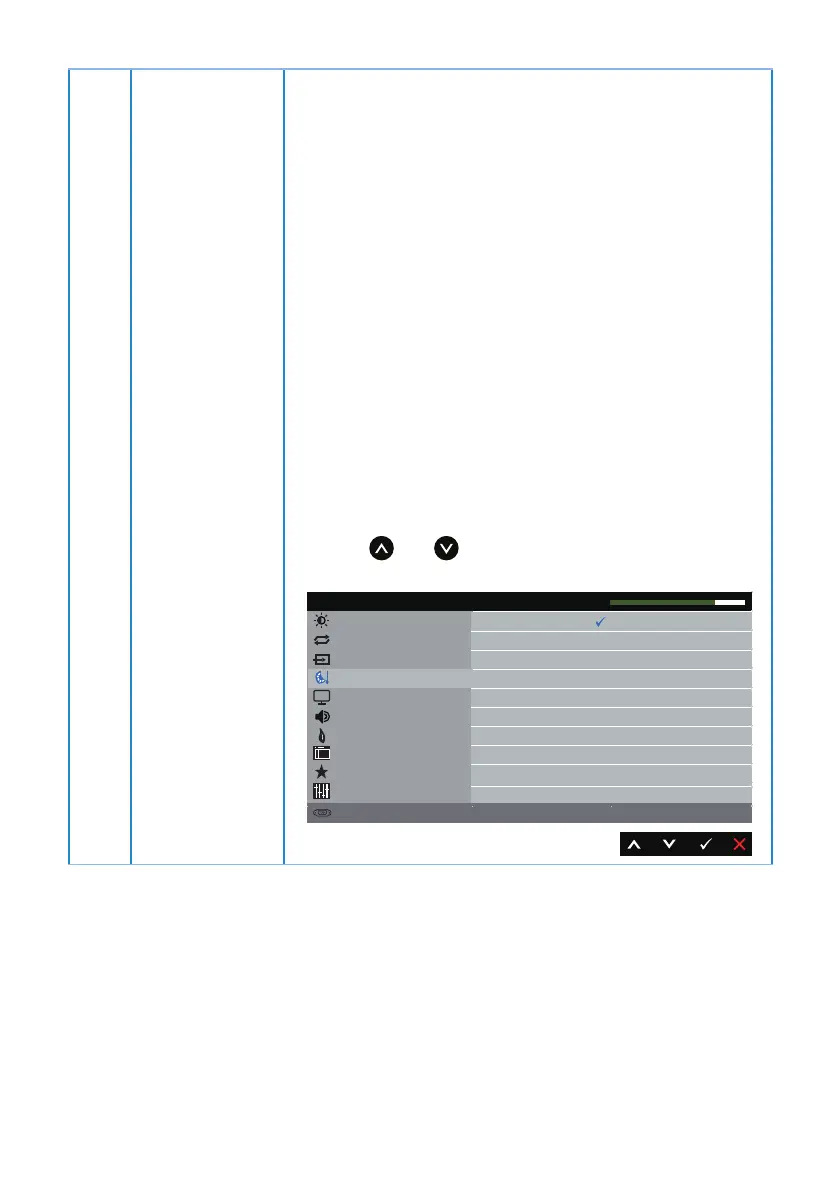
Preset Modes When you select Preset Modes, you can choose Standard,
ComfortView, Multimedia, Movie, Game, Warm, Cool or
Custom Color from the list.
∞
Standard: Loads the monitor's default color settings.
This is the default preset mode.
∞
ComfortView: Decreases the level of blue light emitted
from the screen to make viewing more comfortable for
your eyes.
∞
Multimedia: Loads color settings ideal for multimedia
applications.
∞
Movie: Loads color settings ideal for movies.
∞
Game: Loads color settings ideal for most gaming
applications.
∞
Warm: Increases the color temperature. The screen
appears warmer with a red/yellow tint.
∞
Cool: Decreases the color temperature. The screen
appears cooler with a blue tint.
∞
Custom Color: Allows you to manually adjust the color
settings.
Press the and buttons to adjust the three colors (R,
G, B) values and create your own preset color mode.
Brightness / Contrast
Display
Energy
Menu
Personalize
Others
Resolution: 1920x1080, 60Hz
Dell S2318HN/NX Energy Use
Preset Modes
Auto Adjust
Input Source
Color
Standard
Multimedia
Movie
Game
ComfortView
Warm
Cool
Custom Color
Input Color Format
Reset Color
Audio



 To Next Page