32 | Operating the monitor
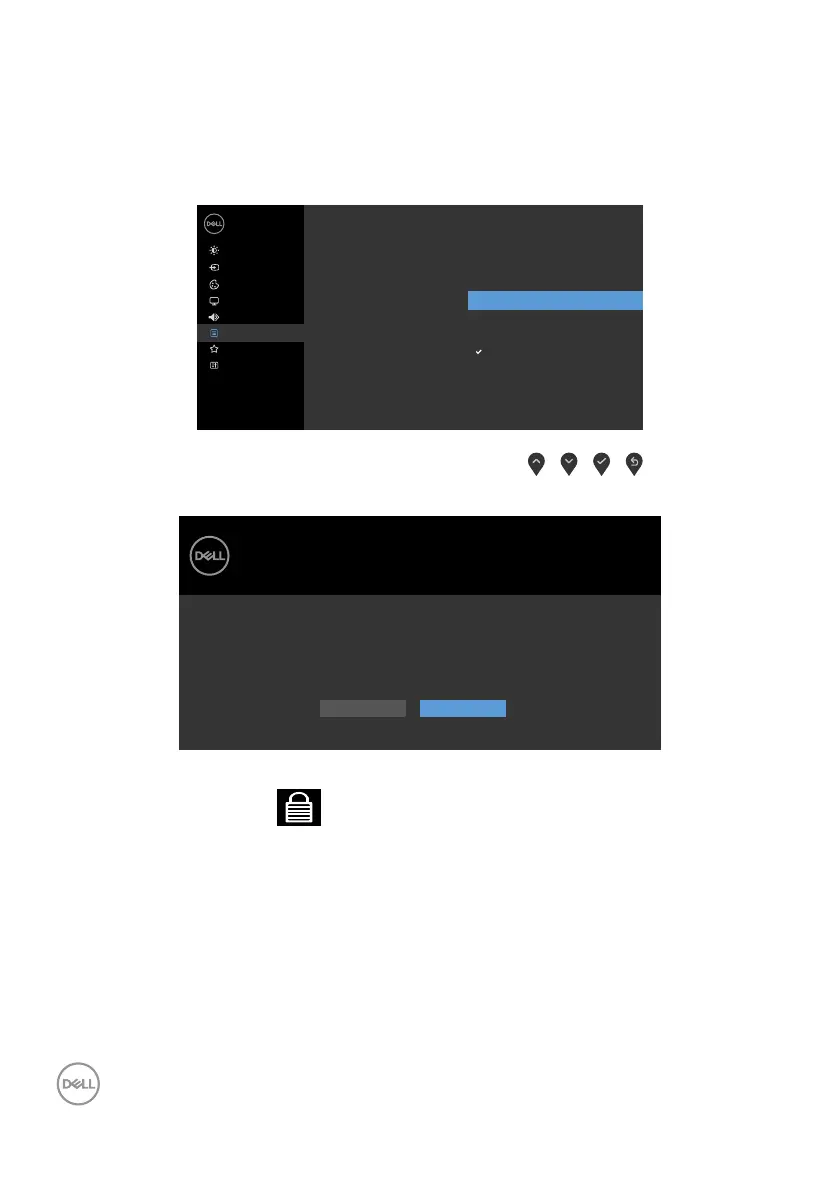
Using the OSD lock function
You can lock the front-panel control buttons to prevent access to the OSD menu and/
or power button.
Use the Lock menu to lock the button(s).
1. Select one of the following options.
Dell 24/27 Monitor
Input Source
Color
Personalize
Display
Menu
Others
Brightness/Contrast
Audio
Power Button
Language
Transparency
Timer
Menu + Power Buttons
Disable
Lock
Reset Menu
Menu Buttons
2. The following message appears.
Dell 24/27 Monitor
Are you sure you want to lock the Menu Buttons?
To unlock the Buttons, refer to the User’s Guide.
Yes No
S2421H/S2721H
3. Select Yes to lock the buttons. Once locked, pressing any control button will
display the lock icon



 To Next Page